Table of Contents
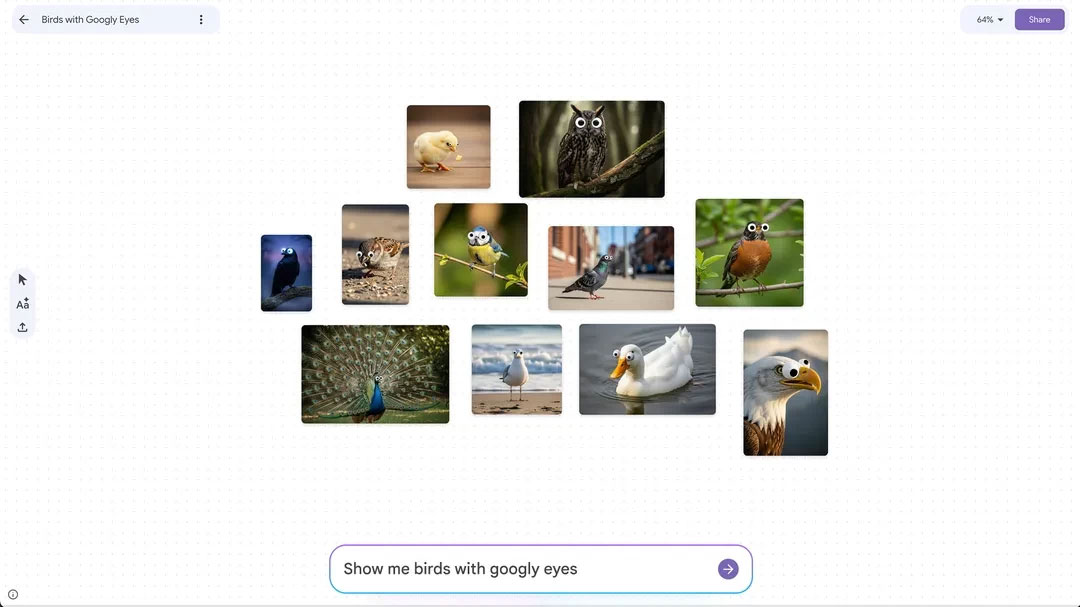
Mixboard is an experimental Google Labs tool for exploring visual ideas on a canvas. You can combine reference images, generated images, and text to develop a moodboard for a room, event, product concept, or other creative project. It is a concepting space rather than a guarantee of production-ready design.
What you can do on a board
Google’s September 2025 introduction describes starting from a prompt or a populated board, adding your own references, generating visuals, and editing images through natural-language instructions. Options such as regenerating or requesting similar versions help compare different directions.
A useful workflow for a first project
- Define the decision. For example, compare two color schemes for a small dining area rather than asking for a vague “beautiful room.”
- Add constraints. State the mood, materials, elements to keep, and what should change. Use your own reference images where appropriate.
- Generate alternatives. Keep several clearly different options instead of repeatedly polishing the first result.
- Refine one element at a time. Request a different palette, shape, or arrangement and compare it with the earlier version.
- Review the board. Remove inconsistent images and add short notes explaining which ideas you actually want to use.
Only upload images or files you are permitted to use. Consider privacy before adding personal photographs or confidential project references.
Availability has expanded beyond the original US beta
The launch announcement described a US public beta, but that is no longer the complete geographic story. Google announced expansion to more than 180 additional countries in October 2025. Check the current service requirements for your account and location.
Google also added presentation generation and other updates in December 2025, including multiple boards per project. Available controls and generation limits can change as the experiment develops.
What still needs human checking
A generated interior image does not establish that furniture will fit, that a product exists, or that a structural change is feasible. A presentation still needs text, factual, and layout review. Use the output to communicate a direction, then verify measurements, actual products, rights, and practical constraints separately.
For a manually assembled alternative, see creating a vision board in Canva. To turn a concept into a checked deliverable, see finishing a design with ChatGPT and Canva.
Related Articles
 Innovative ideas have 1-0-2 of too many IQ associations
 70 simple ways to help you be more creative at the office
 21 proofs show that some designers should take time off
 18 extremely creative advertising ideas that impress at first sight
 9 Creative Photography Ideas You Can Do at Home
 38 extremely creative design ideas for narrow-sized apartments (Part 2)
Reader Comments 0
Sign in with email or Google to join the discussion.