Table of Contents
Google introduced Nano Banana Pro, also called Gemini 3 Pro Image, on November 20, 2025. It is an image-generation and editing model built on Gemini 3 Pro, following the earlier Gemini 2.5 Flash Image model. The main changes are improved text rendering, more control over compositions, and support for higher-resolution output.
These are model capabilities, not a guarantee that every generated image is accurate. Text, faces, diagrams, and fine details still need review before publication.
Text and information inside images
Google says Nano Banana Pro improves the rendering of readable text in posters, mockups, and other designs, including multilingual content. It can also use Google Search grounding to draw on information beyond a prompt, such as weather or sports details.
For an infographic, provide the facts and exact wording you want represented, then compare the generated labels and numbers with your source. Search grounding does not eliminate spelling mistakes or factual errors in the finished visual.
Combining reference images and controlling edits
Google describes support for blending up to 14 input images and maintaining the resemblance of up to five people. The number of inputs available varies by product. Treat these as supported limits and intended behavior, rather than a promise of perfect identity preservation.
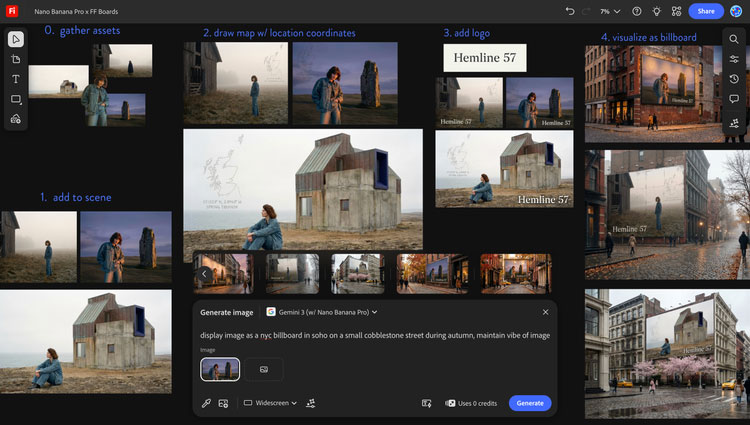
Editing controls include camera angle, focus, color, lighting, and changes to selected areas. The model also supports different aspect ratios and 1K, 2K, or 4K output where the product exposes those settings.
For a practical example, see Nano Banana Pro prompts for realistic fashion images. Describe what should change and what should remain consistent; inspect the result before making the next edit.
Access depends on the Google product
The original announcement described a rollout across the Gemini app, NotebookLM, Flow, developer tools, and other Google services. Those launch plans should not be read as a current availability list. Check the model selector and account limits in the product you use.
Developers can consult Google's Gemini API pricing. Its standard image-output rates list approximately $0.134 for a 1K/2K image and $0.24 for a 4K image. Input, text output, and Search grounding can add charges; batch and other service tiers have different rates. API billing is separate from consumer subscription allowances.
Check the output for its intended use
Proofread every word, compare factual labels with reliable sources, and inspect faces and objects at full size. Higher resolution adds pixels; it does not establish factual accuracy. If you plan to animate a finished image, the next stage is a separate video workflow, such as creating frame-based videos in Google Flow.
Related Articles
 Microsoft launches MAI-Image-1 – the first self-developed imaging model
 Google Launches Gemini 2.5 Computer Use: AI Models That Superiorly Control Web and Mobile Interfaces
 Google launches Gemini 2.5 Deep Think - surpassing OpenAI o3 and Grok 4 in performance
 Gemini 3.1 Pro vs Gemini 3 Pro: What Changed?
 How to Fact-Check Gemini Answers and Sources
 Getting Started With Gemini Embedding 2 in Python
Reader Comments 0
Sign in with email or Google to join the discussion.