Table of Contents
Google is upgrading Circle to Search by adding a new feature that lets you translate text on a web page as you scroll. The translation feature is used a lot when activating Circle to Search, so Google has updated the way it works to improve the user experience.
Previously, Circle to Search would restart the translation process every time you swiped up or down. Now, once you translate something using Circle to Search, it will continue to translate whether you swipe up or down without restarting. Google says the feature will continue to work even if users switch apps, until they tap the 'x' icon, which will stop it.
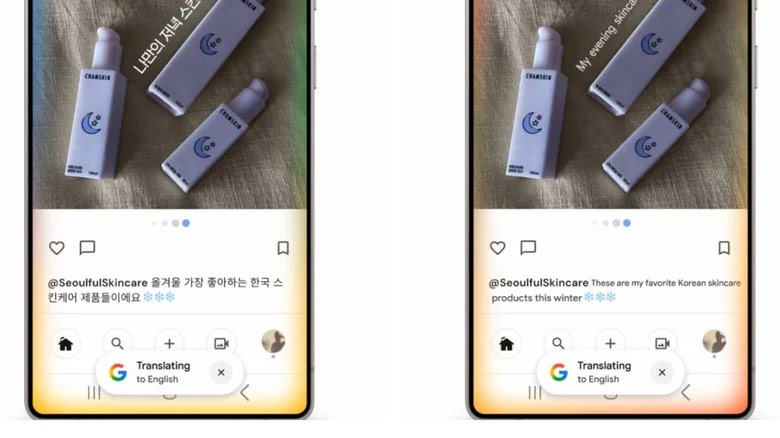
Google's new Circle to Search translation feature is rolling out to Android devices and high-end Samsung phones first. You can test it yourself by pressing and holding the Home button on your phone's navigation bar, then tapping the translate icon. From there, you'll see the Scroll and translate option if you're up to date. If not, you'll have to wait for the app to download to your device.
Final Thoughts
Overall, Google Circle Enhances Scroll Translation is best understood by considering the main facts, practical context, and limitations together. Use the details above as a clear starting point and confirm time-sensitive information when necessary.
FAQ
What does this article explain about Google Circle Enhances Scroll Translation?
Google is upgrading Circle to Search by adding a new feature that lets you translate text on a web page as you scroll.
What should you know about the key details?
Previously, Circle to Search would restart the translation process every time you swiped up or down. Now, once you translate something using Circle to Search, it will continue to translate whether you swipe up or down without restarting.
Should time-sensitive details be verified?
Yes. Software features, game codes, product specifications, prices, and research findings can change. Confirm important details with an official or primary source when accuracy affects your decision.
Related Articles
 TOP AI Tools for Highly Accurate Translation5 minutes read
 The Translation of Google Translate Also Sometimes Has to Surrender Before Vietnamese4 minutes read
 Google Translation: People Translate Tools Automatically3 minutes read
 Google Translate Is Testing a More Expansive Translation: Key Details3 minutes read
 The Power of the Scroll Key: A Practical Guide4 minutes read
 How to Use the Google Circle to Search Feature: Clear Instructions4 minutes read
Reader Comments 0
Sign in with email or Google to join the discussion.