Table of Contents
For children using Minecraft Education, start with Code Builder, chemistry activities, NPC storytelling, and redstone projects. These offer useful learning activities without installing Java Edition mods. Several items commonly called “Education mods” are actually built-in tools or lesson resources.
Mods, add-ons, and built-in tools are different
Minecraft Education does not run Java Edition mods. Compatible add-ons can change a world's appearance or behavior, but a pack made for another edition or version is not guaranteed to work. Use the official Education add-ons collection as a starting point, and test new content in a copy of a world before using it with children.
Choose an activity by the skill you want to teach, rather than by how many features a download promises.
Code Builder: practice sequences and loops
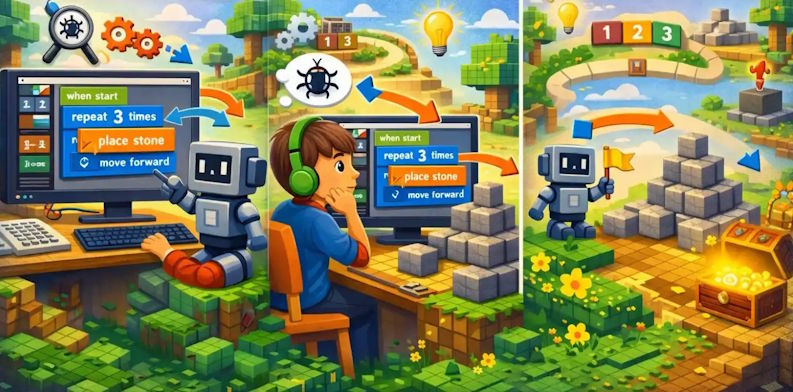
Code Builder lets learners use code to control actions in Minecraft, including an in-game Agent. Start with a small challenge: move the Agent along a path, then repeat a pattern to build a wall.
Ask the child to predict what the program will do, run it, and explain any difference. This turns trial and error into practice with sequencing, loops, and debugging. For a separate browser-based introduction, see Minecraft block coding with Code.org; those tutorials are not the Education app itself.
Chemistry resources: compare elements and compounds
The Chemistry Resource Pack supports in-game science activities. Use a guided lesson and the official chemistry resources to connect what children build with the concepts being taught.
A manageable project is to record which elements are used in a virtual compound and explain how it differs from an element. Treat the game as a teaching model, not as instructions for real-world chemical experiments.
NPCs: build an interactive story or museum
Non-player characters can display dialogue and guide players through a lesson. They are an Education world-building feature; additional NPC appearance packs are optional.
Have a child build a small museum with three characters. Each character can explain an exhibit and give the player a question or task. Review the text together for accuracy, clarity, and story order. World-building permissions may be needed to edit NPCs.
Redstone: test cause and effect
Redstone supports in-game circuits and mechanisms without a separate mod. Begin with a lever, a short redstone connection, and a lamp or door. Change one part at a time and ask the child to explain why the output changes.
Later challenges can include a pressure-plate entrance or a simple signaling system. These projects support logical reasoning, but Minecraft circuit behavior is not a complete model of real electrical engineering.
Set up a manageable learning session
- Choose one learning goal and a small finished project.
- Check that the world or resource works on the child's installed Education version and device.
- Use an adult-approved source for any download and keep a backup of existing work.
- Demonstrate the first action, then let the child test a change independently.
- Finish by asking what worked, what failed, and what they would try next.
If the goal is simply to try programming before installing a classroom environment, compare other coding activities for children as well. Keep the choice tied to the child's experience and the time available.

Reader Comments 0
Sign in with email or Google to join the discussion.