Table of Contents
This guide provides a practical overview of free download of totald pro, the software that supports downloading with clear explanations and useful details. It focuses on the information users are most likely to need.
Step 1: Visit the link below and click the DOWNLOAD TOTALD PRO NOW line.
- Free TotalD Pro

Step 2: Fill in the required information -> click ReCaptcha -> click the line GIVE TO ME NOW.

Step 3: The installation file will be downloaded automatically. In this new window, license key, remember to save to activate TotalD Pro license when using.
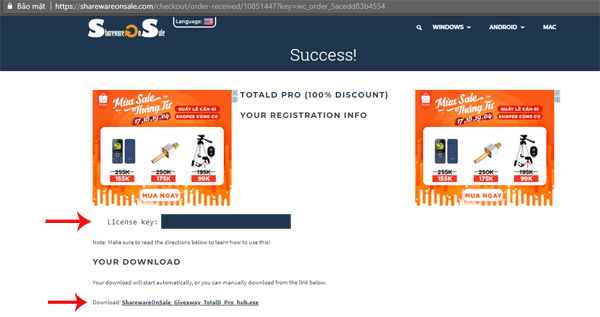
Note:
- The TotalD Pro license free promotion will last until April 13, 2018.
- How to remove the "junk" search bar from Chrome and Firefox browsers
- How to check Facebook personal data is shared with Cambridge Analytica
- Please use and experience Photon Browser, the Chromium kernel browser developed by Vietnamese programmers
FAQ
What is the main benefit of free download of totald pro, the software that supports downloading?
The main benefit is a clearer understanding of the topic and a practical way to apply the information covered in this guide.
What should I check before using free download of totald pro, the software that supports downloading?
Confirm compatibility, review the required settings, protect important data, and use the latest supported version whenever possible.
What should I do if the result is different?
Repeat the steps carefully, verify permissions and version differences, and consult the product's official support documentation for changes not shown in the article.
Related Articles
 Top 9 Top Free Download Support Tools for Windows: Top Picks and Buying Guide11 minutes read
 How to Use Bittorrent Software to Download Movies and Games6 minutes read
 How to Set up Coc Coc Default Download Torrent4 minutes read
 Top Download Acceleration Software for Mac12 minutes read
 Instructions for Downloading Files on Motrix - Supports Downloading Files on6 minutes read
 Instructions for Downloading Files on Motrix4 minutes read
Reader Comments 0
Sign in with email or Google to join the discussion.