Table of Contents
Learn how to download where winds meet mobile with clear steps, practical tips, and troubleshooting guidance for a reliable result.
Therefore, if you are in Vietnam or a region where the game is not displayed, you need to change your App Store region to the US or use a US Apple ID to download it.
I. Things to know before changing your App Store region
To successfully change your region, you need to ensure the following conditions are met:
1. No subscription packages are currently active
- If you're using iCloud+, Apple Music, or any subscription app that automatically renews, you must cancel or wait until the cycle ends.
2. The Apple ID account has no remaining balance
- The App Store does not allow changing regions while you still have credit in your wallet.
3. Leave the Family Sharing group (if you have one)
- If your account is in a shared group, you must leave the group before changing regions.
4. Prepare your US address
- You can use any valid address in the United States (e.g., California or New York).
5. Payment methods
- You can use 'None' if the App Store allows it (in many cases, Apple requires a US payment method).
- Alternatively, you can use an Apple Gift Card US (the most common method).
- Vietnamese bank cards cannot be used for payments in the United States.
II. Instructions on changing your App Store region to the United States (US) to download Where Winds Meet
Applies to iOS 17 and later
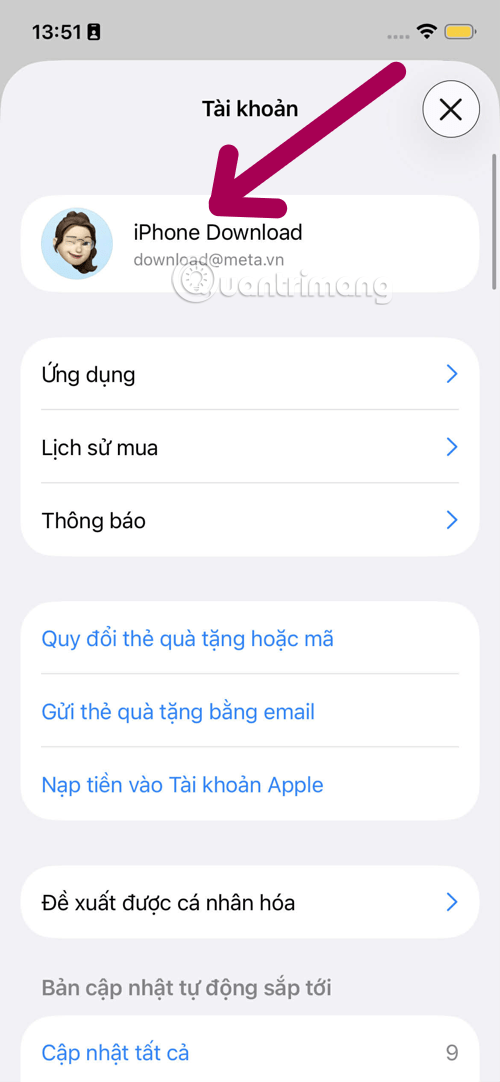
Step 1: Open Apple ID settings
- Select the App Store app, then select your Apple Account.
Step 2: Select Country/Region
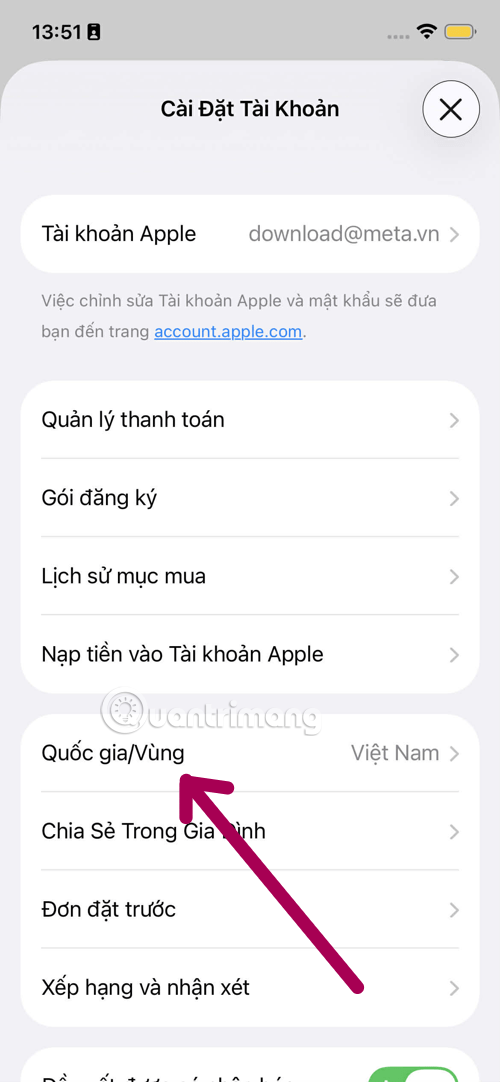
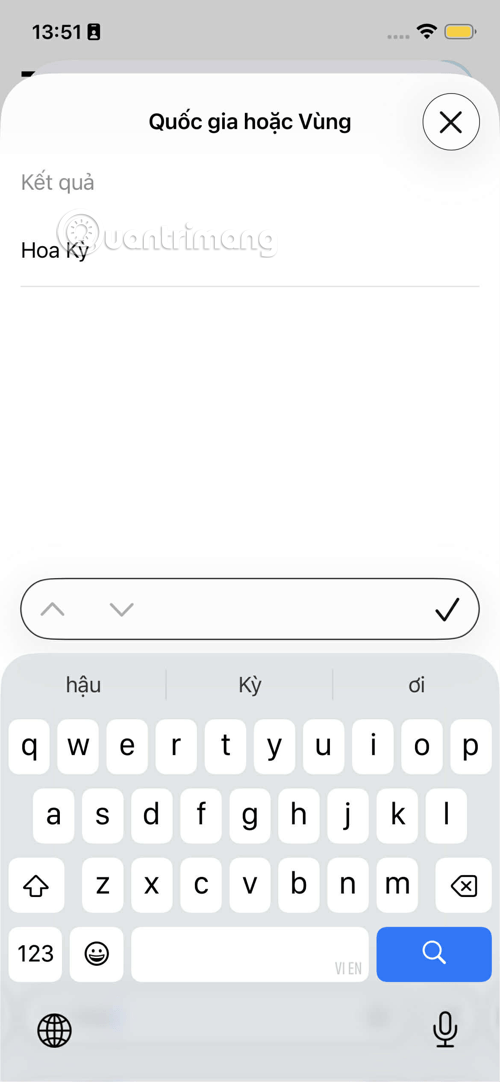
- Press Country/Region
- In the list of countries, please select the United States.
Step 3: Accept the terms
- Press Agree twice to confirm.
Step 4: Enter payment information
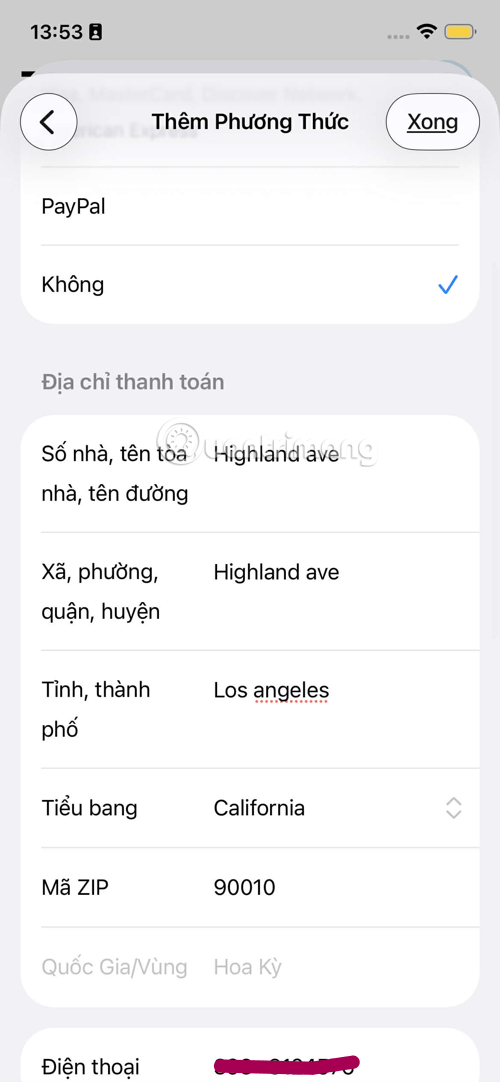
- If there is a None option, please select it.
- Enter a valid US address, for example:
- State: California
- City: Los Angeles
- Zip: 90001
- Phone: 323-000-0000
Step 5: Complete and open the App Store
- After successful saving, the App Store will automatically switch to the US interface.
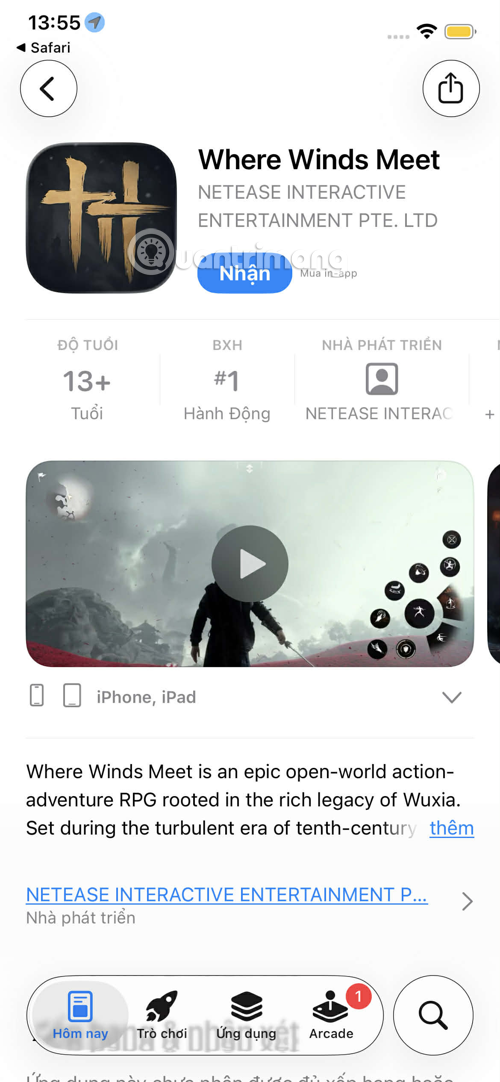
Step 6: Download Where Winds Meet
Download Where Winds Meet
- Access the Where Winds Meet download link above, select the Download button, and choose iOS to open it.
- Click Get to download the game.
IV. Notes and tips to avoid errors when downloading
1. Do not use a VPN to change your region
- VPNs don't help change the App Store region and sometimes cause errors.
2. Once the download is complete, you can change the region again
- Installed apps will not be deleted. However, if the game updates and is not available in Vietnam, you will need to log back into your US Apple ID to update.
3. Choosing to create a US Apple ID is the safest method
- This will not affect your main account or your subscription.
4. Always keep your US Apple ID email and password safe
- If you forget, you won't be able to update the game.
V. FAQ – FAQ
1. Will changing regions cause me to lose my iCloud data?
- No, changing your region only affects the App Store, not iCloud.
2. Will the game be deleted if I change my region back to Vietnam?
- No. The app downloaded with a US account remains the same, but you should keep the US region if the game receives updates.
3. I don't see the 'None' option when changing regions?
You might:
- There is an active subscription.
- There is an unused balance.
- Currently in Family Sharing
- You need to address these three factors first.
4. Do I need a VPN to play Where Winds Meet?
- No need, the game has no IP restrictions.
5. Is it safe to download using a US Apple ID?
- It is perfectly safe if you use your own email address and a genuine Gift Card.
Final Thoughts
Use this guide as a practical checklist for how to download where winds meet mobile. Work through the steps in order, verify each result, and adjust the options to match your needs.
Related Articles
 Where Winds Meet PC Game Configuration: Explained4 minutes read
 The Blockbuster Martial Arts Film Where Winds Meet Is About to Receive a Series of Exciting Content Updates5 minutes read
 Jitsi Meet -- Open Source Zoom Alternative8 minutes read
 Link Download Google Meet: Free Online Meeting Application6 minutes read
 Instructions to Rename Google Meet on PC and Phone6 minutes read
 How to Use Filters on Google Meet3 minutes read
Reader Comments 0
Sign in with email or Google to join the discussion.