Table of Contents
Overview
This guide covers download CPU Z in clear, practical terms. It covers the key concepts, recommended steps, common limitations, and useful checks so you can make a better-informed decision.
CPU-Z is a free software that helps you view basic information on your computer system. CPU Z provides you with the entire processor name and number, code, process, mainboard and chipset type, memory type, size and many other SPD parameters. Not only providing information about computer hardware, CPU-Z also gives real-time measurements of operating frequency and memory frequency of each core. In addition, with this application, you can easily fix basic CPU errors and monitor to adjust computer operations for the best performance.
Download CPU-Z
 You can download the latest CPU Z here:
Information CPU Z can check
- Processor name and number, code name, process, packaging, cache levels.
- Mainboard and chipset.
- Memory type, memory size, timings, and module specifications (SPD).
- Real-time measurement of each core's internal frequency, memory frequency.
Instructions for reading parameters on CPU-Z
After downloading and installing CPUZ, the software will automatically update hardware information on your system. Including:
CPU card
In the CPU Tab, information about the components in the CPU will be displayed most clearly, including the name of the processor, source code name, packages, technology, technical information, Model, Cache levels, Bus speed, Core speed, number of data threads, selection of processors to be tested.
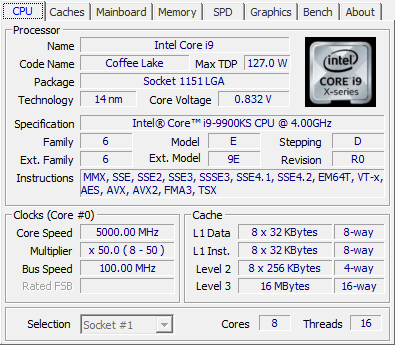
Specifically CPUz can help you know
- Name: CPU name
- Code Name: Code name of the CPU microarchitecture.
- Max TDP: Maximum power consumption of CPU.
- Package: CPU socket type, each different socket type will have a different number of pins. This parameter is very important when you want to upgrade the CPU, you cannot bring a socket 478 CPU chip into socket 1155 and vice versa. This guide has a detailed article about the CPU socket list, you can refer to it.
- Technology: The technology of the transistors. As in my example, it is 22nm, the smaller this number is, the better, because it helps the chip to contain more transistors, run faster, and more efficiently. This technology is being improved, in the latest CPUs it can reach 14nm (Intel's Coffee Lake line). On the phone, Apple has started producing 7nm A12 processors for its devices.
- Core Voltage: Voltage for the core of the chip, this parameter is often not fixed because modern chips often self-adjust voltage consumption to save power.
- Specification: Full CPU name of the computer.
- Family: The main architecture of the chip.
- Model: This is the type of CPU in the Family that the computer has. For example, with Family 15 (NetBrust generation), model 0 is the Willamette core, model 1 is the improved Willamette core. Model 2 is Northwood built on newer technology. Model 3 is the Prescott core on 90nm technology, model 4 is still Prescott but with improvements such as No-eXecute support. This model number is basically a way to identify the type of CPU core. You can look up your model in the Family section link above to get more information about your CPU.
- Stepping: This is the number that determines what kind of improvements have been made to the core, and how new it is. It can be thought of like software patches, the larger this number means it has been fixed many times, improved from previous versions.
- Revision: Combining Family, Model and Stepping can tell you the Revision name (must check in the datasheet provided by Intel). By knowing Revision, you can find the improvements that have been made between chips with the same Family and Model but different Stepping. And with the Revision parameter of CPU-Z, you can easily know the Revision name without having to look for the datasheet anymore. In this example of my article, Revision is C0.
- Instructions: This is a list of instructions that the chip processes.
- Core Speed: CPU clock speed, this parameter with core voltage often changes to save power.
- Multiplier: The clock multiplier (also known as bus ratio) sets the ratio of the internal clock speed to the externally supplied clock. For example, a number of x10 would see 10 internal cycles for every external clock cycle.
- Bus Speed: Bus speed.
- Level 3: Cache parameters, the higher the better, because the CPU will be less clogged with data when processing. The higher the level number, the faster the CPU runs.
- Cores and Threads: Number of cores and threads of the CPU. This number is usually even, like in my photo it is 2 cores, 4 threads.
Cache Card
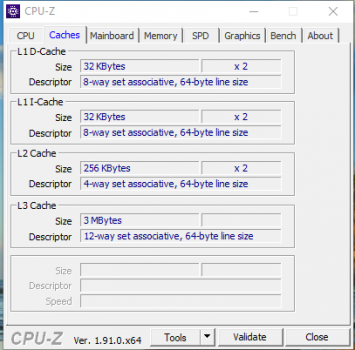
Provides information including the size of level 1/2/3 caches (Size), descriptor and features.
Mainboard Card
This Tap will tell you information about the motherboard manufacturer, chipset, BIOS and graphical interface.
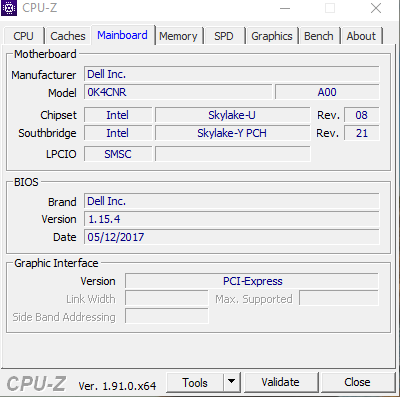
Specifically in this tab you will have:
- Manufacturer: Name of motherboard manufacturer, for example Acer, Asus, Foxconn,.
- Model: Motherboard model, next to it is the version name.
- Chipset: Manufacturer, chip type and Revision.
- Southbridge: Manufacturer, southbridge type and Revision.
- BIOS: Displays information about BIOS brand, version and date of manufacture.
- Graphic Interface: Information about the graphics card slot on the motherboard. Version is the supported version, usually only PCI-Express and AGP. Link Width is the width of the bandwidth but not all motherboards support this slot.
Memory Card
The Memory tab shows information about the RAM and most of the other information in this tab is for advanced users.
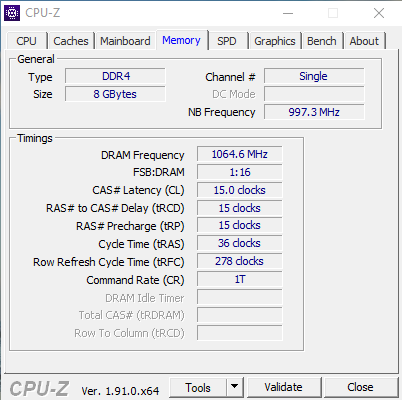
- Type: Computer RAM type, here is DDR3.
- Size: RAM capacity, here is 4GB
- Channel #: Indicates how many RAM slots you are using, Single is 1, Dual is 2. The parameter Single can also mean that the computer only has 1 RAM slot. You can check the number of RAM slots of your computer in the SPD tab as below.
- DRAM Frequency: Real bus speed of RAM
- NB Frequency: Is the speed of NorthBridge.
SPD Card
Helps you check all RAM specifications in each specific slot.
- Slot #1: Click on the arrow next to Slot #1, there are as many slots as there are RAM slots. Normally, the computer will have 2 or 4 RAM slots, equivalent to the maximum Slot # of 2 or 4.
- DDR4: RAM type
- Module Size: The capacity of the RAM plugged into the slot being viewed, in MB, 4096MB is equivalent to 4GB.
- Max Bandwidth: Maximum bandwidth speed. Thanks to this parameter, you can calculate the RAM Bus by taking the clock part in parentheses and multiplying it by 2. In my photo, it is 800Mhz x 2 = 1600Mhz.
- Manufacturer: Name of RAM manufacturer.
Graphics Card
The graphics tab provides information about the GPU such as name, manufacturer, GPU technology. If you want to check more about the graphics card, you can use a dedicated tool called GPU-Z.
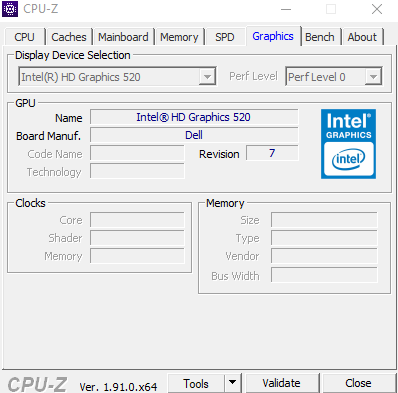
- Display Device Selection: This part is dimmed because my computer only has one video card. If the computer has multiple video cards, this part will light up and you can select the card you want to see.
- Name: Name of the graphics chip manufacturer.
- Code name: Code name of the graphics chip running on the machine.
- Core: GPU clock speed.
- Size: Capacity of the graphics card.
- Technology: The technology of the graphics card, like the CPU chip technology, the smaller this number the better.
- Type: Processing type, for example: 64bit, 128bit, 256bit. The higher this parameter, the more advanced your card is and the better the graphics processing.
Bench Card
For Tab Ben, you will know the benchmark score of the CPU running on your computer by running a small test.
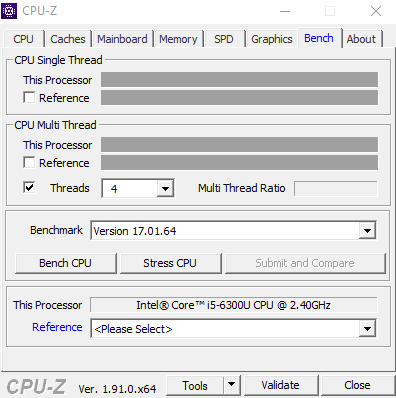
Once it's done, you can compare your CPU with other CPUs by selecting the blue Reference box. Checking the black box next to Reference will convert the result to a % for easy comparison.
About Tag
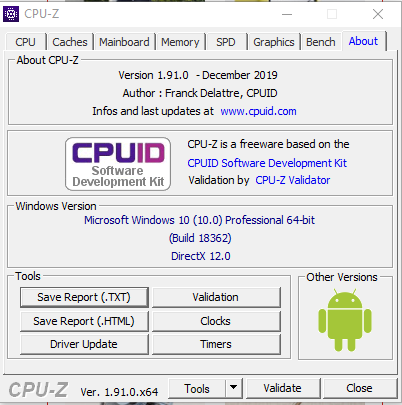
This tab will give you detailed information about the software and some system details. For example, you can see the Windows version, installed service packs, and DirectX version. From this tab, you can export the data to an HTML file.
In the above article, this guide has sent you the link to download the latest version of CpuZ as well as how to read hardware parameters. If you want to check the hardware information of your computer, this will be the most useful software.
>>> See more: Top 5 software you should have on your laptop
Key Takeaways
Use the guidance above as a practical reference for download CPU Z. Check compatibility, follow the steps carefully, and verify important details with official documentation when software, security, accounts, health, or purchases are involved.
FAQ
What is the main point of this article?
This article explains download CPU Z, including the central facts, context, practical implications, and details needed to understand the topic.
Why does this topic matter?
It may affect performance, cost, safety, convenience, purchasing decisions, or how people understand a broader development.
Could the information change over time?
Yes. Product details, software features, prices, policies, codes, and news developments can change, so verify time-sensitive information with official sources.
Related Articles
 How to Enable Parallel Download in Browser6 minutes read
 Neat Manager 1.3/1.8.0, Download Neat Download Manager4 minutes read
 How to Activate Download Booster on Galaxy S8, S8 Plus4 minutes read
 How to Download Pho Anh Hai iOS, Android: Step-by-Step Guide5 minutes read
 Top 8 Best Free Download Support Tools for Windows8 minutes read
 Top 7 Apps That Support the Best Download on Android9 minutes read
Reader Comments 0
Sign in with email or Google to join the discussion.