Table of Contents
This guide provides a clear, practical overview of bixby app now available on Microsoft store, with useful context, important details, and straightforward takeaways for everyday readers.
The Bixby app on the Microsoft Store is now free to download, and comes with the following outstanding features:
- Support users to run applications on their Windows PC with voice commands.
- Support users to open complex settings screens with voice commands.
- Support to check information, weather news with voice commands.
- Supports searching for local files and images in the system, as well as online voice search.
- Support to control devices registered in SmartThings by voice.
Note that some of the above features may not be available in certain countries or regions.
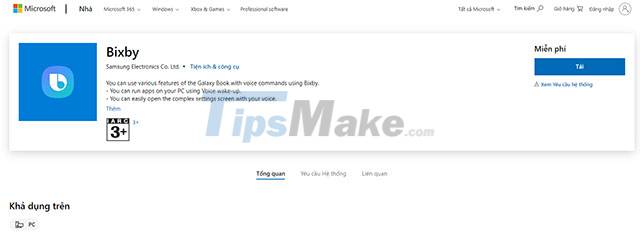
As mentioned, the Bixby app is optimized to work best on Galaxy Book series released from May 2021 onwards (Galaxy Book Pro 360, Galaxy Book Pro, Galaxy Book, Galaxy Book Odyssey, Galaxy Book Go , Galaxy Book Go 5G) and requires Windows 10 21H1 or later.
Bixby is an AI assistant developed exclusively by Samsung. Currently, Bixby's central function is to assist users in navigating their devices. Bixby learns based on habits and adjusts itself to the needs of the user. It even recognizes its own voice and changes its answers based on who is asking.
You can learn more about the Bixby app on the Microsoft Store HERE.
Key Takeaways
Use the information above as a practical reference for bixby app now available on Microsoft store. Review each step carefully, confirm any requirements, and choose the option that best fits your situation.
FAQ
What does this guide explain about Bixby App Now Available on Microsoft Store?
It explains the main concepts, practical considerations, and useful steps related to bixby app now available on Microsoft store without requiring advanced knowledge.
Who can benefit from learning about Bixby App Now Available on Microsoft Store?
This information is useful for readers who want a clear overview, practical guidance, and reliable steps related to bixby app now available on Microsoft store.
What should I check before applying this information?
Review the requirements, confirm that your device, software, or situation matches the instructions, and back up important data before making major changes.
Related Articles
 What Is Bixby? 4 Ways to Use Bixby on Samsung Phones9 minutes read
 How to Disable Hello Bixby on Samsung Galaxy S85 minutes read
 Samsung Introduced Bixby Routines, AI Technology That Can Learn Habits and Anticipate User Needs5 minutes read
 The Control Commands Are Useful with Bixby Voice on Galaxy S86 minutes read
 What Is Bixby? How to Use Bixby Most Effectively6 minutes read
 How to Turn Off the Notification Prompt on Bixby Galaxy S84 minutes read
Reader Comments 0
Sign in with email or Google to join the discussion.