Table of Contents
Apple recently launched a new Digital ID feature. This update allows US passport holders to add their passport information to Apple Wallet for easier identity verification at TSA checkpoints.
Apple recently launched a new Digital ID feature. This update allows US passport holders to add their passport information to Apple Wallet for easier identity verification at TSA checkpoints.
Overview of Apple's Digital ID feature
The new update lets you store a verified digital version of your US passport inside Apple Wallet. This creates a secure ID token on the device that can be used for identity checks at TSA checkpoints in over 250 airports.
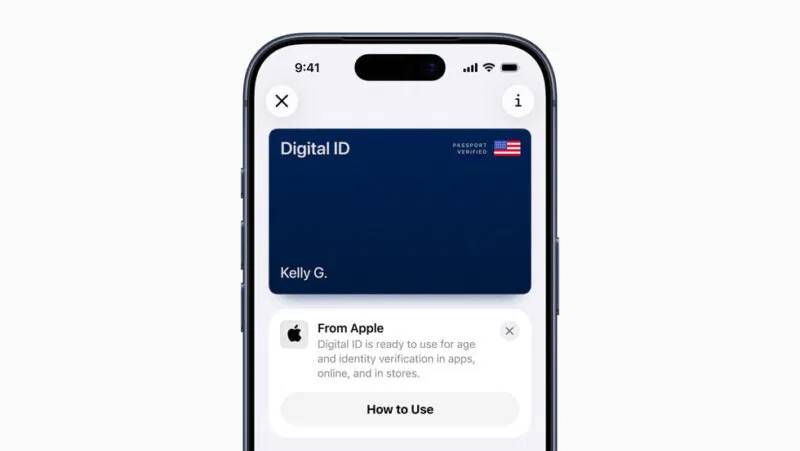
Unlike state-issued Digital IDs, this rollout applies to all US passport holders. Apple uses on-device processing, so your identity data never leaves your iPhone. It's an early step toward a future where physical IDs aren't always needed.
Device and installation requirements
Users need an iPhone XS or newer running iOS 18.1 or later to add a passport to Apple Wallet. Apple Watch Series 4 or later can also display the ID when checking. Other basic requirements include a current US passport, Face ID or Touch ID, Bluetooth turned on, and two-factor authentication associated with an Apple ID in the US.
If you're setting up Wallet for the first time, our Apple Pay setup guide explains the basics.
Add passport to Wallet
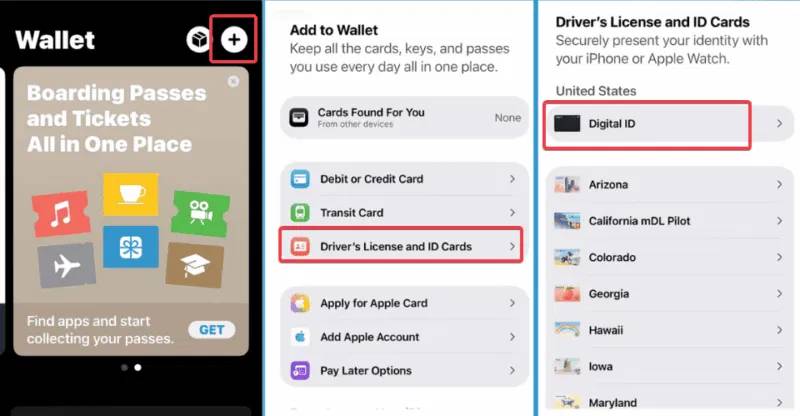
To add your passport to Apple Wallet, open the Wallet app and tap the plus sign (+). Select Driver's License or ID Cards , then select Digital ID For your passport.
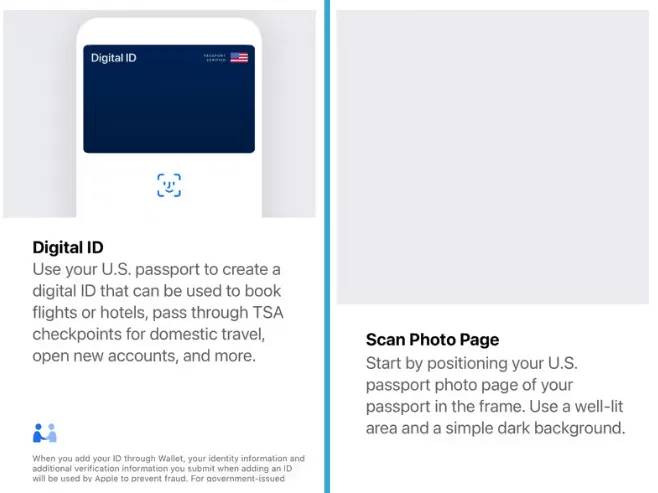
Use your iPhone's camera to scan the photo page and hold it over the passport's NFC chip.
Follow the prompts to take a selfie and move your head for a quick identity check. Apple processes everything locally and deletes your face data after approval. This process takes about 10 minutes.
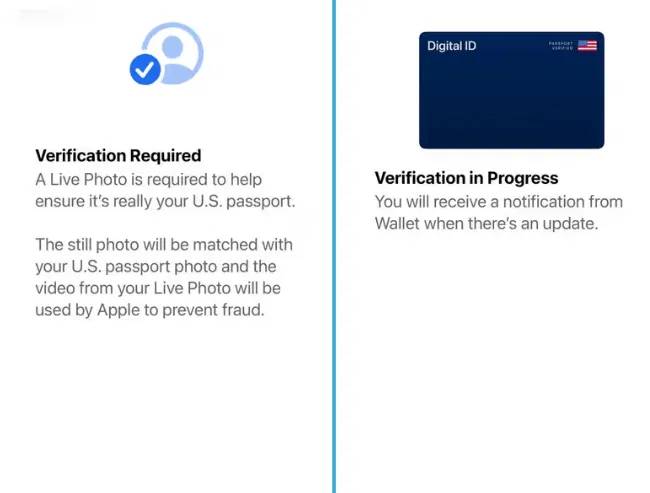
If verification fails, try again in better lighting or make sure your NFC is aligned correctly.
Using Digital ID
Once your Digital ID is ready in Apple Wallet, double-click the side button on your iPhone. Select ID, authenticate with Face ID or Touch ID, and hold your phone near a compatible reader at TSA checkpoints. Select the information you want to share, like your name or date of birth.
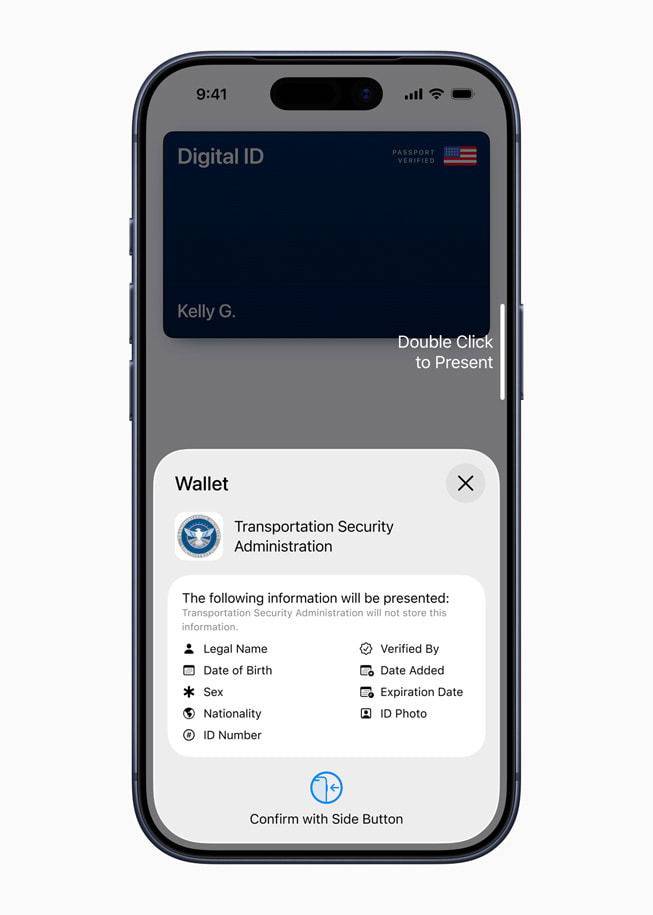
Currently, Digital ID only works with domestic flights at certain airports, but Apple is expected to soon expand support to hotels, apps, and government services.
Privacy, security and restrictions
One of the strengths of Apple's Digital ID is privacy. Your passport data is encrypted and stored only on your device, not on Apple's servers. The company says it can't tell when or where your ID is used. Plus, because the verification is based on Face ID or Touch ID, only you can access and present it.
You can find a few limitations to be aware of, however. TSA acceptance varies by location, as not all checkpoints support Digital ID, and even some listed airports may have limited functionality.
This raises the question of adoption speed, so it's best to consider this a convenience feature rather than a complete replacement for physical IDs at this point.
Additionally, the move ties more personal identification functions to Apple's ecosystem, raising concerns that users will be locked into it long term. Additionally, using only one device also increases the risk if something goes wrong.
On the plus side, adding your passport to Apple Wallet simplifies TSA screening for domestic travel, improves security, and gives you more control over your data. However, keep a physical copy of your passport as a backup until more widespread support becomes available.
FAQ
What should you know about apple's digital ID feature lets users use their passport on their?
In practical terms, apple recently launched a new Digital ID feature. This update allows US passport holders to add their passport information to Apple Wallet for easier identity verification at TSA checkpoints.
Why does apple's digital ID feature lets users use their passport on their matter?
The article highlights that overview of Apple's Digital ID feature The new update lets you store a verified digital version of your US passport inside Apple Wallet.
What is the main takeaway?
The main takeaway is that privacy, security and restrictions One of the strengths of Apple's Digital ID is privacy.
Related Articles
 Use Blackberry Passport for the First Time6 minutes read
 How Many Red Apples Should You Eat a Day: Main Insights4 minutes read
 Guidance on Procedures for Quick Passport Registration Online4 minutes read
 This Is the World's Most Rare Passport, Only 3 People in the World3 minutes read
 In 2019, How Many Worlds Is the Vietnamese Passport In?3 minutes read
 Blackberry Passport Is Set to Debut on September 243 minutes read
Reader Comments 0
Sign in with email or Google to join the discussion.