Table of Contents
Anime Ultra Verse codes are redeemed inside the Roblox experience, but an old code list is not proof that a reward is still available. The three codes below are retained for reference with their current validity unconfirmed. Copy spelling and punctuation exactly, and use the game's response to determine whether a code works for your account.
Previously listed Anime Ultra Verse codes
| Code | Current status | Reward information |
|---|---|---|
StarterCode! | Unconfirmed; may be expired | Do not assume the old reward description is current. |
Release! | Unconfirmed; may be expired | Check the in-game redemption result. |
Sub2Mimo | Unconfirmed; may be expired | Check the in-game redemption result. |
Public code trackers disagree about the availability of some older codes. For example, the Roblox Den reference lists these three as expired. That is a third-party report, not a live test on your account. No guaranteed active codes or exact reward quantities are claimed here.
How to redeem a code

- Open the correct Anime Ultra Verse experience on Roblox.
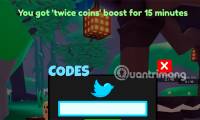
- Look for its Codes control; the illustrated version places it in the right-hand menu.
- Paste the code into the field without extra spaces.
- Select Redeem once and read the full message.
- If accepted, check the relevant balance or inventory rather than assuming every reward is a unit.
Menus can move after an update. If the illustrated control is missing, check the experience's own help or update information instead of entering codes on an unrelated website.
Why a code might fail

- Invalid or expired: check capitalization, punctuation and spaces. If the exact code is rejected, it may no longer be available.
- Already redeemed: the account may have claimed it previously. Repeating the same request will not normally create another reward.
- Requirement not met: follow any specific condition shown by the game; do not invent a level or group requirement.
- Connection problem: if the game reports a service error, wait and try again later. Distinguish this from an explicit invalid-code message.
Where to check for new codes
Start with the official links attached to the experience's Roblox page and its in-game announcements. Verify that a community or creator account is actually connected to the game before trusting a code claim.
A legitimate in-game redemption does not require giving a third-party site your password, session cookie or payment details. Avoid “code generators” and promises of unlimited Robux. For other dated game guides, browse the TipsMake gaming section.
Related Articles
 List of latest Anime Infinity Roblox giftcodes and how to redeem codes
 Anime World Simulator: Full latest giftcode and how to redeem code
 Latest Anime Mania Code and how to enter Code Anime Mania
 Latest Pets Go Roblox Codes
 Full latest Arise Crossover giftcode and how to redeem code for rewards
 Full Giftcode Long Hon Ky Nguyen latest and how to redeem code
Reader Comments 0
Sign in with email or Google to join the discussion.