Table of Contents
This updated guide examines Analyze Malware Actions with the Joebox Online Sandbox and organizes the essential facts, background, and practical takeaways in clear American English.
Responsible-use note: Apply security techniques only to systems you own or are explicitly authorized to test.
In this article, the author will mention another online utility, Joebox. Beginning its official operation in 2008, through 3 years of continuous development and upgrading, Joebox has received positive responses and contributions from the community. Recently on March 14, 2010, Joebox upgraded to the latest version 1.5.5 with many notable changes: correcting errors when working with large HTML pages, adding reading and writing files instead change, the main value query string in the changed sections, increase the ability to design HTML and fix update errors on the server system when working with client requests. One of Joebox's highlights is that users can choose Windows versions to analyze Malware's actions. By default, Joebox will allow those Malware programs to be executed on Microsoft Windows XP SP3 environment, but users can choose from two different versions, Vista SP2 and Windows 7 at the same time. Besides, you can check 'Get network data - PCAP' and open with Wireshark application to analyze traffic flow, collected data.
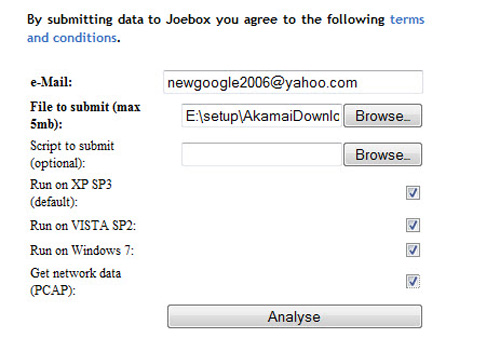
You need to enter the correct email address in the 'e-Mail' box because the entire result and the scanning process will be sent to that email address. The report will be sent as an HTML file, and can be very confusing for less experienced security people.

Can many people wonder about Joebox's reports that are more confusing than other online machines? One of Joebox's highlights and features is the ability to identify the latest Malware-equipped anti-action analysis software ( un-analyzable ) that other services do not yet have. From an obscure position, Joebox has become one of the trusted names in the field of security and action analysis of today's malicious software. Note that you should only download *.exe file, not other formats such as ZIP, RAR, 7z. However, if the user is afraid of the risk of accidentally activating that Malware software on a personal computer You can upload it directly without paying attention to the extension, Joebox will automatically identify it as the executable file (*.exe), although they can be disguised as *.exe, *.dll, *.sys, *.doc, *.pdf.
FAQ
What is Analyze Malware Actions with the Joebox Online Sandbox about?
It provides a structured overview of Malware, explains the main context, and highlights practical takeaways for readers.
Why does this topic matter?
Understanding the main concepts helps readers evaluate the issue, avoid common mistakes, and make better-informed decisions.
How should readers use this information?
Use the guidance as a practical starting point, confirm details that may have changed, and follow current product, safety, or security recommendations.
Related Articles
 Simple Sandbox Tips to Help You Stop Worrying About Malware7 minutes read
 Tracking: Analyze Malware Actions16 minutes read
 What Is a Sandbox and How Does It Sandbox a Program?17 minutes read
 What Is a Sandbox? the Best Sandbox Software6 minutes read
 How to Configure Windows Sandbox on Windows 108 minutes read
 Windows Sandbox: What It Is and How to Use It to Run the Application5 minutes read
Reader Comments 0
Sign in with email or Google to join the discussion.