Table of Contents
Explore 6 months copyright reader iobit advanced systemcare pro 12 and learn what each option does well. The article focuses on practical details that can help you make a more informed decision.
IObit Advanced SystemCare PRO is a reputable software that specializes in spyware, privacy protection, performance tuning, and system cleaning capabilities. Normally, you will have to pay 29.95USD to be able to fully utilize the features of IObit Advanced SystemCare PRO. In this article. com will give you 6 free copyright months of IObit Advanced SystemCare PRO 12. Please scroll down to the end of the article to get your Advanced SystemCare Pro 12 key.
The app has 2 versions, Free and Pro, you can download and use it for free. However, some advanced system care tools and features can only be used on the paid version. Below is a table comparing the features of the free and paid versions, and how to activate the app key for you.
Compare features Advanced SystemCare 12 Free and Pro
Advanced SystemCare Pro 12FeaturesFreeAdvanced SystemCare Pro 12 ProClean and optimize the system Clean and optimize the basic system. xx Clean and optimize the advanced system. x Clean deep registry to prevent system crash. x Defragment the drive to optimize PC performance. x Automatically clean up RAM to stop unused processes and programs. x Automatically take care of the system according to schedule. x Monitor system conditions in real time xx Speed up your computer Help your computer start up 200% faster. x Internet acceleration 300% with Internet Booster. x Enhance your computer's privacy Protect your computer basic with spyware removal. xx Comprehensive computer protection thanks to its ability to detect and eliminate in-depth infections. x Unauthorized system intruder identification by FaceID. xx Browsing protection with data blocker. x Digital fingerprint protection to ensure online privacy. x Protect personal data from unreliable programs. x Actively detect and block security vulnerabilities in real time. x IObit service Automatically updates to the latest version. x Free 24/7 technical support upon request. x
How to enable Advanced SystemCare Pro 12 key
Please download this program Here To install.
On the app interface, looking down at the bottom right corner select Activate Now

Select Enter code:
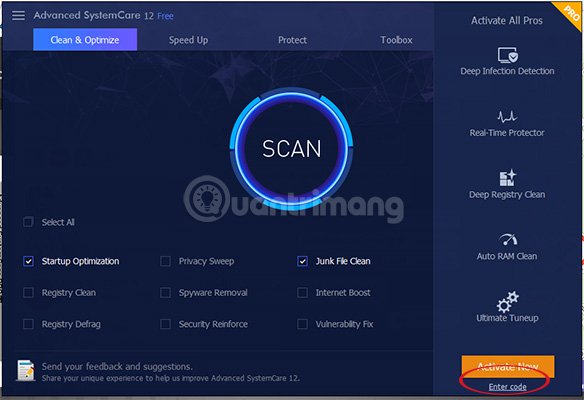
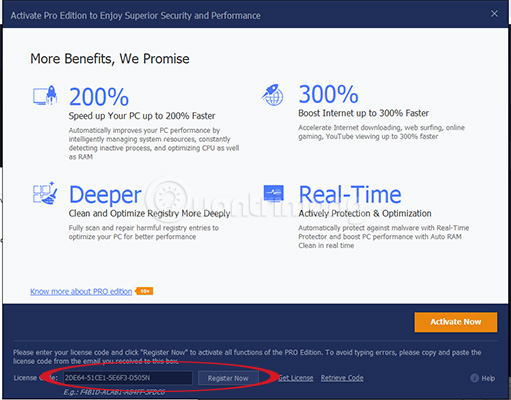
Next enter Advanced SystemCare PRO CAD46-A132B-07B1C-BE95N Key and click Register Now:
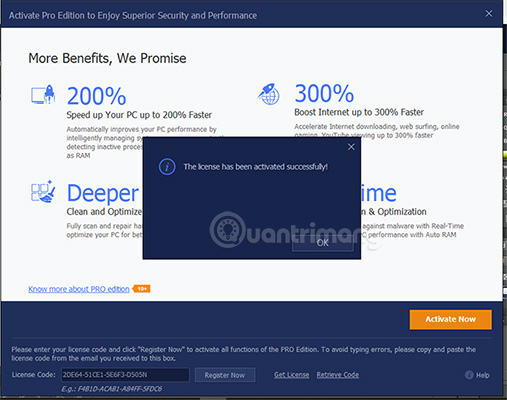
Wait a moment to activate the license, when the following message is completed, it appears:
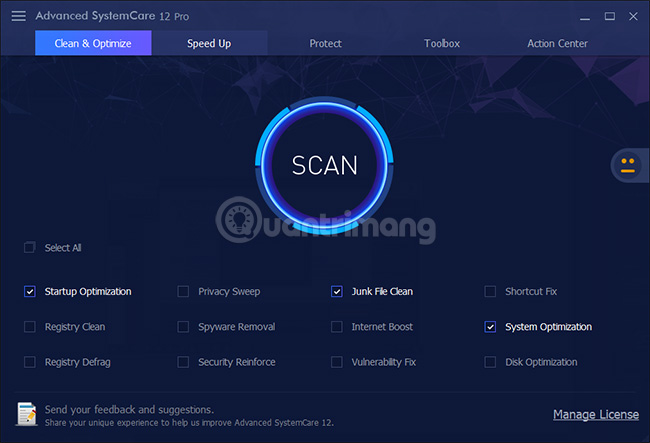
And this is the interface of the Pro version:
Note : The Key only has an activation period until the end of November 30, 2018 and the copyright term is 6 months from the time of activation. If you need to use the features of the app, please quickly download and activate you.
Don't miss out on. com's free, discounted software section to get good discounted software or for free.
- Offers Distraint: Deluxe Edition, great psychological horror game, is free on Steam
- Offers, VideoProc - professional video processing software for $ 79, are free
FAQ
How were the 6 months copyright reader iobit advanced systemcare pro 12 options selected?
The options are compared by usefulness, ease of use, core features, and their fit for the situations described in the article.
Which option is best for beginners?
Choose the option with the simplest setup, clear documentation, and the features you actually need. A more advanced option is not always the better starting point.
What should I check before choosing?
Check compatibility, current availability, pricing or licensing, privacy requirements, and whether the product still receives updates and support.
Related Articles
 Giveaway: Iobit's Top 20% Software Discount Program5 minutes read
 Computer Protection: How to Use Iobit Advanced Systemcare7 minutes read
 (Giveaway) Free License for Advanced SystemCare 11 PRO, System5 minutes read
 How to Install Advanced Systemcare Pro, Error Repair3 minutes read
 How to Clean up Junks and Speed up PC with Advanced SystemCare11 minutes read
 IObit Offers 50,000 PRO License Codes, Using All of Its3 minutes read
Reader Comments 0
Sign in with email or Google to join the discussion.