Table of Contents
This article examines 5 Important Statements at Apple's Education Event. It presents the main facts, practical implications, and key points in a clearer, easier-to-follow format.
Important points are briefly presented in just 1 hour, most revolving around the new iPad. If you missed this event, these are notable points.
iPad 'Education'
The highlight of this event is the new 'popular' iPad that supports a stylus. Called 'popular' because it has a price of $299 for schools, but for others it is $329 - the price of a 9.7-inch tablet earlier this year.
The most remarkable thing about this iPad is the ability to work with $99 Apple Pencil ($89 for students, students, teachers), which was previously only supported on iPad Pro.
This new educational iPad has ToucH ID, HD FaceTime camera, 8 megapizel rear camera, and A10 Fusion chip. Estimated battery life is 10 hours and there will be an LTE version.
Logitech Crayon Stylus New
Although the new iPad supports Apple Pencil, it is still sold separately and does not discount. Instead, Apple introduced a cheaper third-party pen, called Logitech Crayon. For $49, Crayon has a more pleasing orange strip than Apple's pen.
 The Logitech Crayon stylus has a beautiful orange strip.
Apple also said that Logitech will sell a $99 iPad shell with a floating keyboard.
Update IWork
Most updates are revolved around the software, with the new iWork version supporting Apple Pencil. For example, the Digital Book Creaton tool allows teachers and students to create a book by inserting images, handwritten notes, and illustrations. Numbers to create reports and Clips encourages children to express themselves.
Teachers can bookmark Pages with Apple Pencil, similar to traditional paper grading.
Class Management Application
Schoolwork allows teachers to assign lessons, set deadlines for submission. to students, and make exercises similar to writing emails in the ability to attach PDFs or links to other articles. To support this attachment capability, Apple will update the students' iCloud accounts with the default 200GB storage.
For teachers, Apple continues to push the Apple Teacher program to show a diverse application of Apple applications in the classroom, encouraging with prizes when completed.
Everyone Can Create
All of these are part of the new Everyone Can Create initiative, promising the new iPad to be a creative and useful tool for students to learn and express themselves, around musical themes, video, photography and drawing.
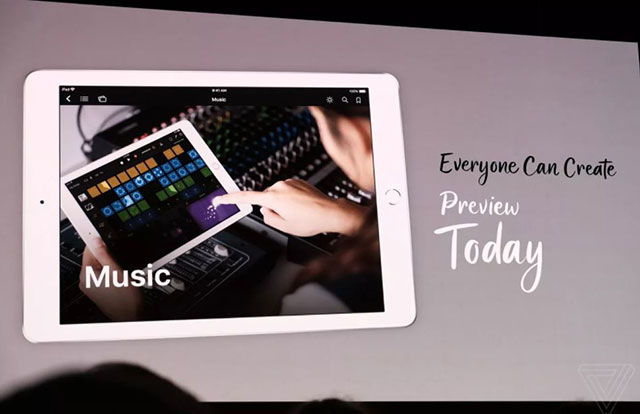 Encourage creativity with Everyone Can Create project.
With tools like Clips or GarageBand, Apple encourages learners to be creative right from a young age, quite interesting when they are around with only YouTube and Instagram as entertainment sources. They can also use AR applications to illustrate mathematical, scientific concepts and sound reports.
Everyone Can Create starts the Preview from today and will be officially released in the summer. Schoolwork is scheduled for release in June.
- This is the first Chrome OS tablet
- Apple may launch cheap tablets to increase sales.
- The stylus can be written on all surfaces, including Apple's special atmosphere?
FAQ
What is the main point of 5 Important Statements at Apple's Education Event?
Important points are briefly presented in just 1 hour, most revolving around the new iPad. If you missed this event, these are notable points.
Why is 5 Important Statements at Apple's Education Event important?
5 Important Statements at Apple's Education Event matters because it can affect how readers understand, choose, use, or respond to the subject discussed in the article.
What should readers verify about 5 Important Statements at Apple's Education Event?
Check the date, product or software version, compatibility, and any current guidance before acting, especially when technology, security, health, or pricing is involved.
Related Articles
 How Many Red Apples Should You Eat a Day: Main Insights4 minutes read
 How to Know the Importance of Education: Step-by-Step Guide10 minutes read
 Actual Technological Challenges in Higher Education8 minutes read
 5 Great Benefits from Apples You May Not Know4 minutes read
 13 Important SQL Statements Programmer Needs to Know18 minutes read
 10 Most Memorable Statements of Technology Genius Steve Jobs6 minutes read
Reader Comments 0
Sign in with email or Google to join the discussion.