Table of Contents
This updated guide examines Adobe: Worm Can Infect Windows System via PDF Vulnerability and organizes the essential facts, background, and practical takeaways in clear American English.
 Spam emails contain malicious code when users open
The target is the Microsoft Windows operating system. When the user opens the PDF file, they immediately activate the cmd.exe application, with the purpose of calling out two scripts.vbs and batscript.vbs:

When opening the PDF file, the user will see the following bulletin board appear, but has been cleverly disguised with gaps as shown below:

But when pulled up, users will see the full message as follows:
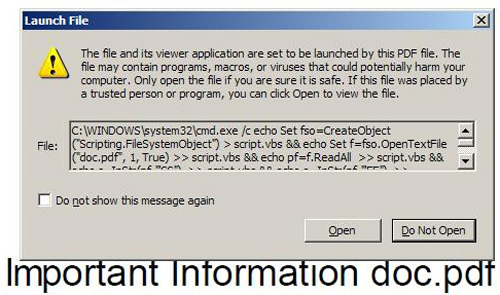
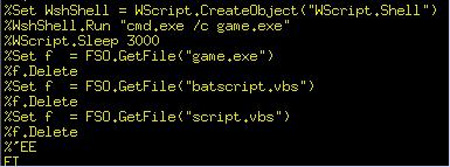
Of course, if they want to be activated, they must have an impact from the user, and the hackers have carefully 'lured' them with the above 'secure' information. Users just need to select ' Open ', the embedded malicious code will immediately create a strange file named game.exe with the following form:
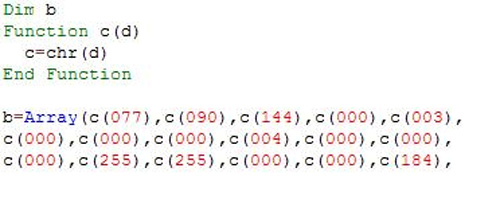
The script.vbs script contains the executable file (this is game.exe ), encoded into VBS string. This process is really confusing and confusing, but the value 077, 090 is actually ASCII standard encoding of two characters M and Z, this is the first 2 bytes of any *.exe file of the executable. Microsoft Windows platform:
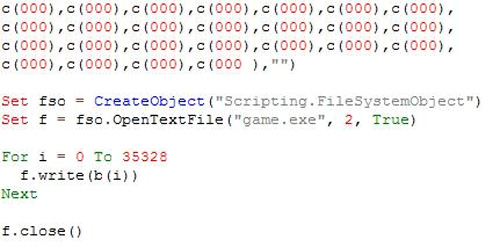
This code continues to do the writing of strings into files:
The next code ( batscript.vbs ) will execute this game.exe file. This is actually another variant of a worm known as Win32 / Auraax or Win32 / Emold . It will automatically copy to C: Program FilesMicrosoft Commonsvchost.exe , and then, use the HKLMMicrosoftWindows NTCurrentVersionImage File Execution Optionsexplorer.exe key , to install itself into the debug application of explorer.exe, and of course it will automatically Dynamic is activated when the user boots the Windows system. At the same time, it also automatically creates 1 rootkit driver to replace the asyncmac.sys file in the system. Besides, part of this malware will continue to spread, copying itself to other partitions of the entire drive (including mobile devices) with the autorun mechanism, it will automatically create files. autorun.inf and system.exe on every partition it finds, set and adjust the necessary parameters of autorun.inf to automatically activate the system.exe process. But actually the problem only occurs when users do not pay attention to the suspicious bulletin board, so Adobe does not rank this vulnerability in a serious manner. Adobe thinks that a useful function only becomes dangerous when users use it incorrectly.
FAQ
What is Adobe: Worm Can Infect Windows System via PDF Vulnerability about?
It provides a structured overview of Adobe, explains the main context, and highlights practical takeaways for readers.
Why does this topic matter?
Understanding the main concepts helps readers evaluate the issue, avoid common mistakes, and make better-informed decisions.
How should readers use this information?
Use the guidance as a practical starting point, confirm details that may have changed, and follow current product, safety, or security recommendations.
Related Articles
 Openoffice Worm Attacks the Operating System1 minutes read
 Use Nepenthes Honeypots to Detect Common Malware10 minutes read
 'Printer Catastrophe' Vulnerability Threatens All Versions3 minutes read
 Worms: New Worm Attacks Attack Dangerous Windows Errors1 minutes read
 Computer Worms: The New Worm 'Digs' a Windows Vulnerability1 minutes read
 Steps to Fix Printnightmare Vulnerability on Windows 104 minutes read
Reader Comments 0
Sign in with email or Google to join the discussion.