Table of Contents
This updated guide examines Windows 10 Is About to Support Streaming Music from Your Phone and organizes the essential facts, background, and practical takeaways in clear American English.
On Windows 7 or older versions of Microsoft operating systems, simply right-click the Bluetooth icon in the system and select the 'Add a device' option. Then search for the smartphone or Bluetooth device you want to use as a music source and pair with your PC. During the above process, all required peripheral drivers are installed. Once the process is complete, you can access your phone's internal memory, send files and stream music.

It's not clear for what reason that music streaming via Bluetooth is no longer available on Windows 10, although you can still access your device's internal storage and send / receive files.
In fact, Windows 7 has the ability to stream phone music through Bluetooth connectivity because the operating system supports A2DP (Advanced Audio Distribution Profile) - one of the Bluetooth modes that support playback. standard stereo / wireless audio via Bluetooth is nearly the same quality as regular wired headsets, allowing users to play music on the phone and listen via the speakers or the 3.5mm port on the computer.
This mode has been removed on Windows 10, but it will soon be back as revealed by a group of computer experts after conducting a codebase analysis of recent preview builds of Windows 10. These reference to the Bluetooth A2DP feature has been discovered, suggesting it will soon be brought back to Windows 10 in upcoming updates.
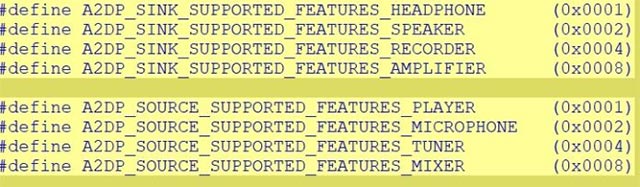
In addition, Microsoft is likely to add an instant control cluster on the taskbar, dedicated to managing A2DP connections, allowing users to manage the music player more easily and quickly..
Microsoft has not yet officially announced Bluetooth A2DP, but you can expect to experience this exciting feature soon.
FAQ
What is Windows 10 Is About to Support Streaming Music from Your Phone about?
It provides a structured overview of stream music via bluetooht on win 10, explains the main context, and highlights practical takeaways for readers.
Why does this topic matter?
Understanding the main concepts helps readers evaluate the issue, avoid common mistakes, and make better-informed decisions.
How should readers use this information?
Use the guidance as a practical starting point, confirm details that may have changed, and follow current product, safety, or security recommendations.
Related Articles
 5 Free Music Streaming Apps Better Than Spotify: Practical Guide7 minutes read
 How to Choose the Right Music Streaming Service for You9 minutes read
 Windows 10 Will Soon Be Equipped with One of the Most Interesting Features3 minutes read
 How to Turn Groove and Onedrive into a Music Streaming Tool6 minutes read
 How to Find Songs on 7 Music Streaming Services at the Same2 minutes read
 Do You Know What Bluetooth on TV Is For?6 minutes read
Reader Comments 0
Sign in with email or Google to join the discussion.