Table of Contents
Learn what is nvidia reflex? should you enable nvidia reflex means, how it works, and which key concepts, benefits, or limitations matter most.

What is Nvidia Reflex?
Nvidia Reflex is a suite of technologies encompassing GPUs, G-Sync displays, and software that measure and reduce system latency. This allows PCs and monitors to respond faster to mouse and keyboard input, helping you target and eliminate enemies more quickly and accurately.
Like Deep Learning Super Sampling, Reflex Low Latency mode is a proprietary technology that requires an Nvidia graphics card. While newer GPUs like the RTX 40-series ensure the best experience, Reflex works with all models, including GTX 900 and above. It works by optimizing the GPU and the game to deliver the best performance with low latency.
Some games also offer a Reflex+Boost setting, which increases the GPU clock speed, especially if you're playing CPU-intensive games, thereby preventing any potential bottlenecks.
How does Nvidia Reflex work?
Traditionally, games send frames to the CPU for processing before sending them to the GPU for display on your screen. Typically, the CPU will process more frames than the GPU can handle, displaying previously received frames while also rendering new ones, thus increasing system latency.
With Reflex, the game forces the CPU to process only enough frames for the GPU to render them almost simultaneously, preventing the GPU from having to chase after the frame rendering. By processing and rendering frames in Just-In-Time (JIT) mode, your PC can reduce system latency and allow more frames to be displayed on the screen. This will allow users to react faster, so the movements you make with your gaming mouse will respond more quickly to the updated frames. In short, you can click faster.
How to enable Nvidia Reflex
You can enable Nvidia Reflex in individual games by going into that game's graphics settings. Each game has different settings, so you may have to search, but it's usually located in the game's options or settings menu.
Here's an example from Apex Legends:
- After opening Apex Legends, select the Options button (gear icon) in the bottom right corner and then click Settings.
- Next, select video settings at the top, and under Advanced, you'll find the option to enable Nvidia Reflex.
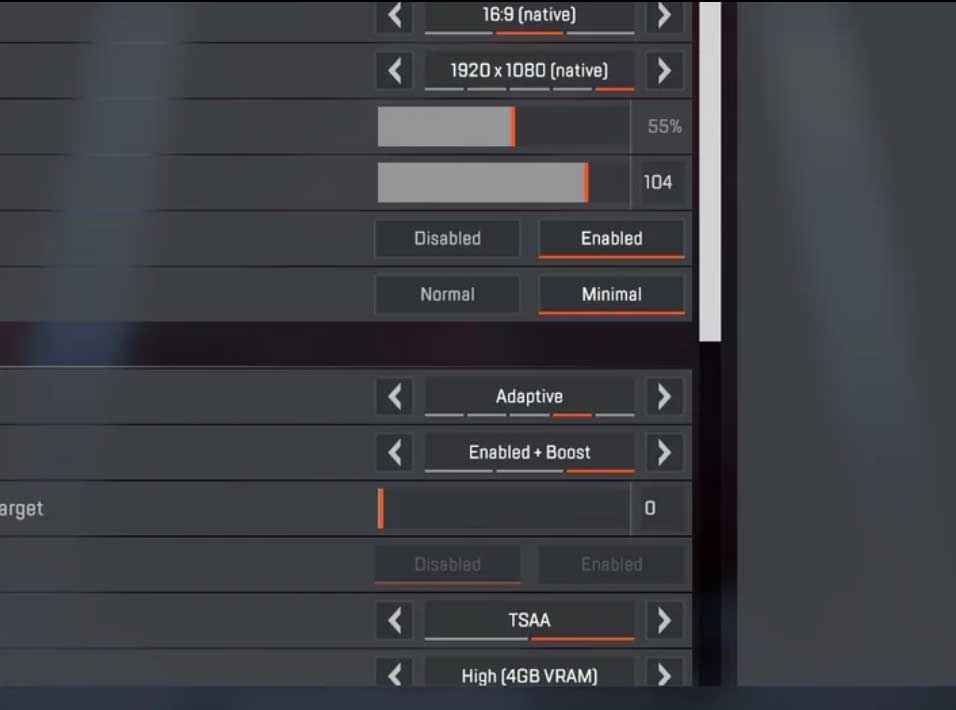
Some games also have a separate option called Nvidia Reflex+Boost. Enabling this option can improve GPU performance to further reduce latency.
Should Nvidia Reflex be enabled?
With modern graphics cards like the RTX 50 series, enabling this feature might not bring any significant or noticeable changes to system latency; it's important to know that your system latency will vary between games that support Reflex based on video settings. However, you can get lower system latency while gaming without much compromise, so you should enable this feature to get the most out of your gaming experience. Even so, you should test it on a few of your most frequently played games to see if it works for you in each specific case.
For laptop users looking to reduce system latency while retaining battery-saving features, Reflex's On mode offers all the benefits. For users who are not concerned about or don't have battery life issues, Reflex's On + Boost mode ensures optimal gaming performance and maximizes GPU computing power.
Final Thoughts
Understanding what is nvidia reflex? should you enable nvidia reflex makes it easier to evaluate the information and apply the most relevant recommendations. Focus on the key points above and verify details that may change over time.
FAQ
What is what is nvidia reflex? should you enable nvidia reflex?
Learn what is nvidia reflex? should you enable nvidia reflex means, how it works, and which key concepts, benefits, or limitations matter most.
What key points does this article cover?
The article focuses on What is Nvidia Reflex?, How does Nvidia Reflex work?, How to enable Nvidia Reflex, with practical explanations and examples.
How can you use this information in practice?
Use the explanations to compare options, verify important details, and make a more informed decision. Apply the recommendations that best match your goals and situation.
Related Articles
 Invite to Terrain Racing Game MX Vs ATV Reflex, Is Free5 minutes read
 How to Enable Ultra-low Latency Mode for Nvidia Graphics Card5 minutes read
 How to Use the NVIDIA Canvas App8 minutes read
 Will PCs Using NVIDIA Processors Appear as Early as This Year5 minutes read
 How to Enable G-Sync on Windows 113 minutes read
 Nvidia Says Two Mystery Customers Accounted for 39% of Q2 Revenue4 minutes read
Reader Comments 0
Sign in with email or Google to join the discussion.