Table of Contents
Explore invite to terrain racing game MX vs ATV Reflex, is free, including the core mechanics, useful strategies, and common mistakes to avoid.
Invite to Terrain Racing Game MX Vs ATV Reflex, Is Free Overview
MX vs ATV Reflex is an exciting cross-country racing game that brings players to the exciting motocross and supercross races. Players will have to go along with other opponents to overcome a series of rugged terrain and hold the steering wheel to the finish line. Is the third title in the MX vs. terrain racing simulation game series. Famous ATV, MX vs ATV Reflex with the mechanism to control and simulate physical elements gives players the same experience as fascinating.
Currently, this fascinating game is being licensed for free through the GameSessions channel in a short time, if it is a fan of racing games, please quickly register to receive the free copyright of MX vs ATV Reflex.
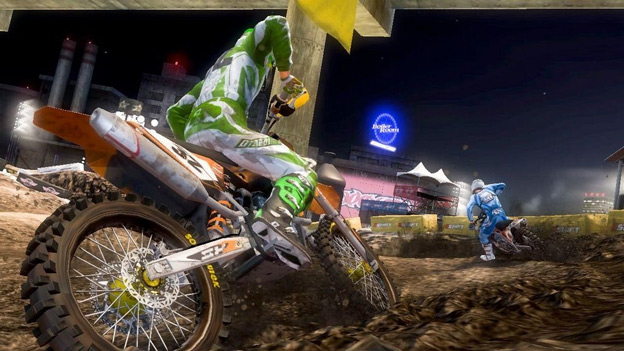
How to receive free copyright game MX vs ATV Reflex right on the computer
Just install a few simple steps that you can get DRM-free version of MX vs ATV Reflex but if you want to link data to the Steam account, you have to spend about 5 USD to buy Steam key.
Step 1: Visit the homepage of GameSessions under the link below and register for an account if not yet.
- Https://www. gamesessions. com/en

Step 2: Visit the link below and select the Download Free Game line.
- Https://www. gamesessions. com/en/Game/MXvsATVReflex

Step 3: At the game download page, the installation file will be downloaded automatically (otherwise you can click Download Free Game to download).
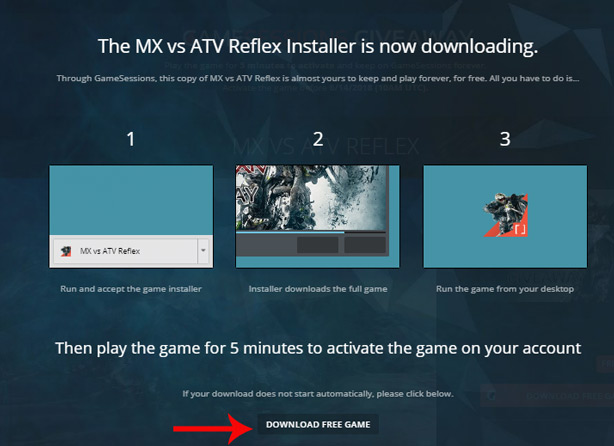
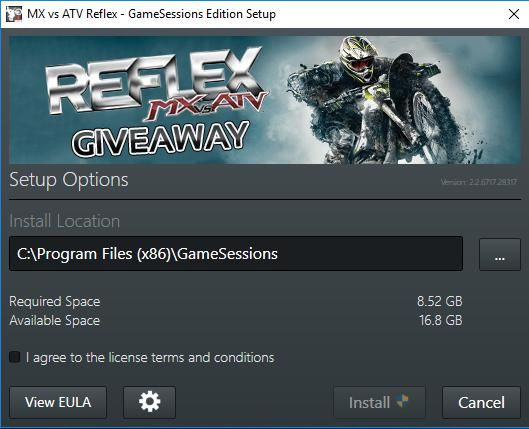
Step 4: Proceed to install the game. Note, the free space on the hard drive must be about 9GB. After setting up the installation line, select I agree to the license terms and conditions and click the Install button. This step takes a lot of time so you can take advantage of other things.
Step 5: Start the game from the game icon at the desktop and log in with the registered GameSessions account (step 1).

Step 6: You need to play the game or let the game work for about 5 minutes until the notice of Activation Complete notification. At that time, you have permanently owned this fascinating terrain racing game.
Step 7: If you want to buy Steam key for 5 USD, choose Buy Options or click Back to game to go back to play MX vs ATV Reflex.
Note: Deadline to receive free MX vs ATV Reflex game of the GameSessions only lasts until 17h on 14/6/2018.
Minimum configuration to be able to battle MX vs ATV Reflex:

See more:
- Invite to download and experience Smartphone Tycoon - the phone design game is very hot
- 10 best puzzle games on Android and download links
- PC Building Simulator, a simulation game that helps you satisfy your own passion for installing 'big' computers
Update note: Game mechanics, item values, menus, and availability can change. Check the current game version or official support information if your experience differs.
FAQ
What does this guide explain about invite to Terrain Racing Game MX Vs ATV Reflex, Is Free?
Explore invite to terrain racing game MX vs ATV Reflex, is free, including the core mechanics, useful strategies, and common mistakes to avoid.
What is the best way to apply these tips?
Apply one tip at a time, practice it in a low-risk setting, and adjust your approach based on the current game version and your play style.
Can game features or requirements change?
Yes. Updates can change menus, mechanics, item values, compatibility, and availability. Check the current in-game information or the developer's official support pages when details differ.
Related Articles
 Offer F1 2015 - an Appealing 1 Racing Game, Free4 minutes read
 Please Download Riptide Gp: Renegade, the Water Motor Racing Game3 minutes read
 Top 20+ Best Racing Games for Android and iOS 201814 minutes read
 Download GRID Autosport Racing Game Worth $ 39.99, Free of Charge5 minutes read
 Inviting GRID 2 Racing Game Worth $ 29.99, Is Free4 minutes read
 Get Free Racing Game Dirt Rally Worth $$ 39.99 via Humble Store3 minutes read
Reader Comments 0
Sign in with email or Google to join the discussion.