Table of Contents
Learning how to stay safe from phishing while working from home doesn't have to be complicated. This updated guide presents a clear workflow, practical checks, and troubleshooting advice you can use while completing the process.
Key Takeaways
- Review stay up to date on the latest email scams.
- Explore learn how to identify phishing.
- Understand think carefully before clicking.
1. Stay Up to Date on the Latest Email Scams
Knowledge really is power when it comes to protecting your business from cybercrime. Just a glance at a shady email or SMS message is enough to set off your internal alarm bells if you know what to look for.
Classic email scams where someone pretends to be your bank to steal your data are relatively easy to spot. Chances are you've been targeted at random multiple times through one of many shotgun methods.
But as a remote worker, you'll also have to become a master at spotting targeted email scams. These are much harder to spot because they often include specific information about you or your company. In other words, the hacker has done their research and therefore seems more convincing.
Along with Spear Phishing, you may also encounter email scams, in which you receive copies of legitimate communications with dangerous attachments or links.
Unfortunately, AI has made things much scarier, including Vishing. Previously, scammers would call you and pretend to be someone else. Now, they can actually copy the voice (and image via deepfake video) of someone in your organization.
You should be familiar with all of these techniques as they can ensure that you think twice before clicking on a link in a seemingly safe email from your colleague.
2. Learn How to Identify Phishing
Learning how to spot Phishing is relatively simple. The first thing you should look at is the sender's email address. In most cases, you'll notice that while it looks very similar to an official organization (or group member), some of the letters may be swapped out for a similar symbol, or one of the letters may be omitted altogether.
The most obvious sign of a scam is often language that creates a sense of urgency. Cybercriminals are trying to take advantage of people who may not have the experience to recognize scams, and thus create situations that require you to act quickly without thinking.
In the past, phishing emails were often full of grammatical errors and typos. Today, cybercriminals often use AI language models to create more polished text that is good enough to fool most unsuspecting individuals.
You can spot AI phishing attacks by their unnatural sentence flow. Email text is also often overly formal or perfect, lacking any human touch that is a hallmark of most work-related communications.
Here is an example of an email created using Google's Gemini:
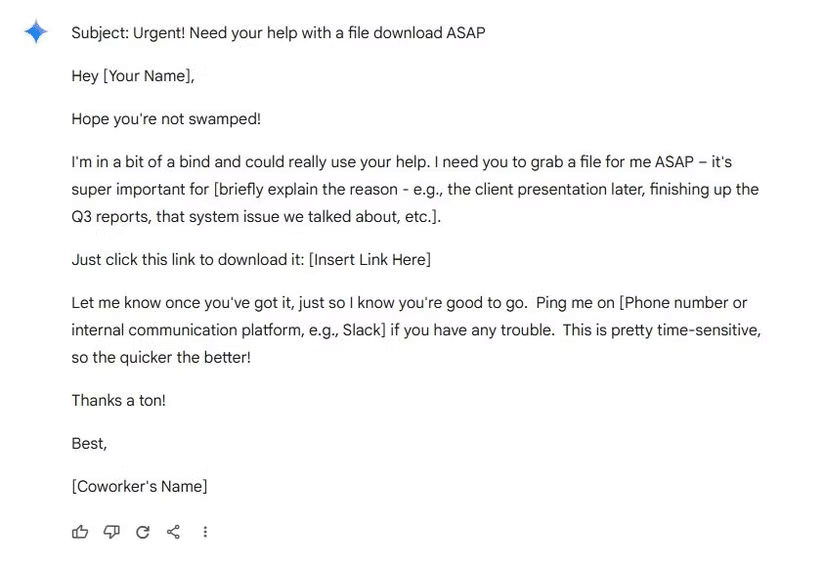
It may look fine on the surface but upon closer inspection it turns out to be very problematic. Contact the alleged sender directly to clear up any confusion rather than taking any risks if you ever receive a similar email.
With voice cloning and deepfakes, things get a little more complicated. As a result, most of us will never have to deal with this type of scam. The good news is that most cybercriminals are looking to make a quick buck, so cloning a manager's voice and image can be too much work. However, while the chances are low, it can happen, so it's definitely worth knowing the basics.
For instance, voice cloning can sound convincing, but digital artifacts can still be noticeable today that make the speaker sound robotic. The cadence and small inflections of the voice will be off even though the timbre is perfect.
The same goes for detecting deepfakes, where you might notice imperfections like jerky movements or broken lip sync. Either way, you know your co-workers well enough to be familiar with their gestures, so anything that seems out of the ordinary is a big red flag for you.
3. Think Carefully Before Clicking
Whenever you receive a link in an email (even from a familiar address), always check it by hovering your cursor over it. First, check the domain name (aka the first part of the link). Just as scammers try to make email addresses look legitimate, they do the same with the domain names in the links they send you.
Look for spelling mistakes, hyphens, and missing or extra letters.
The purpose of the scam is to steal your login information or get you to download malware, so the link will try to mimic a legitimate service.
Likewise, you should be wary of any file attachments. This includes executable files (.exe) and compressed files (.zip,.rar) that cybercriminals love because they can easily hide malware, as well as Microsoft Office documents that now allow hackers to set up scripts and macros that function similarly to.exe files.
4. Pay More Attention to Public Wi-Fi
The great thing about working remotely is that you can take your work with you wherever you go. It does come with its own cybersecurity risks, primarily due to Wi-Fi phishing or Wi-Fi spoofing while this is great for your mental health.
In this scenario (often referred to as a Man-in-the-Middle attack ), the hacker creates a 'twin' network of an actual Wi-Fi hotspot in a public place. Then, they simply wait for the victim to establish a connection to see everything they do online, including their login information.
There are a number of things you should prepare for if you plan to work in coffee shops and other public places like libraries, mainly cybersecurity. It's best to avoid public Wi-Fi altogether, especially if you're handling sensitive company data. This helps you avoid falling victim to Wi-Fi spoofing. Always carry a mobile hotspot or use a 4G/5G connection to minimize risk and avoid traffic congestion.
You should install a VPN first to be safe if you absolutely insist on using public networks.
5. Use Software to Minimize Phishing Attempts
Why do it yourself when there is software that can help you? For instance, the premium version of Malwarebytes can significantly enhance your online security and protect you not only from malware but also from scams.
With real-time scanning, Malwarebytes analyzes incoming emails and automatically blocks them if it detects any phishing messages. Malwarebytes also analyzes links in emails to check if they are safe, along with scrutinizing the content of the messages themselves. Malwarebytes can also verify that the sender of an email is authentic by comparing their details with available information. This makes it a powerful tool against email spoofing.
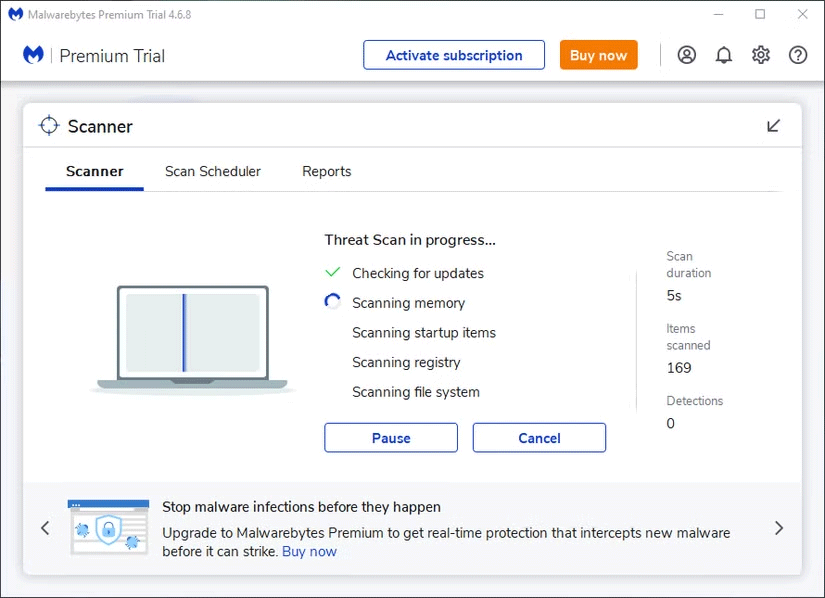
It adds an extra layer of defense against the growing number of scams and also reduces your 'phishing' workload while this is an optional step.
By practicing due diligence, analyzing links and attachments in emails, you will avoid falling victim to a scam. Indeed, adding AI to the mix doesn't help, but the same rules still apply – stay alert, don't fall for high-pressure tactics, question everything, and the AI won't have anything on you!
Final Thoughts
The most reliable way to handle stay safe from phishing while working from home is to follow the process in order, verify each important setting, and test the result before moving on. Use the guidance above as a practical reference, then adjust the details for your device, software version, or specific goal.
FAQ
What should I check before I stay safe from phishing while working from home?
Use the latest available software, confirm that your device meets the requirements, and make sure you have the necessary permissions, account access, or backup before changing anything.
Why might I be unable to stay safe from phishing while working from home?
Common causes include outdated software, missing permissions, incompatible settings, incomplete setup steps, or a temporary network problem. Recheck the process from the beginning and restart the app or device if needed.
Is it safe to stay safe from phishing while working from home?
It is generally safe when you use official tools, review every permission, and back up important data before making system-level or account-level changes.
Related Articles
 How to Stay Safe While Playing Online Games6 minutes read
 Working from Home Makes You Vulnerable to Hackers. Here's8 minutes read
 5 Ways to Win at Working from Home: You Already Have8 minutes read
 How to Stay Safe Online: Clear Instructions17 minutes read
 4 Types of Phishing Are Easy to Trap Users4 minutes read
 How to Stay Safe at Night: Step-by-Step Guide12 minutes read
Reader Comments 0
Sign in with email or Google to join the discussion.