Table of Contents
Virtual Keyboard is easier to understand when the core ideas are paired with practical examples. The sections below explain the topic clearly, highlight useful steps, and point out details that can prevent common errors.
A virtual keyboard is completely made of light. Therefore, it can be projected on any flat surface and becomes a very space-saving idea product. A dual-sensor infrared sensor will pick up the signals of key presses when users use it. How to arrange the QWERTY standard keys since the first keyboard came out so far. Speech recognition software is becoming stronger and smarter. A lot of keyboards will be completely replaced by microphones. Characters appear on the device screen of personal digital assistant (PDA). Visible light creates the image of a keyboard How does virtual keyboard work? 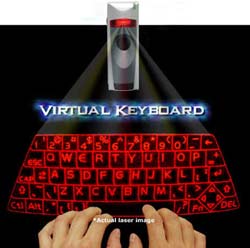 Hand-held digital devices like PDAs or cell phones often have small buttons, making it difficult for users to use them when they need a lot of work. To press a short phone number or text message, it is easy but to write a long email, the keys start to become inconvenient. Virtual keyboard solves these problems. A small projector transmits images of the keyboard arranged on all flat surfaces, As an example,, a suitcase lid. The sensor inside the projector senses user keystrokes, turning them into characters on the screen. To create the feeling of using a real keyboard, the projector also emits clicks when manipulating. How is a keypress operation of the virtual keyboard displayed on the screen? 1. The laser projects an image of a virtual keyboard on a flat surface. 2. Virtual infrared beams projected above the keyboard. 3. Fingers perform keystrokes. This action will affect infrared beams and infrared rays that will reflect the change to the projector. 4. Reflective infrared beam passes through an infrared filter to the camera. 5. The camera receives reflected infrared rays and calculates the angle and then renders the images. 6. The sensor chip identifies the broken points of the infrared beam due to the user's click action. From there it transfers broken images to coordinates. 7. The last characters are set on the device screen with built-in coordinates transmitted over a wireless connection. The extended infrared beam is projected above the virtual keyboard. A virtual keyboard is made up of both visible and invisible light. Visible light will project the image of the keyboard to the surface and the invisible light is responsible for recognizing the user's keystroke. When an infrared beam is broken (due to a key press) the sensor inside the projector detects which key has been pressed.
FAQ
What is Virtual Keyboard?
A virtual keyboard is completely made of light.
Why is Virtual Keyboard important?
A clear understanding of Virtual Keyboard helps you make informed decisions, avoid common mistakes, and use the relevant tools or techniques more effectively.
How should beginners approach Virtual Keyboard?
Start with the fundamental concepts, follow the examples step by step, and test each change in a safe environment before applying it to important systems or data.
Related Articles
 6 Ways to Open Virtual Keyboard on Windows 109 minutes read
 Summary of Several Ways to Open Virtual Keyboard on Windows XP //8 minutes read
 How to Get the Most Out of Virtual Keyboards on Windows 104 minutes read
 3 Tips for Using Good Virtual Keyboard for iPhone, iPad6 minutes read
 How to Open the Virtual Keyboard on Windows 103 minutes read
 Here Are 4 Ways to Open the Virtual Keyboard on Windows 7/8/8.1/10/1110 minutes read
Reader Comments 0
Sign in with email or Google to join the discussion.