Table of Contents
Deep Reasoning in Microsoft Copilot Studio is a preview capability for agent tasks that require multi-step analysis, comparison, planning, or constraint handling. Turn on generative orchestration and Deep Reasoning (preview) for the agent; Copilot Studio can then choose reasoning automatically, or you can place the keyword reason in the instruction step that should use it.
Reasoning usually takes longer and consumes billed Copilot Credits. Microsoft does not recommend preview features for production use, and availability, model choice, data location, and regional support can change.
When Deep Reasoning is useful
- comparing several suppliers against cost, location, capacity, and risk;
- analyzing unstructured evidence before making a recommendation;
- solving a problem with dependent steps or conflicting constraints;
- building a plan that must explain tradeoffs and justify a final choice;
- checking whether multiple retrieved facts satisfy a policy.
Do not use it for simple retrieval, formatting, classification, or a one-field lookup. A slower model adds little value when the task requires no meaningful reasoning.
Requirements and limitations
The agent must use generative orchestration and the environment must allow the preview capability. Microsoft states that preview processing may occur outside the organization's geographic boundary. Organizations should review tenant policy, data-residency requirements, and billing before enabling it.
Model names and supported regions are volatile. Check the current Copilot Studio settings and Microsoft's Deep Reasoning documentation rather than relying on an older static region list.
Enable Deep Reasoning
- Open the agent in Microsoft Copilot Studio.
- Confirm that generative orchestration is enabled for the agent.
- Open the agent's Settings.
- Turn on Deep Reasoning (preview).
- Save the agent and open the test experience.
If the control is missing, confirm the environment's region, administrator policy, authoring experience, and preview settings.
Target one instruction step with “reason”
Once access is enabled, the agent can decide when a task benefits from reasoning. To request it for a particular activity, use the word reason in that step rather than applying it to every action.
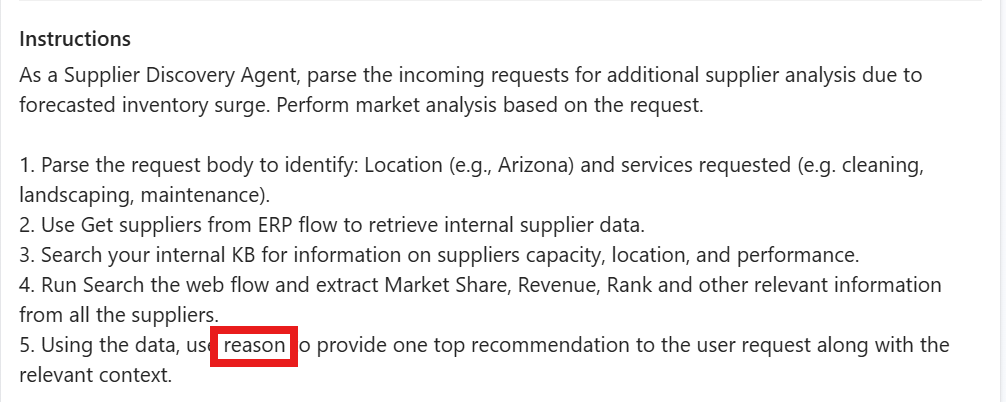
A supplier-selection instruction could be written as follows:
- Extract the requested location, service, budget, and deadline.
- Retrieve eligible suppliers from the approved ERP flow.
- Collect capability and performance data from internal knowledge.
- Discard suppliers that fail mandatory requirements.
- Use reason to compare the remaining suppliers and return one recommendation with the decisive evidence and unresolved risks.
This keeps ordinary retrieval steps fast and reserves deeper analysis for the final comparison.
Write better reasoning instructions
- State the decision: Specify exactly what the agent must select, rank, or conclude.
- Separate hard constraints: Identify requirements that cannot be traded away.
- Name the evidence: Tell the agent which knowledge sources or tool results it may use.
- Define the output: Request a recommendation, supporting factors, and uncertainty—not an unrestricted essay.
- Set a fallback: Require clarification or “insufficient evidence” when mandatory data is missing.
Do not request hidden internal reasoning or a verbatim thought process. Ask for a concise justification based on the evidence users are allowed to see.
Test quality, latency, and cost
Run the same evaluation set with Deep Reasoning on and off. Compare:
- correctness of the final decision;
- use of approved evidence and citations;
- compliance with mandatory constraints;
- response time and timeout rate;
- Copilot Credits consumed;
- consistency across repeated runs.
If quality does not improve materially, remove the reasoning trigger from that step. Applying it repeatedly can make an agent slower and more expensive without making the result safer.
Review reasoning activity
Open the agent's Activity page after a test. The activity map identifies where a Deep Reasoning node was used. Expand the node to inspect the inputs, tool data, result, timing, and any error information available in your environment.
Use this trace to confirm that reasoning was applied to the intended step and that the agent did not reason over unapproved or incomplete data. If the model chose reasoning automatically for a trivial step, rewrite the instructions to make task boundaries clearer.
Production decision
Deep Reasoning remains a preview feature, so treat it as an evaluation tool rather than a production dependency. Keep a default-model fallback, avoid sensitive test data unless the environment is approved for it, document credit impact, and retest whenever Microsoft changes the underlying model or regional availability.
Related Articles
 How to Create Prompts Based on Inference Sequences11 minutes read
 What Is Gemini 3 Deep Think?8 minutes read
 OpenAI Unveils Deep Research, a New AI Agent That Can Complete4 minutes read
 When Should You Use Reasoning Mode on an AI Chatbot: Explained8 minutes read
 What Is Deep Web? Where Is the Deep Web? Good or Bad?9 minutes read
 Deep Learning (DL): What You Need to Know5 minutes read
Reader Comments 0
Sign in with email or Google to join the discussion.