Table of Contents
This guide covers us air force has a headache for ps3 with practical context and easy-to-follow details. Use it to understand the subject and apply the information confidently.
Having purchased 1, 700 sets of Sony PlayStation 3 (PS3) to build supercomputers, the US Air Force currently does not know how to upgrade the entire system with the latest firmware (firmware) of Sony . 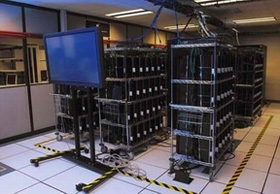 The US Air Force uses PS3 to build servers. Updating firmware is relatively time consuming and complicated for users of technology equipment. If the update fails or the update process fails, it is likely that the device will be damaged, or the operation is unstable. With the number of PS3s reaching thousands of units as is the case with the US Air Force, this update process can become a nightmare. The number of PS3s used by the US Air Force for the 500 TeraFLOP supercomputing system. The reason PS3 was chosen is because it has a very powerful Cell chip. The cost of this supercomputing system is much cheaper than investing in a conventional supercomputer system. The problem is that the PS3-based supercomputing system runs on the Linux platform, which is not supported by Sony's latest firmware. The US Air Force's PS3 server system is not connected to the PlayStation Network, so the upgrade is completely manual. Normally in these cases, the buyer must send the PS3 to Sony's factory to reinstall.
FAQ
What should I check before following these steps?
Confirm device and software compatibility, save important data, and make sure you have the required permissions, files, and account access.
Why might the process not work?
Common causes include outdated software, missing permissions, incompatible hardware, an unstable connection, or completing a step in the wrong order.
Can I undo the changes if necessary?
That depends on the tool or setting. Use built-in restore options when available, keep a backup, and record the original configuration first.
Related Articles
 Get Rid of These Habits if You Don't Want to Be Old and Have6 minutes read
 The Reason Why Woodpeckers Are Pecking Continuously into the Trunk2 minutes read
 There Is Evidence That Confirms the Existence of a Fifth Force4 minutes read
 7 Simple Ways to Eliminate Headaches without Taking Medicine5 minutes read
 What Is Friction?4 minutes read
 Download Ace Force 2 PC, Ace Force 2 PC: Features, Uses, and5 minutes read
Reader Comments 0
Sign in with email or Google to join the discussion.