Table of Contents
Quick Overview
Keyboard Test Software : Compare useful Keyboard Test Software options and learn how to evaluate them, including Test your keyboard using keyboardtester. com and Test keyboard with keyboardchecker. com.
If you need to test the keyboard and test its performance, using keyboard testing software is the simplest and most convenient. Join the editorial team to learn about the top 5+ best keyboard testing software currently used through this guide.
Test your keyboard using keyboardtester. com
Step 1: Go to the website keyboardtestster. com and click Launch the Tester on the website's homepage. This is an online keyboard testing software that is widely used today.

Step 2: A popup window will appear and simulate your keyboard. Enter the keys on the keyboard with the keys to be tested in the box. The key that is still working normally will have the key indicator light on as shown. And vice versa, if the key is paralyzed, it will not light up.
Test keyboard with en. key-test. ru
Step 1: Visit the website en. key-test. ru
Step 2: On the main page interface, click on the key you want to check. The implementation method and web operation are similar to keyboardtester.
Test keyboard with keyboardchecker. com
This keyboard testing website is used similarly to the 2 websites presented above. Users access the website and enter keys in turn to test with the keyboard testing software keyboarchecker. com:

Step 1: Go to keyboardchecker. com
Step 2: Enter the key to test, if the key is still working properly, the green light will be displayed on the screen.
Use keyboard testing software tool
Control Panel keyboard testing software
The process of testing a computer keyboard is to perform the process of checking whether the keys are still working properly or not. It seems that just opening a text editor to check is enough, but there are many other features of the keyboard that need to be checked.
For example, if the keys work well and are sensitive, the keyboard device driver can still have unexpected problems that interrupt the usage process, so it is necessary to use effective online keyboard testing software.
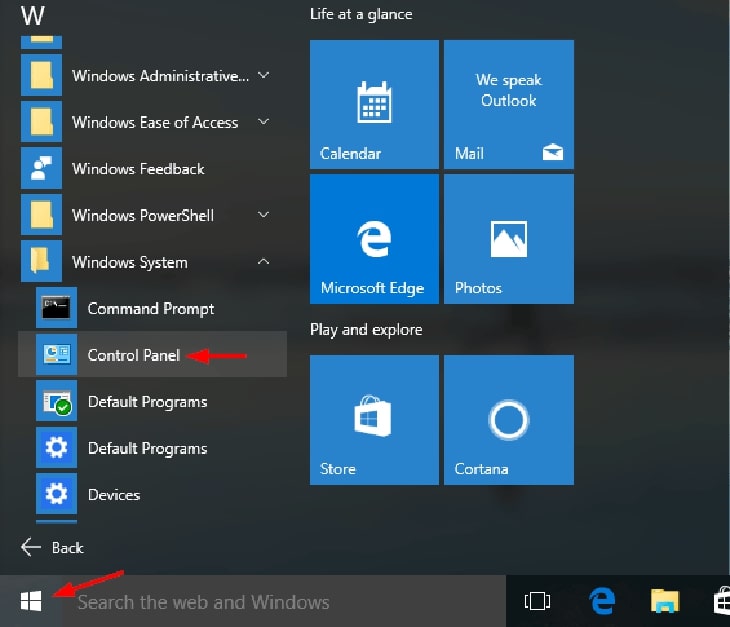
Control Panel keyboard testing software is a tool available on Windows.
Step 1: Click on the Start bar on the main screen. Select Control Panel
Step 2: Click on Systems and open Open Device Manager.
Step 3: Click Scan for Hardware Changes from the menu.
When Device Manager appears it will test your computer keyboard.
In case if error icon appears next to the listing if there is a problem with the keyboard. Right click on the listing for the device and select Properties for more detailed information about these errors.
Keyboardtest keyboard testing software
Keyboardtest is an online keyboard testing software that allows you to check desktop computers , laptops , check keyboard LED lights,. for good working condition or not. Overview Keyboardtest will help detect errors related to keyboard hardware, errors that cannot be checked and detected with the naked eye, quite convenient for users to manage hardware devices well.
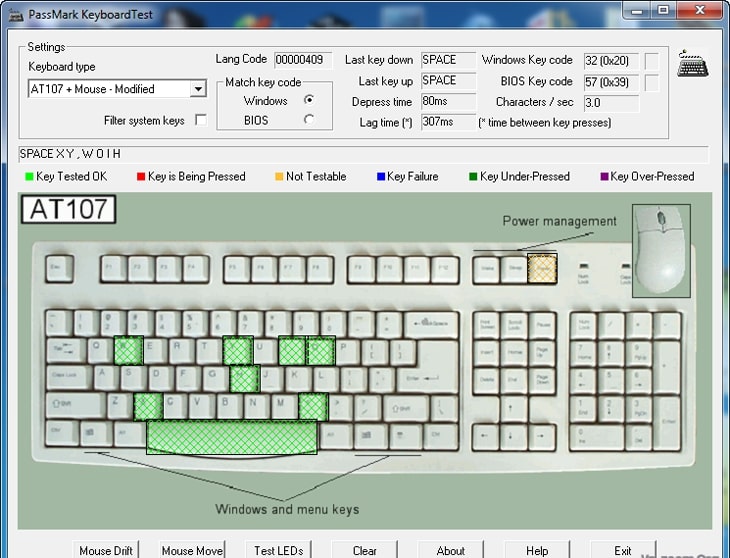
Common keyboard errors when using such as: laptop keyboard cannot be pressed, key functions do not perform correctly,.
How to handle when computer keyboard is broken
In case the computer keyboard has a hardware error, depending on the level of damage, the user can consider whether to replace the keyboard at a reputable warranty center for repair or not.
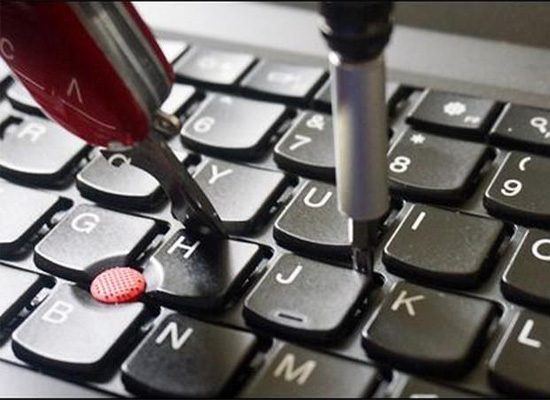
It is absolutely not recommended that users disassemble and repair computers at home without technical expertise.
the editorial team is proud to be a leading distributor and maintenance unit of electronic equipment components on the market today. Contact the editorial team now to receive advice and support for the best warranty and maintenance of your device.
FAQ About Keyboard Test Software
How do you choose the best Keyboard Test Software?
This is an online keyboard testing software that is widely used today
Which features matter most when comparing Keyboard Test Software?
Keyboardtest keyboard testing software Keyboardtest is an online keyboard testing software that allows you to check desktop computers, laptops, check keyboard LED lights,. for good working condition or not
Are free Keyboard Test Software options reliable?
If you need to test the keyboard and test its performance, using keyboard testing software is the simplest and most convenient
Related Articles
 KeyboardTest - Software Testing Keyboard, Checking Keyboard Errors3 minutes read
 What Is Automation Testing?6 minutes read
 Top 5 Laptop Screen Testing Software5 minutes read
 3 Ways to Test Macbook Keyboard for Free, Simple and Accurate8 minutes read
 Insert Line Shortcut in Excel - Shortcut Insert Excel4 minutes read
 Magic Keyboard Battery Testing and Charging Steps5 minutes read
Reader Comments 0
Sign in with email or Google to join the discussion.