Table of Contents
Explore top 5 best browsers for Android, including the key concepts, practical examples, important considerations, and useful guidance.
But you don't have to accept such an annoying default option. People are fed up with Chrome, and that's why they're experimenting with other browsers. Instead of imitating, these browsers are actually superior to Chrome.
Vivaldi
Desktop-style tab management interface
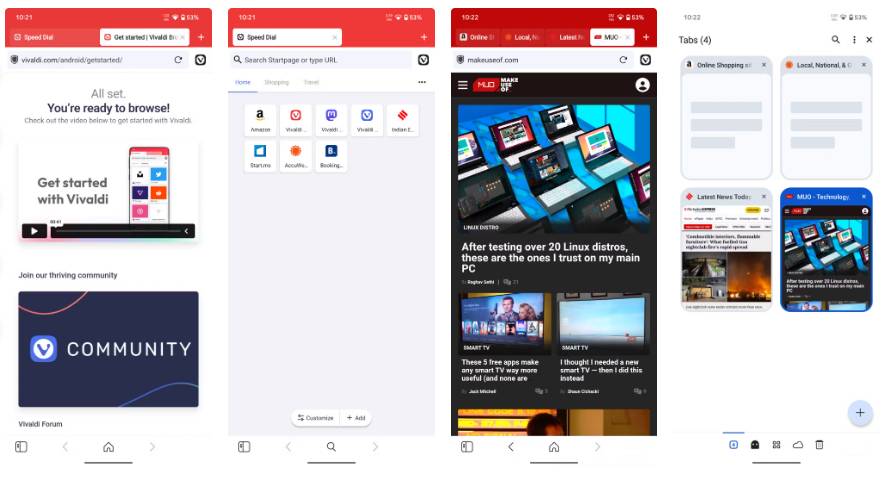
Chrome's tab management experience is like a simplified version of what you have on a desktop. Vivaldi takes the opposite approach: It treats you like a professional user wanting a desktop experience on their phone.
Tab stacking is one of the features that people love about Vivaldi. Instead of Chrome's messy, endless tab stacks, Vivaldi lets you organize tabs into two separate rows, similar to a desktop. You can group travel tabs into one stack and news tabs into another, keeping your workspace tidy.
Adventurous browser
The browser offers a free VPN and seamless ecosystem synchronization
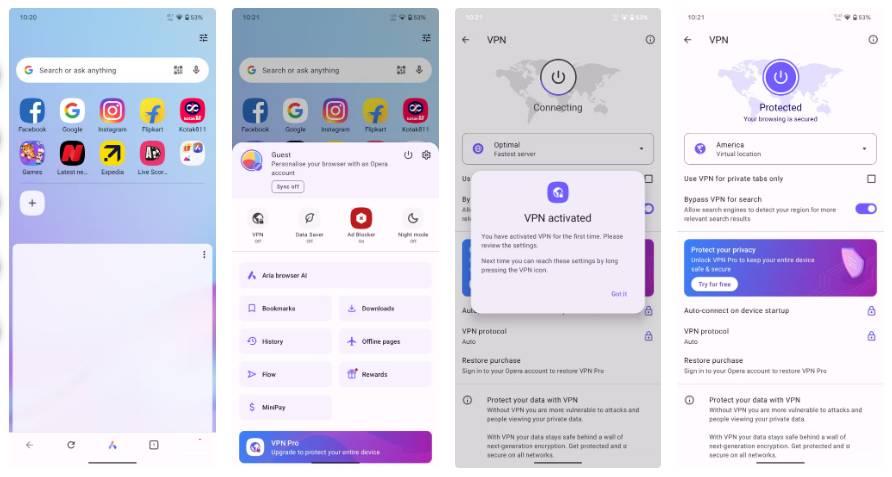
While not a replacement for high-security enterprise tools, Opera's free built-in VPN is the perfect solution for bypassing geographical restrictions and adding an extra layer of security when using public Wi-Fi—something that would otherwise require a third-party app in the case of Chrome.
Opera even has My Flow, a chat-like interface that lets you send files, not just links, unlike Chrome, which is also slower at syncing. Combined with significant mobile compression for users with limited mobile data plans, Opera is the ultimate utility browser.
Microsoft Edge
Powerful productivity with integrated GPT-4
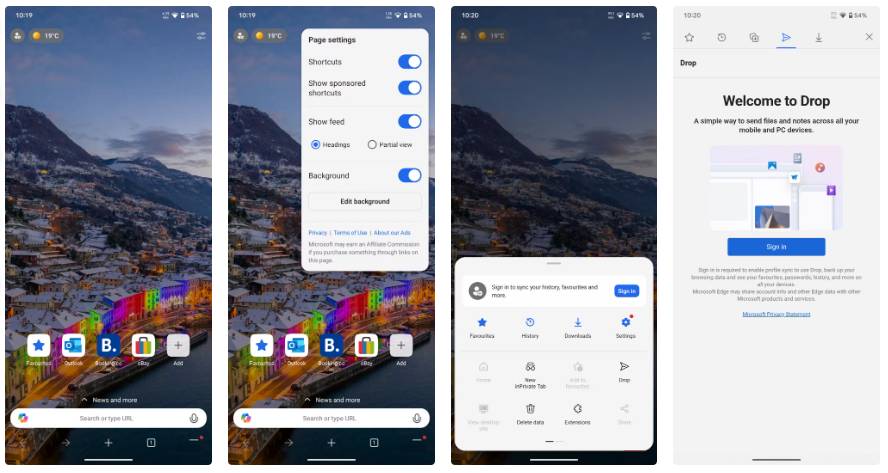
Many users still associate Edge with the ghost of Internet Explorer, but Edge on mobile is truly a productivity beast. Deep integration with Microsoft Copilot is one of its most useful features.
Google's Gemini AI is amazing, but Chrome still struggles to integrate it effectively on mobile. The Edge browser lets you pull up a sidebar and instantly summarize long PDFs, articles, or web pages. It changes the way you consume information.
Additionally, the Read Aloud feature uses artificial neural network-based text-to-speech technology, delivering surprisingly natural-sounding audio – perfect for converting long articles into podcasts while you're driving long distances.
Mozilla Firefox
Mobile browsers support extensions designed for PCs
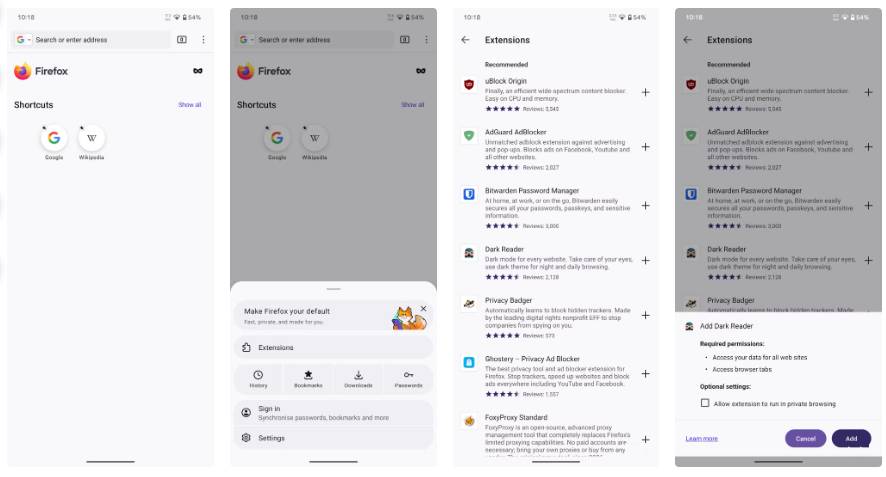
Mozilla Firefox is one of the few popular browsers that supports a carefully curated and powerful collection of PC extensions that can change your browsing habits. A prime example is the Dark Reader extension, which has revolutionized the web browsing experience for many.
Although Chrome offers a basic dark mode, it often malfunctions on websites, resulting in blank white pages. The Dark Reader extension for Firefox intelligently inverts colors on any website, maintaining aesthetics while protecting your eyes. There are also many other curated extensions to help you perform everyday tasks on your browser.
Brave
The best browser you can use for viewing media content and enhanced security
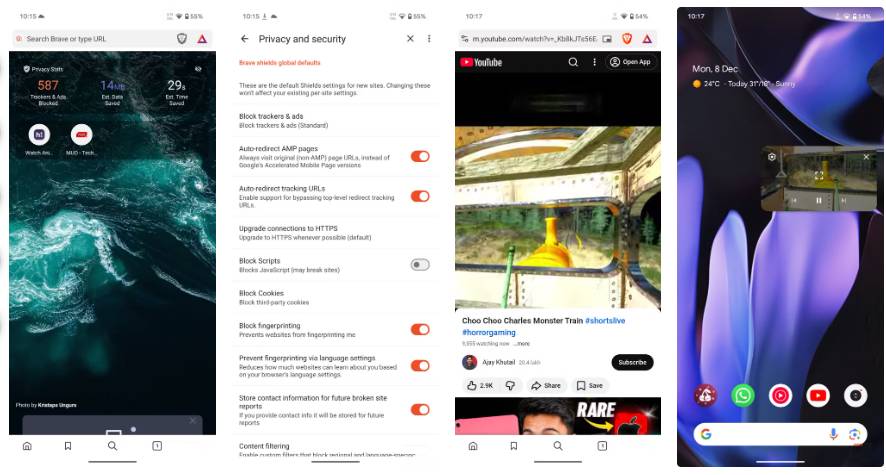
Brave is often the default browser for those concerned about security and privacy. This browser offers Brave Shields, with a notable security feature: Fingerprint protection.
Most, if not all, browsers allow websites to identify you based on your device's unique hardware and software configuration (also known as a digital footprint). Brave proactively randomizes this data, making you appear as a completely different user from the tracker. This ensures true anonymity and security without complex setup.
Besides security, Brave's standout feature is its Background Play function. Minimizing Chrome often stops any video or audio from playing. Brave fixed this issue from the start.
You can start playing a video or podcast and lock the screen, or switch to another app and continue working there, and the audio will continue playing in the background. People often use this feature on older phones with limited storage. Instead of downloading separate apps for Spotify or YouTube, use Brave.
See more:
- Which browser, Google Chrome or Firefox, consumes more RAM?
- After weighing all aspects, which browser is better, Chrome or Firefox?
- Microsoft claims Edge surpasses Chrome and Firefox to become the best browser in the world.
Final Thoughts
Understanding top 5 best browsers for android makes it easier to evaluate the information and apply the most relevant recommendations. Focus on the key points above and verify details that may change over time.
FAQ
What is top 5 best browsers for android?
Explore top 5 best browsers for Android, including the key concepts, practical examples, important considerations, and useful guidance.
What key points does this article cover?
The article focuses on Vivaldi, Desktop-style tab management interface, Adventurous browser, with practical explanations and examples.
How can you use this information in practice?
Use the explanations to compare options, verify important details, and make a more informed decision. Apply the recommendations that best match your goals and situation.
Related Articles
 5 Best Fastest and Best Browsers on Android9 minutes read
 6 Super Light and Fast Browsers for Android10 minutes read
 6 Great Browsers for Android Devices: Browser for Android5 minutes read
 6 Best Android Browsers in 20214 minutes read
 Top 6 Best Browsers for Android4 minutes read
 How to Block a Website on All Web Browsers: Complete Guide10 minutes read
Reader Comments 0
Sign in with email or Google to join the discussion.