Table of Contents
Top 5 Best Lightweight Android Emulators for Weak PCs is easier to approach with a clear overview and reliable steps. This guide organizes the essential information, highlights practical details, and explains what to check along the way.
Key Takeaways
- Review i - 5 lightest Android emulators for weak PCs.
- Explore BlueStacks.
- Understand NoxPlayer.
I - 5 Lightest Android Emulators for Weak PCs
1. BlueStacks
BlueStacks has a modern design and advanced technology, suitable for low-configuration computers. You can transfer files between the virtual device and PC, install APKs via drag and drop, record videos, take screenshots. The software supports Key Mapping, allowing you to customize keys for gamepads and keyboards. The new BlueStacks 5 version improves installation speed, saves RAM, and provides a game library with more than 2 million games.
Outstanding features: - Supports playing multiple Android games at the same time. - Record and playback any action in real time with just one keystroke. - Includes video recording and screenshot features. - Supports live game streaming.
=> BlueStacks download link here.
2. NoxPlayer
NoxPlayer is a popular Android emulator for low-end PCs, supporting Android 7, Android 4.4.2 Kitkat, and 5.1 Lollipop. It allows customizable controls for keyboard, touchscreen, and gamepads. It also supports switching between DirectX and OpenGL, along with the ability to adjust RAM and CPU to optimize performance for your PC configuration.

Outstanding features: - Supports keyboard, mouse, controller, gamepad. - Ability to customize CPU, RAM and resolution. - Supports video recording and screen capture. - Compatible with X86/AMD.
=> Download NoxPlayer here
3. LDPlayer
LDPlayer is a great choice for low-end computers, with stable performance and the ability to run most popular Android games. It supports custom CPU and RAM allocation, multiple windows, keyboard mapping, video recording, and APK installation. LDPlayer runs on Android Nougat (7.1.2) for good performance and compatibility.
Outstanding features:
- Supports macros, video recording and screenshots. - Open multiple games and applications at the same time. - High compatibility with the latest games. - Customize controls for gaming with mouse and keyboard.
=> Download LDPlayer here.
4. GameLoop
GameLoop, formerly Tencent Gaming Buddy, is developed by Tencent Games and is the official emulator for PUBG Mobile, Call of Duty Mobile. It has low system requirements and uses proprietary AOW technology to ensure a smooth, lag-free gaming experience. You can customize the interface, RAM, and image quality in the settings. GameLoop supports Android 7.1.2.
Outstanding features: - Supports video recording and game streaming. - Exclusive anti-cheat system prevents cheating behaviors when playing games. - Provides configured controls to play PUBG Mobile, Call of Duty Mobile on PC. - Supports Tencent games as well as many other hot third-party games.
=> Download GameLoop here.
5. MEmu
MEmu is a popular Android emulator for low-end PCs. It supports features such as emulator configuration, key mapping, APK support, screenshot capture, video recording with high or low quality options, and macro recording for repetitive actions. MEmu also lets you run multiple Android versions at the same time, including Jelly Bean 4.3, Kit Kat 4.4, and Lollipop 5+.
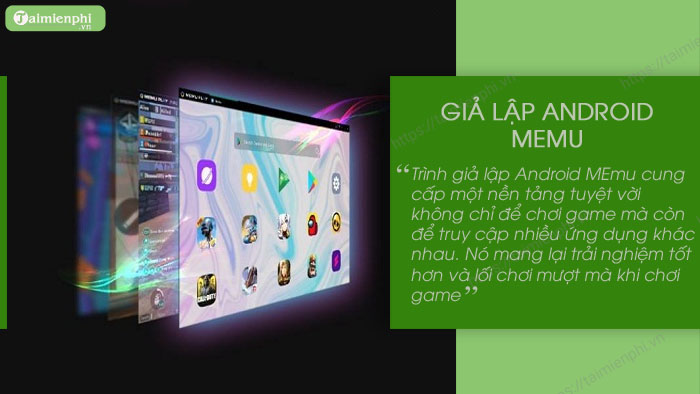
Outstanding features: - Keyboard mapping with Key Mapping feature. - Support running multiple games on the same account or the same game with multiple accounts. - Support playing games with mouse, keyboard and gamepad. - Flexible customization of CPU, RAM, resolution, root mode.
=> Download Memu here.
II - Which Software Is the Best?
Whether you are using an Android emulator to test apps or play games, each of the options in this article will serve your needs well. These Android emulators have their own differences and pros and cons, but they all work well on low-end computers. You can choose any of the software on the list to install mobile apps and games without needing an Android device.
Thus, the article has shared with you the top lightweight Android emulators for low-configuration computers today. Each of the above options includes useful features, meeting the needs of playing games or running Android applications on your weak PC.
Final Thoughts
The most reliable way to handle top 5 best lightweight Android emulators for weak PCs is to follow the process in order, verify each important setting, and test the result before moving on. Use the guidance above as a practical reference, then adjust the details for your device, software version, or specific goal.
FAQ
What should I know first about Top 5 Best Lightweight Android Emulators for Weak PCs?
I - 5 lightest Android emulators for weak PCs 1.
How do I get the best results with Top 5 Best Lightweight Android Emulators for Weak PCs?
Use current software or equipment, follow the steps in order, review the recommended settings, and test one change at a time so you can identify what improves the result.
What should I do if Top 5 Best Lightweight Android Emulators for Weak PCs doesn't work as expected?
Check compatibility, permissions, connectivity, and version-specific settings. Restart the relevant device or app, then repeat the process carefully before trying a more advanced fix.
Related Articles
 Lightweight Android Emulator Software for Weak Configuration12 minutes read
 Great, Lightweight PC Games for Weak Configuration Machines4 minutes read
 Synthesis Lightweight Pc Game That Is Good for Weak Configuration7 minutes read
 The Best Android Emulators for Gaming7 minutes read
 Top Best iOS Emulators Help Run Applications on Windows9 minutes read
 8 Top PlayStation Emulators for PC 2023: Expert Selection Guide10 minutes read
Reader Comments 0
Sign in with email or Google to join the discussion.