Table of Contents
Microsoft recently removed the stripped-down version of the Taskbar clock from Windows 11 after receiving negative feedback from users. That means the clock interface will remain the same unless you use third-party customization software. And Taskbar Clock Customizer — a mod for Windhawk — is a good option.
With Taskbar Clock Customizer, you can customize the Taskbar clock to your liking, from custom date/time formats to displaying other useful information such as CPU usage, RAM, network, weather, news headlines or secondary time zones. In addition, this mod also allows you to change the size, position, font, color of the clock and add more information in the tooltip when hovering.
One important detail is that Taskbar Clock Customizer is compatible with the old-style Taskbar (Windows 10), which is useful if you're using tools like ExplorerPatcher. Aesthetically, the Windows 10/11 interface style will remain the same, and you can still select the clock to open the notification center or calendar as default. If you want, you can also add emojis, custom fonts, or unique color schemes.
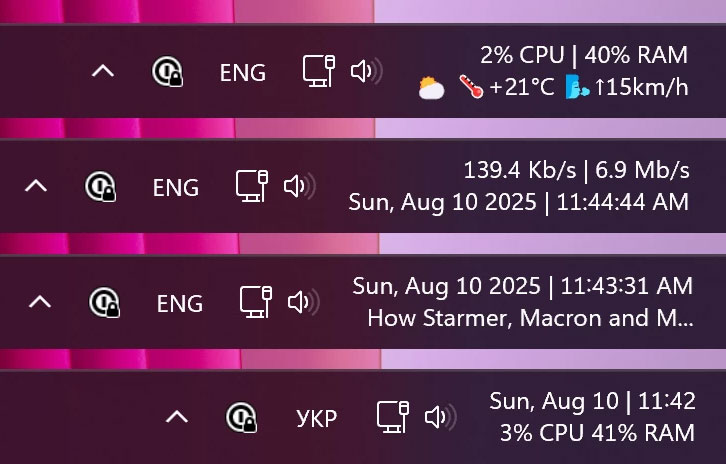
That said, like many other Windhawk mods, Taskbar Clock Customizer's interface isn't very beginner-friendly. You don't need to edit complex configuration files, but you still need to understand the customization syntax. Luckily, all changes are applied instantly with just one click, no need to restart Explorer or the system.
The author suggests an ideal setup: the first line displays the day, month, date, and time; the second line displays CPU and RAM usage. More complex customizations will take some getting used to, but it's not too difficult, especially since the mod includes a link to detailed Microsoft documentation.
You can download Windhawk from the homepage, then go to the Explore tab to find and install Taskbar Clock Customizer . Once installed, just switch to the Settings tab to customize it to your needs.
Hope you have interesting new experiences!
Final Thoughts
Overall, This Windows 11 Mod Lets You Have Tons of Useful Information is best understood by considering the main facts, practical context, and limitations together. Use the details above as a clear starting point and confirm time-sensitive information when necessary.
FAQ
What does this article explain about This Windows 11 Mod Lets You Have Tons of Useful Information?
Microsoft recently removed the stripped-down version of the Taskbar clock from Windows 11 after receiving negative feedback from users. That means the clock interface will remain the same unless you use third-party customization software.
What should you know about the key details?
With Taskbar Clock Customizer, you can customize the Taskbar clock to your liking, from custom date/time formats to displaying other useful information such as CPU usage, RAM, network, weather, news headlines or secondary time zones.
Should time-sensitive details be verified?
Yes. Software features, game codes, product specifications, prices, and research findings can change. Confirm important details with an official or primary source when accuracy affects your decision.
Related Articles
 How to Fix the Windows 10 Taskbar Crashes Error4 minutes read
 How to Customize the Taskbar in Windows: Step-by-Step Guide15 minutes read
 Do You Know What Is the Optimal Location of the Windows8 minutes read
 How to Fix Windows 11 Taskbar Not Working8 minutes read
 Taskbar: Complete Guide3 minutes read
 How to Add Wallpaper to Taskbar on Windows 104 minutes read
Reader Comments 0
Sign in with email or Google to join the discussion.