Table of Contents
Siri AI in iOS 27 adds back-and-forth conversations, a dedicated Siri app, personal-context search, and actions across supported apps. It also extends Visual Intelligence through Siri mode in Camera and questions about content on your screen.
Siri AI is rolling out in beta, so installing iOS 27 alone does not guarantee access. Your iPhone, language, region, and the availability of a particular feature all matter.
Which iPhones can use Siri AI?
Apple lists iPhone 15 Pro, iPhone 15 Pro Max, and Apple Intelligence-enabled iPhone 16 models or later. The regular iPhone 15 and iPhone 15 Plus do not qualify for Apple Intelligence. Newer supported families include iPhone Air and iPhone Duo.
The initial Siri AI beta is available in English. Apple Intelligence's broader language support should not be confused with support for every Siri AI feature. Siri AI is not initially available on iPhone in the European Union, and other regional restrictions can apply. Some server-based features also have daily usage limits.
Check Apple's current Siri AI requirements before troubleshooting a missing option. For background on the underlying features, see what Apple Intelligence does.
How to turn on Siri AI
- Update a supported iPhone to iOS 27 or a later compatible release.
- Open Settings > Siri.
- If Siri is off, turn it on.
- Select Try Siri AI (Beta) if the option is available and follow the setup instructions.
Use a supported Siri and device language. If the beta option is absent, check the requirements rather than assuming the installation failed. Availability can change as Apple expands the rollout.
Conversations and the dedicated Siri app
You can ask a question, then follow up within the same conversation. For example, ask for ideas for a football viewing party, then refine the menu or ask for a draft invitation. Review factual details and the proposed recipients before sending anything.

On supported devices, you can invoke Siri by voice or the side button. On iPhones with Dynamic Island, swiping down from it can start a conversation. For quieter interaction, see using Type to Siri; controls differ between Siri versions.
The dedicated Siri app gathers conversations so you can reopen one or start a new chat. This makes it easier to continue a task than issuing isolated commands each time.
Find personal information and act across apps
Siri AI can use supported content from Photos, Messages, Mail, Calendar, and other apps to help find information. Useful requests include locating a travel confirmation, finding photos from a particular trip, or retrieving a recommendation someone sent you.
It can also draft text, create reminders, and perform supported app actions. Be specific about the item and destination: “Find the booking confirmation in Mail” is more precise than “Find my trip.” Check the returned message or document when the result matters.
Third-party capabilities depend on the developer's integration. Personal-context search and app actions are related but distinct: being able to find an app's content does not mean Siri can perform every operation in that app. Apple's rollout announcement distinguishes available experiences from integrations still coming.
Use Visual Intelligence with Camera and the screen
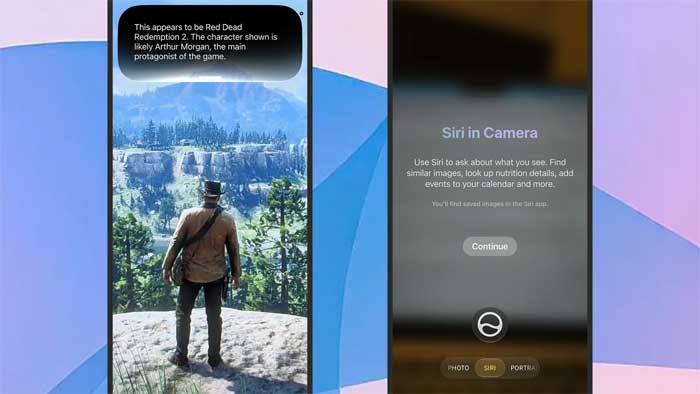
In Camera on a supported setup, select Siri mode, point the camera at the relevant object or document, and ask a question. Siri can also answer questions about supported content already on the screen, such as an image or PDF.
A practical use is identifying an object, extracting information from a document, or working with visible recipe text. Image recognition and generated answers can be wrong, so inspect names, amounts, and extracted text. Specific actions, such as payment-related suggestions, have additional eligibility and regional requirements.
What changes on Mac and other Apple devices?
On compatible iPad and Mac systems, Siri AI is integrated with Spotlight. Context menus can offer a way to ask about selected images, text, or files. Apple Vision Pro adds spatial interaction. These are separate platform experiences, not additional controls that appear on every iPhone.
How Apple Intelligence and Gemini fit together
Siri AI uses Apple's Foundation Models and system integrations. Apple has described working with Google and using Gemini technology to develop the newer Foundation Models; this does not mean Siri is simply the standalone Gemini app. See Apple's developer presentation on the model architecture.
Processing can occur on the device or through Private Cloud Compute, depending on the request. Apple's design combines local capabilities with cloud processing intended to protect personal data. It should not be described as keeping every AI request entirely on the phone. Start with supported tasks, review generated results, and check the controls for any content you choose to share.
Related Articles
 Good Features with Siri on Mac5 minutes read
 The 'Critical' Answers of Siri, the Funny Assistant on iOS9 minutes read
 What's New in Siri on iOS 158 minutes read
 How to Turn Off Siri on iPhone, iPad, Mac, and Apple Watch5 minutes read
 How to Use 'Hey Siri' on an Old Mac5 minutes read
 How to Translate Many Languages on Siri iOS 116 minutes read
Reader Comments 0
Sign in with email or Google to join the discussion.