Table of Contents
This guide covers the market is still waiting for the tablet computer revolution with practical context and easy-to-follow details. Use it to understand the subject and apply the information confidently.
Many believe that until 2010, new tablet devices really became popular . The explanation for this prediction, analysts say, is that tablet PCs have become more advanced, have tap screens, and consumers are also familiar with virtual keyboards. In particular, Apple's participation in this area is also an important stimulus. Tablet is a concept that has appeared for a long time, denoted as a notebook computer with a flat and rotating screen, using an electronic pen or finger tap when entering data, or some tap electronics formats like iPod tap feature e-mail, web browsing and video playback. Market research firm DisplaySearch predicts sales of all touchscreen devices will increase from $ 3. 5 billion this year to more than $ 6 billion by 2012. But if 2010 is the year of the tablet as expected, the number maybe more.
 An Apple Tablet prediction design.
Toshiba, Archos, Fujitsu, and Lenovo have already or will soon release touchscreen tablet models in the next few months. Although these products are unlikely to revolutionize the tablet PC market, manufacturers still show great optimism about their business prospects. Toshiba claims the "tablet for home multimedia" products will be one of the fastest growing products in the consumer electronics market. Meanwhile, Fujisu also expressed confidence that the tablet's time has come because consumers are using more and more tap technology in everyday life through devices such as smartphones, sales counters. Automated goods and ATMs. However, there are concerns that whether the market needs to add another mobile platform for web access and video viewing? The most popular computer product now has netbooks, with a growth rate of 40% in the second quarter of this year compared to the same period last year. That number is nearly double that of the traditional laptop market (22%). Technology commentators often have a sentence: if there are 3 subjects taking part in something, then there is a trend. And at the very least, fans of tablet genres have a trend. Apple is expected to introduce the tablet in early 2010, although the evidence for the project is unclear, while Toshiba and Archos, along with a number of other companies, are very active in developing this product at the end of the year. This year. There are also rumors that Dell and Intel are cooperating to develop a similar device. HP and now with Lenovo, Fujitsu is also taking advantage of tap support on Windows 7 operating system to equip their mobile PC with tap screen features.
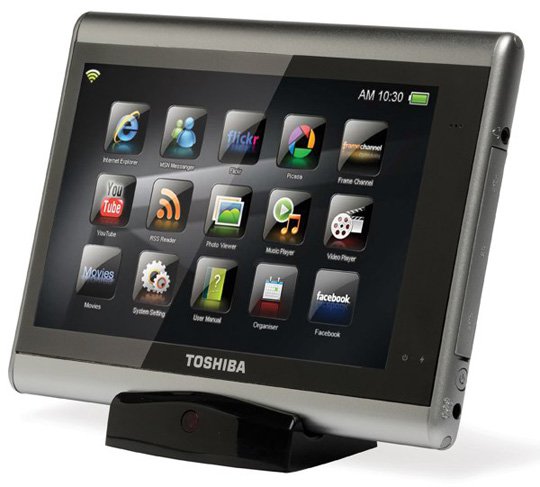 Toshiba JournE tap machine.
In the announced products, Toshiba's tablet is a small device, focusing on audiovisual features, called JournE tap, launched at the recent IFA 2009 (Germany) exhibition. This slim and light device has a 7-inch screen with large tap icons for easy access to audiovisual functions, photos, Internet. JournE tap has Wi-Fi connectivity and can be connected. With TV to view web content on the big screen.
 Archos Tablet PC Photo: Laptopspirit .
Archos, famous for audiovisual equipment, is completing the first tablet product using Windows 7 operating system. Although it is not an official design, the model that the company has just released shows that it is a device. It is quite heavy and the keyboard displayed on the screen is not easy to manipulate. The expected price of the product is US $ 499, which is quite attractive compared to the rumored amount of US $ 800 to US $ 1, 000 of tablet made by Apple.
FAQ
What should I check before following these steps?
Confirm device and software compatibility, save important data, and make sure you have the required permissions, files, and account access.
Why might the process not work?
Common causes include outdated software, missing permissions, incompatible hardware, an unstable connection, or completing a step in the wrong order.
Can I undo the changes if necessary?
That depends on the tool or setting. Use built-in restore options when available, keep a backup, and record the original configuration first.
Related Articles
 Lineage2 Revolution Was Officially Released in Vietnam3 minutes read
 Microsoft Plans to Withdraw from Tablet Market?3 minutes read
 Ultrabook Made the Computer Revolution7 minutes read
 What Is Industry 4.0 Revolution?5 minutes read
 4 Ways to Use Your Android Tablet Even When the Battery Is Completely Dead8 minutes read
 How to Install Lineage 2 Revolution: Vietnam on the Computer6 minutes read
Reader Comments 0
Sign in with email or Google to join the discussion.