Table of Contents
This guide covers hp probook 5310m aluminum alloy case with practical context and easy-to-follow details. Use it to understand the subject and apply the information confidently.
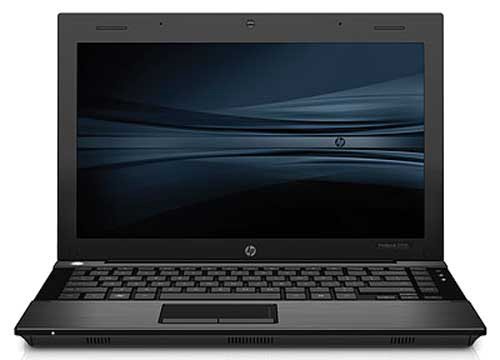 HP Probook 5310m Photo: Notebookcheck .
It uses 13. 3-inch LED screen, resolution of 1366 x 768 pixels, equipped with Intel Core 2 Duo SP9300 2. 26 GHz or Intel Celeron SU2300 1. 2 GHz processor. In addition, with the "chiclet" floating keyboard of the MacBook, Probook 5310m will help users feel more comfortable when used long. Despite using a metal frame, the Probook 5310m retains a slim body, only 23. 6 mm thick and quite light, about 1. 7 kg. In terms of configuration, Probook 5310m has Intel GMA 4500MHD integrated graphics card, 4 GB DDR2 RAM, 320 GB HDD (7, 200 rpm), full Bluetooth connectivity, Wi-Fi b / g / n, DisplayPort output port, integrated 2 Megapixel Webcam. Particularly, the hard drive is protected with 3-way anti-shock technology (using 3-axis accelerometer) to avoid the loss of data by using system software to stop the operation of the reader / write the. The ProBook 5310m is a "green" laptop that conforms to environmental standards when absolutely no use of PVC synthetic plastic is made in machines to avoid long-term effects. According Laptopcheck, the device will soon be sold in the near future with Windows 7 operating system pre-installed with a price of about 699 USD, equivalent to 12. 6 million.
FAQ
What should I check before following these steps?
Confirm device and software compatibility, save important data, and make sure you have the required permissions, files, and account access.
Why might the process not work?
Common causes include outdated software, missing permissions, incompatible hardware, an unstable connection, or completing a step in the wrong order.
Can I undo the changes if necessary?
That depends on the tool or setting. Use built-in restore options when available, keep a backup, and record the original configuration first.
Related Articles
 HP Out Probook Aluminum Shell3 minutes read
 The 2013 HP ProBook Is Lighter and Costs from $$ 4993 minutes read
 20 Advantages of HP ProBook Laptop 4x30s5 minutes read
 HP Probook 450 G1 Beautifully Designed, Powerful Configuration6 minutes read
 Case: 'Armor' for PC3 minutes read
 HP's Year-end Gamble7 minutes read
Reader Comments 0
Sign in with email or Google to join the discussion.