Table of Contents
When Shopee displays an error, start with the full message rather than the code alone. A rejected voucher needs a different response from a failed payment or a restricted account. The examples below come from Shopee's Vietnam interface; wording, available payment methods and promotion rules may differ by country and change over time.
Before retrying a payment: check your order list and payment account. If an order already exists or money has been deducted, resolve that transaction first instead of repeatedly pressing Pay.
U02 and F06: a voucher cannot be applied
In the examples shown here, U02 and F06 accompany messages saying a discount code is invalid. This does not, by itself, establish that your account violated a policy.
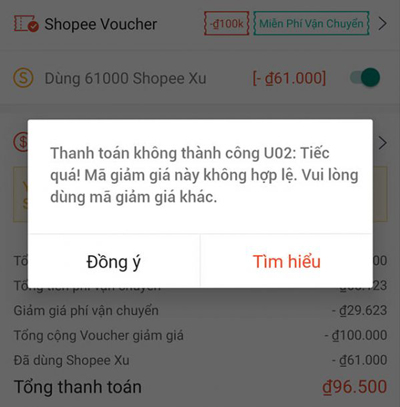
- Open the voucher details and check its validity period, minimum spend and eligible products or shops.
- Check whether the voucher requires a particular payment method or is limited to certain users.
- Confirm that the usage quota has not been exhausted.
- Remove the voucher and review the new total. Use another eligible voucher, or continue without it only if you accept the price.
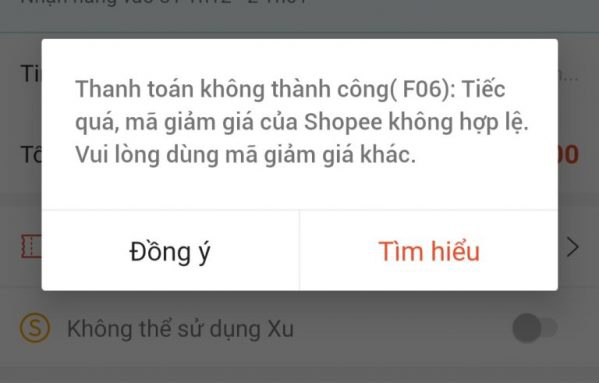
A different voucher will not necessarily solve a payment-method or account restriction. If the message persists without a voucher, investigate that separate cause.
U05 and D07: free-shipping allowance messages
The illustrated U05 and D07 messages say that the account's free-shipping allowance has been used. Check the particular promotion's conditions and your voucher usage before assuming a system fault.
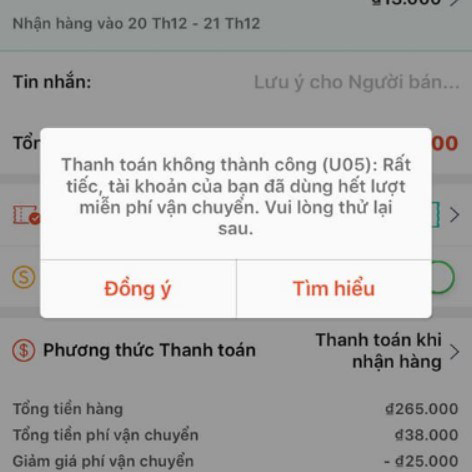
You can look for another shipping offer for which your order qualifies, or review the total with ordinary shipping charges. Do not assume that collecting another voucher overrides an account-level limit.
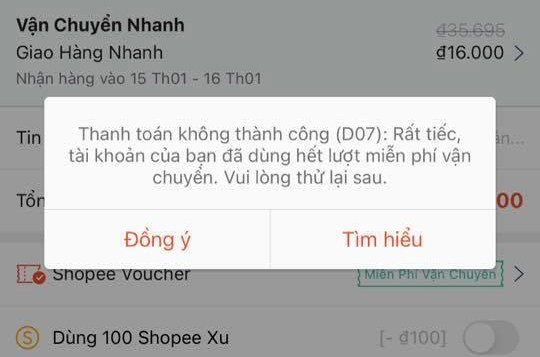
Wait only for the next eligibility period stated in the offer. There is no universal reset date that should be assumed for every campaign. If the usage appears wrong, ask Shopee support to check it.
F01: checkout blocked by an account-activity warning
The F01 example reports unusual account activity during payment. Stop repeated checkout attempts and read any account notification explaining the restriction. The code alone cannot tell you exactly what triggered it.
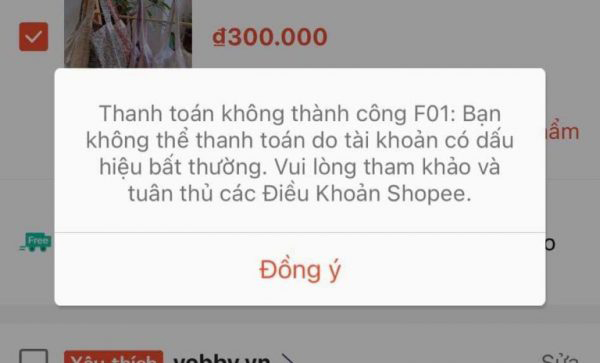
Contact support through Shopee's official app or your country's Help Center. Provide the error message, time, affected order and steps that produced it. Do not create additional accounts or change devices to try to evade the restriction.
F02: login or account access restricted
The F02 screenshot shows a login restriction associated with unusual activity. The original claim that every F02 account is permanently unrecoverable is too broad: follow the actual notice and ask support whether review or appeal is available.
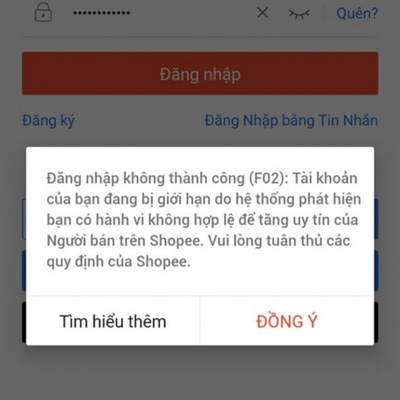
Shopee's account-limitation guidance for Malaysia, for example, describes suspicious activity and promotion abuse as possible causes. Your own market's rules and the decision on your account determine the next steps.
D01: multiple-account or device warning
The D01 example says the device has been used to log in to multiple accounts and asks the user to use a previously created account. Follow the displayed instruction only for an account you own and are authorized to access.
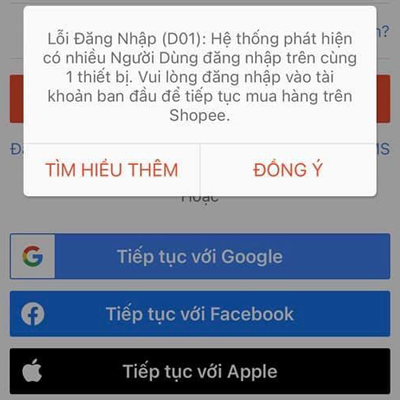
Do not assume that access will return after ten days; use any period stated in your notification. If you cannot access your legitimate account, contact support. If the issue is simply a forgotten password, use the official recovery flow described in how to recover a Shopee password.
Other checkout problems
| Problem | What to check |
|---|---|
| No shipping option | Check the delivery address and the seller's supported service area. Ask the seller whether delivery is available before changing the order. |
| Delivery temporarily restricted | Read the current delivery notice. Try again when service resumes; do not assume an old pandemic-related explanation still applies. |
| Payment method unavailable | Choose only a method offered for this order. Eligibility may depend on the seller, product, location and account. |
| Phone number not verified | Complete verification in the official app. Never share the verification code with a seller or unsolicited caller. |
| Network or system error | Check your connection, close and reopen the app, and look for an official service notice. Verify order and payment status before retrying. |
| Too many product types or variations | Follow the limit displayed at checkout and reduce the basket if needed. Review shipping costs and vouchers again if splitting orders. |
| Out-of-stock item | Remove the unavailable variation or ask the seller about restocking. |
| Seller has not configured shipping | Ask the seller to check the listing's delivery settings. |
| Shipment exceeds a weight limit | Ask whether an eligible shipping service or a smaller order is possible. Keep payment within Shopee. |
| Purchase-quantity limit | Reduce the quantity to the permitted amount; do not use extra accounts to bypass the limit. |
| Insufficient available funds | Check the total and available balance using your payment provider's official app. Check pending transactions before choosing another method. |
| Account locked, restricted or displaying A02 | Read the notice and contact official support for the reason and any review process. |
If you need to check the ordinary checkout sequence, see ordering on Shopee from a phone. Older screenshots may differ from your app.
What to send to support
Keep a screenshot of the complete error, the order reference if one exists, the time of the attempt, and whether funds were deducted. Use the official Shopee Vietnam Help Center or the in-app support channel for your market. Do not send passwords, one-time codes or full payment-card details, and do not pay an unofficial “account recovery” service.
Related Articles
 Shopee Switchboard: Shopee Pbx, Shopee Phone Number4 minutes read
 How to Use Shopee to Register Online Sales7 minutes read
 How to Register a Shopee Account on a Computer6 minutes read
 A Journey with Shopee, Summarizing from Day One4 minutes read
 Purchase Experience on Shopee to Avoid Buying Fake Goods10 minutes read
 How to Retrieve a Shopee Password4 minutes read
Reader Comments 0
Sign in with email or Google to join the discussion.