Table of Contents
Understanding setting up firefox 4 requires saving passwords for paypal, citybank… is easier when the main points are organized clearly. This guide brings together the essential details and practical considerations.
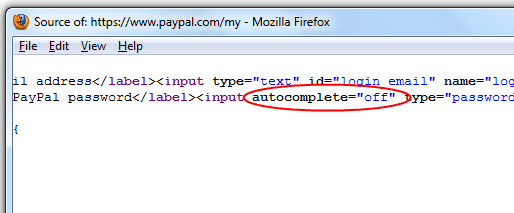
How Setting up Firefox 4 Requires Saving Passwords for Paypal, Citybank… Works
For some reason, if you do not want to use the bookmarklet or this feature does not work, while Firefox always needs to skip this Autocomplete = 'off' Code, follow these steps to apply in Firefox 4. First, please refer to this article to learn how to work with omni. jar file of this browser.
Once you've got the basics, open the components folder and then edit the nsLoginManager. js file in Notepad ++, press CTRL + F and find the _isAutoCompleteDisabled Parameter .
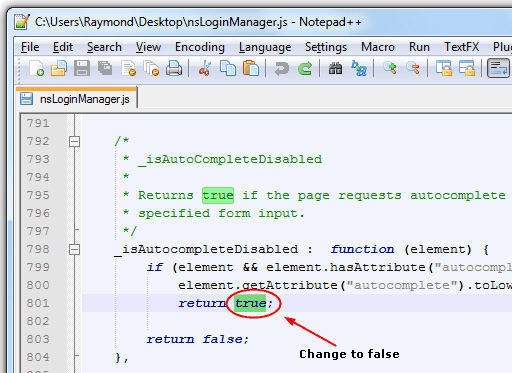
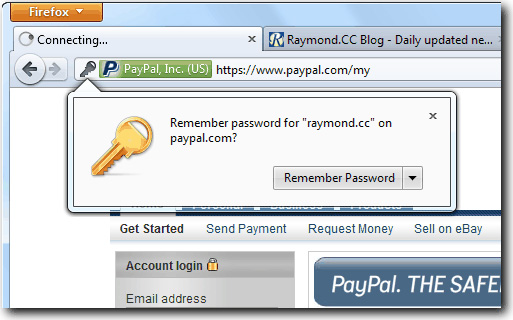
Here, you just need to change the True Value to False , keeping the mark intact ; Behind. And our results when accessing Paypal will be as shown below:
Besides, if you are using LastPass to manage the entire password, you do not have to worry about these actions, because this application does not "touch" anything AutoComplete = off . Good luck!
FAQ
What is the main benefit of setting up firefox 4 requires saving passwords for paypal, citybank…?
The main benefit is a clearer understanding of the topic and a practical way to apply the information covered in this guide.
What should I check before using setting up firefox 4 requires saving passwords for paypal, citybank…?
Confirm compatibility, review the required settings, protect important data, and use the latest supported version whenever possible.
What should I do if the result is different?
Repeat the steps carefully, verify permissions and version differences, and consult the product's official support documentation for changes not shown in the article.
Related Articles
 Instructions to Turn Off the Proposal to Save Passwords on the Web7 minutes read
 What Is PayPal? PayPal Benefits for You14 minutes read
 Utilities Paypal Payment Gateway for You11 minutes read
 How to Export and Delete Saved Passwords in Firefox4 minutes read
 The Last 9 Years Firefox Has Not Protected User Passwords Carefully3 minutes read
 Retrieve Saved Passwords in Firefox and Chrome3 minutes read
Reader Comments 0
Sign in with email or Google to join the discussion.