Table of Contents
Explore russian fake IP way to receive gifts in PUBG Mobile, including the core mechanics, useful strategies, and common mistakes to avoid.
Recently, the PUBG Mobile Vietnam gaming community is transmitting a way to circumvent the law to receive free gifts in PUBG Mobile. Specifically, the player will use fake IP applications on the phone being used to the area where the event is received.
And when fake ip comes to the address of the country that is holding such a gift event, players will receive a lot of valuable and free gifts in the game PUBG Mobile. It will be in PUBG Mobile's mailbox or event directory
Many gamers using this trick have fake ip Taiwan to receive gifts from PUBG Mobile and now they turn to the second country, Russia. Here are instructions to fake IP Russia to receive free gifts from PUBG Mobile.
- How to find and use Easter Eggs in PUBG Mobile
- How to earn meeting points and buy items in PUBG Mobile
- Some tips you need to know in Darkest Night PUBG Mobile mode
Video Tutorial Fake Ip Russia to Receive Gifts in PUBG Mobile
Instructions to Fake Ip Russia to Receive Gifts in PUBG Mobile
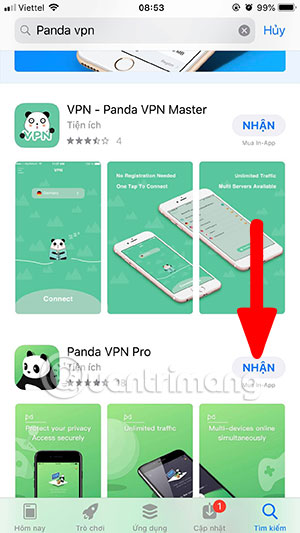
First to fake IP to Russia to receive gifts, please use Panda VPN Pro application. Next login your account by clicking Sign UP > Next will have a row of Digital Top Account number. At the bottom, please write your password and email and click Next , then when you are logged in to the application, select the IP display item.
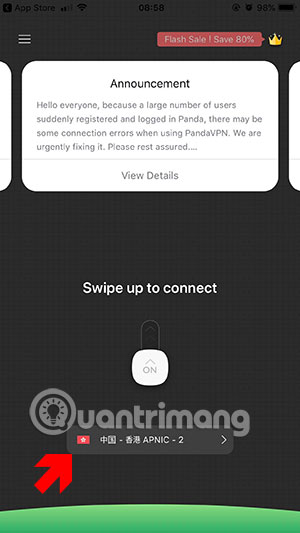
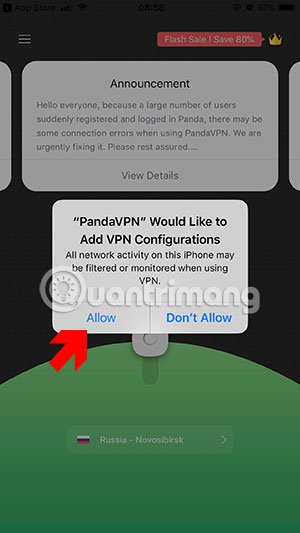
Then the server list will display, you scroll down and select Russia server to fake ip Russia. There will be three options for Russian IP fake, then click Allow to accept Panda VPN to enable VPN on your computer.

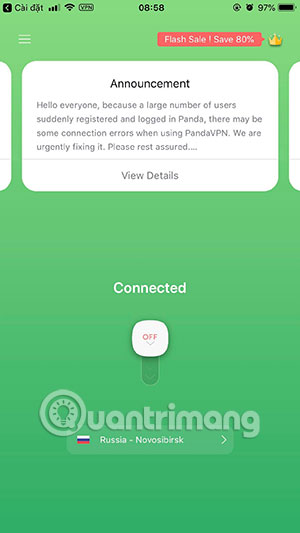
Next to the main screen if you see Connected it is already successful. Now open PUBG Mobile. Note that don't open PUBG Mobile before using Panda VPN.
Then start PUBG Mobile. Different from fake ip Taiwan, players will go to Events to receive prizes.
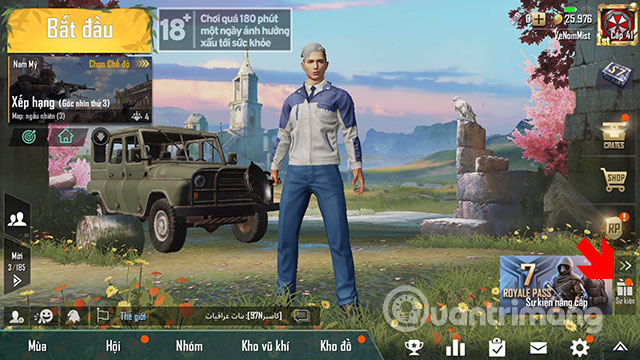
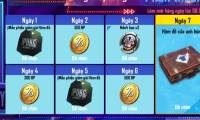
In the daily event table, select Log in 7 days to receive the reward. In 7 days you will receive the rewards that the event has for gamers. Note that if you later turn off Fake Russian IP, the 7-day Login section will not appear .
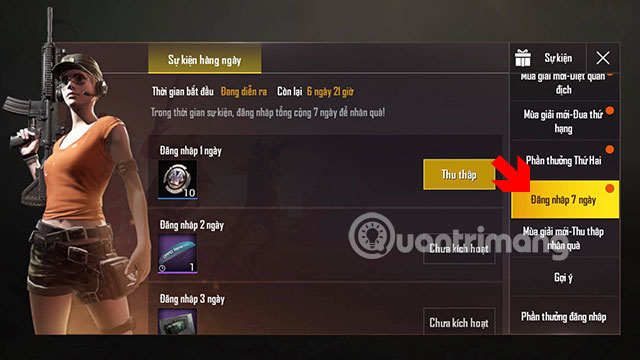
So with fake ip to Russia to receive free gift PUBG Mobile. With these gifts, though not much help for gamers. But the fake ip Russian to receive free bonuses in PUBG Mobile is always attractive to new players who play or don't charge a lot of money in PUBG Mobile.
Update note: Game mechanics, item values, menus, and availability can change. Check the current game version or official support information if your experience differs.
FAQ
What does this guide explain about russian Fake IP Way to Receive Gifts in PUBG Mobile?
Explore russian fake IP way to receive gifts in PUBG Mobile, including the core mechanics, useful strategies, and common mistakes to avoid.
What is the best way to apply these tips?
Work through the sections in order, especially video tutorial fake ip Russia to receive gifts in PUBG Mobile and instructions to fake ip Russia to receive gifts in PUBG Mobile. Practice one change at a time so you can see what improves your results.
Can game features or requirements change?
Yes. Updates can change menus, mechanics, item values, compatibility, and availability. Check the current in-game information or the developer's official support pages when details differ.
Related Articles
 Fake IP American: Fake IP Us Way to Get Free Gift Pubg Mobile5 minutes read
 Fake IP Israel Way to Receive Gifts Pubg Mobile4 minutes read
 PUBG Mobile: How to Get Free Items with S4D Halloween Events6 minutes read
 Fake IP Taiwan Way to Receive Free Items PUBG Mobile4 minutes read
 Comparison Between PUBG Mobile VNG and PUBG Mobile International6 minutes read
 How to Receive Daily Rewards in PUBG Mobile3 minutes read
Reader Comments 0
Sign in with email or Google to join the discussion.