Table of Contents
This guide provides a clear, practical overview of "Phone Link Now Allows Remote Control of Windows 11 Computers". It organizes the most useful details, explains important considerations, and highlights the steps or choices that matter most.
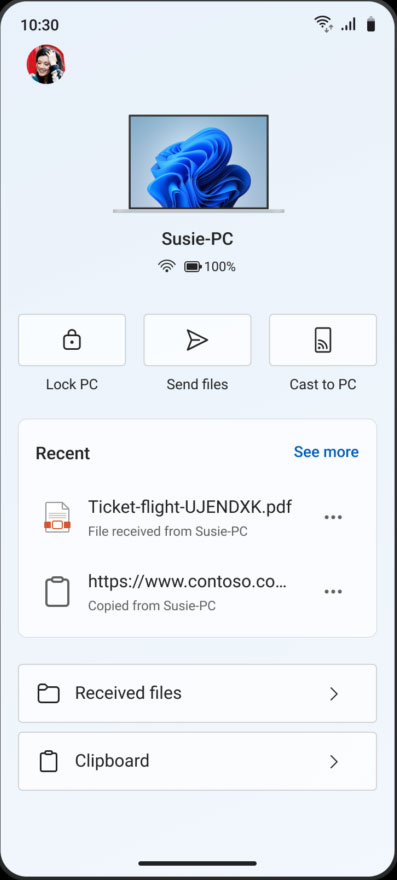
The Phone Link app has just been updated with a new look, now acting as a 'hub for your connected PC experience' – a single area for you to access everything PC-related right on your phone screen. In addition to the refreshed user interface, the Phone Link app also has the following improvements:
- Recent Activity: Quick access to recently received files and clipboard history.
- PC Status: You can check your computer's battery level and Wi-Fi status.
- Remote Actions: Phone Link now includes remote controls for your PC. You can lock your PC, send files to your PC, or mirror your phone screen to your PC. Additionally, Microsoft has improved the initial setup experience, now allowing users to connect directly from their Android phone without needing a PC:
We're updating the initial setup experience to let you set up Link to Windows directly from your Android device – no PC required to get started. This lets you discover the value of connected experiences right away, with contextual permission prompts and a simplified setup process with clear instructions on what to do next when you return to your computer. These features are designed to give you more control and flexibility, especially when you're away from your desk.
The updated Phone Link app is rolling out gradually to Windows Insiders. To try it out, head to the Google Play Store, join the Link to Windows beta program, and make sure the app is running version 1.25071.155 or higher. On your PC, update the Phone Link app to version 1.25062.83.0 or higher. Then, pair your phone with your PC and make sure you're both signed in with the same Microsoft account.
FAQ
What does this guide cover?
This guide explains phone link now allows remote control of Windows 11 computers, including the main steps, important details, and practical considerations.
Who is this guide for?
It is designed for readers who want a clear, practical overview and a reliable process they can follow without unnecessary complexity.
What should you check before getting started?
Review the requirements, confirm that your software or device is up to date, and save any important data before changing settings.
Related Articles
 How to Use ASUS Remote Link to Control Remote Windows Computers4 minutes read
 How to Control and Access Computers by Phone with Microsoft Remote9 minutes read
 Where to Buy TV Control, How to Buy It Well?8 minutes read
 TV Control Applications on the Phone6 minutes read
 8 Best Ways to Control Kodia Remotely11 minutes read
 How to Use Ultraviewer to Control Remote Computers4 minutes read
Reader Comments 0
Sign in with email or Google to join the discussion.