Table of Contents
Comet is a web browser from Perplexity that places an AI assistant inside the browsing experience. In addition to answering questions about a page, the assistant can work across tabs and, when the user grants access, help with multi-step web tasks and connected services.
This approach can reduce repetitive navigation during research and planning. It also gives the assistant access to more browsing context than a separate chatbot may receive, so permissions, privacy, and confirmation of important actions deserve close attention.
What is the Perplexity Comet browser?
Comet combines familiar browser functions with Perplexity's search and conversational tools. Its built-in Comet Assistant is designed to interpret the page or tabs you are viewing, summarize information, compare sources, and help carry out supported actions.
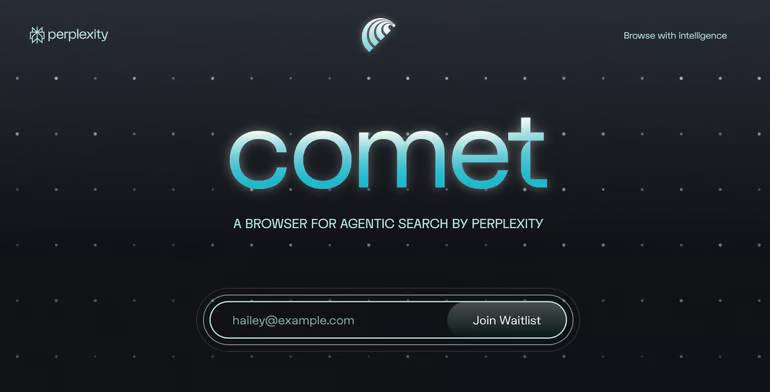
The term “agentic browsing” describes the shift from asking for information to asking software to take a sequence of steps. For example, an assistant might collect options across several pages and organize them into a comparison. What it can complete depends on the current Comet version, the website, account permissions, and whether a task requires user confirmation.
Key Comet features
Ask questions about the current page
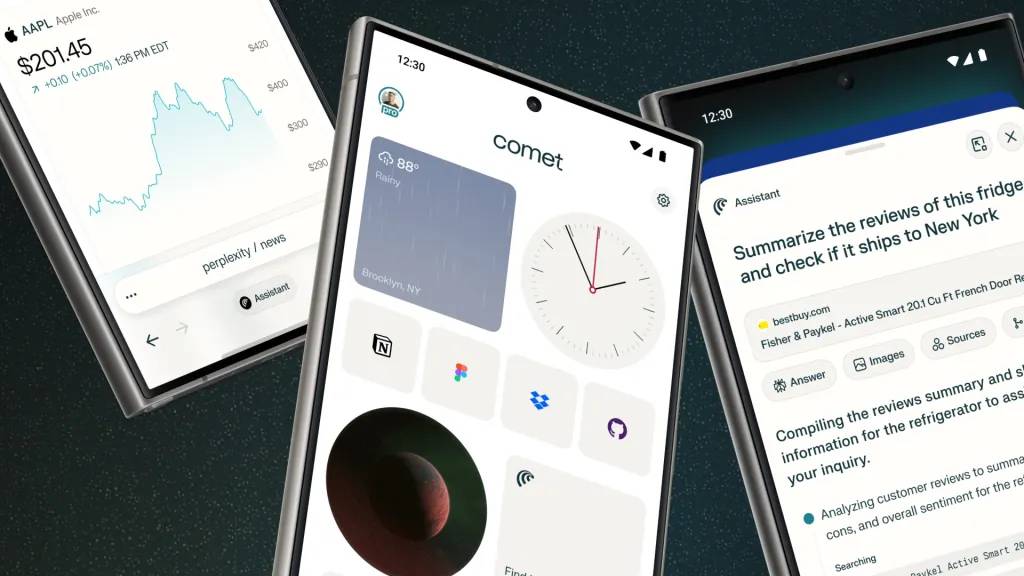
The assistant can use visible browsing context to explain a page, extract key details, or answer a focused question. This is useful for long articles, technical documentation, and product comparisons, but important claims should still be checked against the original source.
Work across multiple tabs
Comet can help connect information that is spread across open tabs. A user researching a trip, purchase, or project can request a summary or table instead of manually copying each item. Review the result for omitted conditions, different dates, currencies, or product variants before making a decision.
Assist with multi-step browsing
Supported automation may open pages, locate information, and interact with controls. The assistant should not be treated as an unrestricted substitute for the user. Purchases, bookings, messages, account changes, downloads, and deletion deserve an explicit review immediately before they occur.
Voice interaction
If voice controls are available in the installed release, users can ask questions or request supported browsing actions without typing. Microphone access is a separate permission; enable it only when needed and review the browser and operating system's permission settings afterward.
Connected email and calendar services
Comet may offer integrations that let the assistant search mail or work with calendar information. These permissions can expose private messages, contacts, schedules, and the ability to create or change data. Read the exact access request instead of assuming that “connect” means read-only access.
What Comet is useful for
- Summarizing a long page while keeping the source available for verification
- Comparing information from a small set of open tabs
- Extracting dates, requirements, or product details into a structured list
- Planning a task and identifying the pages that require manual action
- Explaining unfamiliar terms without leaving the current page
- Drafting a response or itinerary that the user reviews before sending or booking
Tasks with clear inputs and a reversible output are better starting points than actions involving money, sensitive accounts, legal commitments, or publication.
Privacy and security considerations
Browsing context can be sensitive
Open tabs, page content, searches, downloads, email, and calendars can reveal personal or business information. Check what context a feature sends for processing, how activity is retained, and which controls are available for the specific account and plan.
Web pages can contain hostile instructions
An AI assistant may encounter text designed to manipulate automated agents—for example, hidden or misleading instructions that ask it to reveal data or perform an unrelated action. This is one reason to limit permissions and inspect any consequential step rather than assuming the assistant will distinguish every malicious instruction from legitimate page content.
Summaries can be wrong or incomplete
The assistant may confuse similar products, miss a footnote, use an outdated page, or merge details from different tabs. Open the cited page and confirm price, date, cancellation terms, eligibility, and other decision-critical facts directly.
Account connections expand the impact of mistakes
A browser that can read and write connected services can do more useful work, but an incorrect action can also have greater consequences. Prefer the narrowest available permission, disconnect services you no longer use, and keep account-level security such as multifactor authentication enabled.
How to evaluate Comet safely
- Install it only from a verified official source listed by Perplexity.
- Begin without connecting email, calendar, or other sensitive accounts.
- Try read-only tasks on nonconfidential pages and compare answers with the sources.
- Review browser privacy, history, download, microphone, extension, and site permissions.
- Connect one service only if a specific benefit justifies the requested access.
- Require manual review for messages, bookings, purchases, downloads, and account changes.
- Recheck permissions after updates or when a feature's behavior changes.
Is Comet a replacement for your current browser?
Comet may appeal to users who want AI-assisted research and are comfortable reviewing automated work. A conventional browser may remain preferable for people who need mature enterprise controls, minimal AI processing, or compatibility with an established extension and management environment.
Because browser features, supported platforms, subscriptions, and integrations change, evaluate the current release rather than relying on an old feature or price list. Comet's main value is the proximity of the assistant to the work; that same proximity is why it should begin with limited access and deliberate user oversight.
Related Articles
 Why Is Perplexity Comet a Worthy AI Browser Replacement for Safari?6 minutes read
 6 Must-Know Keyboard Shortcuts When Using Perplexity's Comet Browser7 minutes read
 Why Are People Returning to Brave After Trying Perplexity's AI Browser8 minutes read
 Perplexity's New Comet Browser Will Completely Change the Way You Use7 minutes read
 TOP 5 Best AI Web Browsers13 minutes read
 Top Americ AI Browsers Worth Trying In 20269 minutes read
Reader Comments 0
Sign in with email or Google to join the discussion.