Table of Contents
Pixel Blade codes are redeemed inside the Roblox experience, not on a third-party “reward generator.” Check the developer’s current announcements before relying on an old list: codes can expire or change between updates.
Code advertised by the official game page
The Pixel Blade listing by Frost Blade Games displayed FBG when checked on November 12, 2026. That is evidence of a developer-advertised code, not a guarantee that it will remain redeemable or grant a particular reward indefinitely.
Earlier codes from this guide
The table preserves the earlier code strings for reference. Except for the official-page observation above, their current status and rewards have not been verified. “Unverified” does not mean confirmed expired.
| Code | Current verification |
|---|---|
200K | Not verified |
175K | Not verified |
Rings | Not verified |
30M | Not verified |
150K | Not verified |
Update | Not verified |
Nightmare2 | Not verified |
Potions | Not verified |
SorryForDelay | Not verified |
Ancient | Not verified |
Nightmare | Not verified |
XP | Not verified |
Alpha | Not verified |
UpdateLog | Not verified |
EarlyAccess | Not verified |
FBG | Advertised on official page at the check date |
Theo | Not verified |
How to redeem a code
- Launch the correct Pixel Blade experience and complete any access requirements shown by the game.
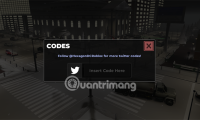
- Find the Bank code-redemption area shown in the screenshots. Interface and location details may change.
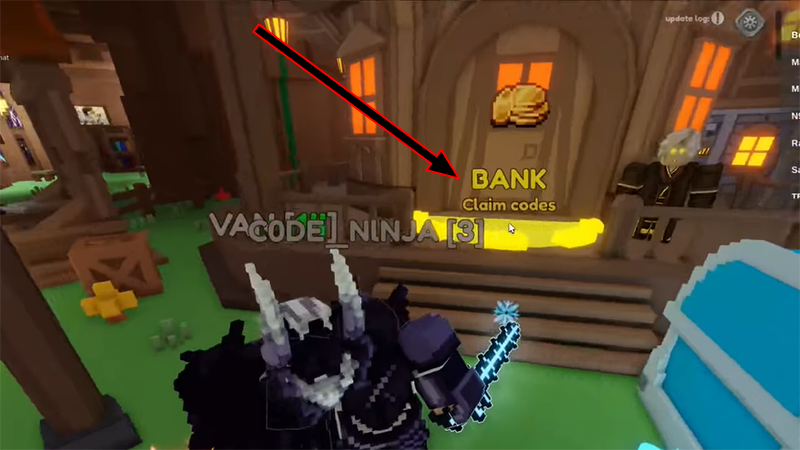
Use the interaction prompt—shown as E on the pictured desktop interface—to open the code box. Enter the code exactly, without extra spaces, and select Claim.
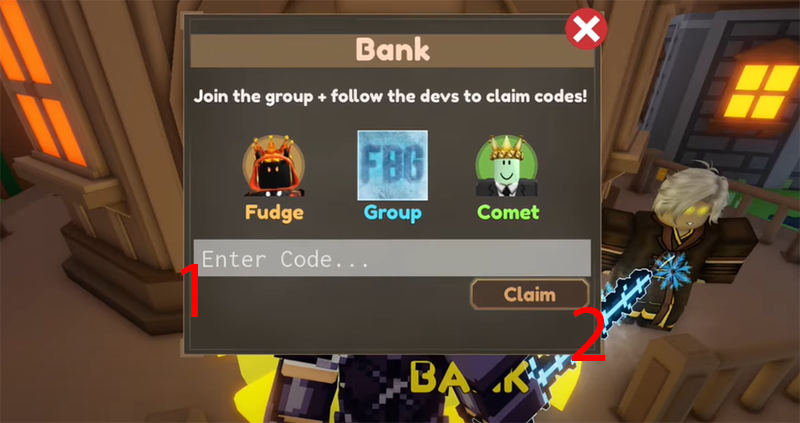
Read the game’s response and check your inventory or currency. Mobile and controller inputs may differ from the keyboard prompt.
If redemption fails
Check spelling and whether you already redeemed the code. An expired message, an unmet requirement, and a connection failure are different problems. Follow the requirement displayed in the game rather than assuming every failure is a network error.
Creator-support codes may use a separate system. Do not assume that entering one requires a purchase or grants a fixed reward unless the game explicitly says so.
Where to find updates safely
Start from the official Roblox game page and follow its developer or community links. Do not share passwords, verification codes, or account cookies to claim a reward. Check announcements again after an update instead of treating a copied code list as permanently current.

Reader Comments 0
Sign in with email or Google to join the discussion.