Table of Contents
The following guide provides a clear overview of Facebook, with the most relevant background, details, and practical takeaways.
Facebook Overview
This new feature takes advantage of smartphone positioning technology to identify which Facebook friends are near you. You will be sent a notification by Facebook when a friend is near you, otherwise, the other party will receive the same notification. It is convenient when you go to a cafe or restaurant and want to invite friends to join. Facebook allows users to enable / disable this feature on demand, which means that your location information will not be shared until the new feature is activated.
However, users note that once enabled, this feature will not turn off automatically but you will have to turn it off manually.
Before using this feature, you need to turn on navigation for iPhone
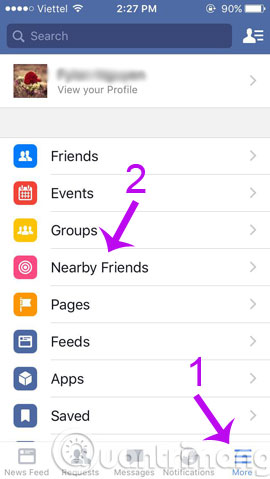
From the Facebook interface on the phone, click on More (3 dashes icon) at the bottom of the screen and select Nearby Friend

- How to call Facebook videos on mobile, tablet
- Guide to upload HD videos to Facebook with iPhone
- Instructions to turn off the creation of the Facebook security code on the phone
Having fun!
FAQ
What is the main topic of New Feature Finds Facebook Friends Around Here?
The following guide provides a clear overview of Facebook, with the most relevant background, details, and practical takeaways.
Why is Facebook important?
Facebook Overview This new feature takes advantage of smartphone positioning technology to identify which Facebook friends are near you.
What should readers remember about Facebook?
You will be sent a notification by Facebook when a friend is near you, otherwise, the other party will receive the same notification.
Related Articles
 How to Turn Off the Feature That Suggests Making Friends Via5 minutes read
 Connect with Friends on Facebook22 minutes read
 Instructions on How to Remove Less Interactive Friends on Facebook4 minutes read
 Tonight (March 26), Facebook's 'Dating' Feature Will Be Available in Vietnam, Are You Ready to Try4 minutes read
 How to Suggest Friends on Facebook: Practical Guide11 minutes read
 Tips That Make It Hard for Others to Find You on Facebook2 minutes read
Reader Comments 0
Sign in with email or Google to join the discussion.