Table of Contents
This guide covers netbook configured to play acer full hd video with practical context and easy-to-follow details. Use it to understand the subject and apply the information confidently.
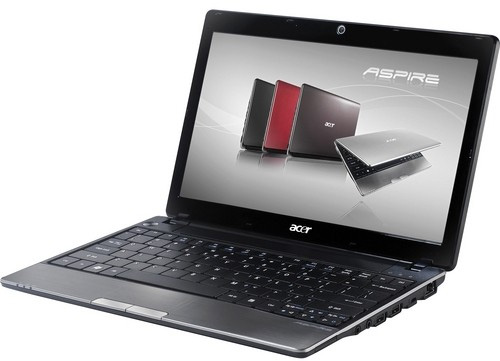 Aspire 1551 Photo: Engadget .
Aspire 1551 is the latest netbook introduced by Acer with a slim look, weighing only approximately 1. 36kg. Equipped with 11. 6-inch LED backlight display with a strong configuration including 1. 5GHz AMD Turion II Neo K625 processor, up to 4GB of DDR3 RAM, and a 320GB hard drive. Like the other two brothers, Aspire 521 and 721, Aspire 1551 also owns a powerful ATI Mobility Radeon HD 4225 graphics chip with the ability to play Full HD 1080p videos and support memory expansion.
Aspire 1551 is also equipped with connectivity like standard Wi-Fi, HDMI port, 6-cell battery for about 5 hours of battery life.
The machine has started to be sold for $ 550 in the US.
FAQ
What should I check before following these steps?
Confirm device and software compatibility, save important data, and make sure you have the required permissions, files, and account access.
Why might the process not work?
Common causes include outdated software, missing permissions, incompatible hardware, an unstable connection, or completing a step in the wrong order.
Can I undo the changes if necessary?
That depends on the tool or setting. Use built-in restore options when available, keep a backup, and record the original configuration first.
Related Articles
 Netbook Duo Watch Acer Full HD Video3 minutes read
 AMD-based Netbooks Play Full HD Videos3 minutes read
 Watching HD Videos on Netbooks Will Be Easy3 minutes read
 Acer: 'Netbook Is Not Dead Yet'4 minutes read
 Acer Added Two 'Sleek' Netbooks to Vietnam4 minutes read
 Acer Unveiled a New Netbook3 minutes read
Reader Comments 0
Sign in with email or Google to join the discussion.