Table of Contents
This article presents Multiple Choice Questions on Windows XP in a clear, structured format. It helps readers review key concepts, test their understanding, and learn from the material.
Understanding Multiple Choice Questions on Windows XP
- Question 1. Which shortcut keys are used to close the window?
- F1
- Alt + F4
- Tab + F9
- F7
- Question 2. In a program, such as WordPad, which shortcut is used to save the file?
- Alt + S
- Ctrl + S
- Shift + S
- Tab + S
- Question 3. In a program, such as WordPad, which shortcut is used to open the file?
- Alt + O
- Ctrl + O
- Shift + O
- Tab + O
- Question 4. What key do you hold when you want to select multiple consecutive objects?
- Ctrl
- Shift
-
- Tab
- Alt
- Question 5. What key do you hold when you want to select multiple objects that are not adjacent?
-
Ctrl
-
- Shift
-
- Tab
- Alt
-
- Question 6. Right-select an object usually displays a drop-down menu. Right or wrong?
- It's correct
- False
- Question 7. The Shutdown command is similar to the Restart command. Right or wrong?
- It's correct
- False
- Question 8. You can arrange icons on the desktop by day. Right or wrong?
- It's correct
- False
- Question 9. You can arrange icons on the desktop according to size. Right or wrong?
- It's correct
- False
- Question 10. You can arrange icons on the desktop according to network location. Right or wrong?
- It's correct
- False
- Question 11. What is the name of this program?
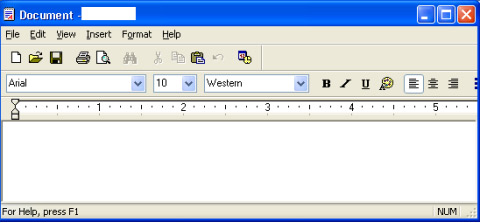
- Paint
- WordPad
-
- Calculator
-
- Notepad
- Question 12. What is the extension of WordPad files?
-
DOT
- DOC
-
BAK
- TMP
-
- Question 13. To create a new folder, right-select an existing folder and select the New Folder command from the drop-down menu that appears. Right or wrong?
- It's correct
- False
- Question 14. What is a shortcut to copy an item to ClipBoard?
- Ctrl + C
-
- Ctrl + V
- Ctrl + X
-
- Ctrl + Z
- Question 15. What is the shortcut key for cutting an item into ClipBoard?
-
- Ctrl + C
-
- Ctrl + X
-
- Ctrl + V
-
- Ctrl + Z
-
FAQ
What is the main point of Multiple Choice Questions on Windows XP?
Which shortcut keys are used to close the window? F1 Alt + F4 Tab + F9 F7 Question 2.
Why is Multiple Choice Questions on Windows XP important?
Multiple Choice Questions on Windows XP matters because it can affect how readers understand, choose, use, or respond to the subject discussed in the article.
What should readers verify about Multiple Choice Questions on Windows XP?
Check the date, product or software version, compatibility, and any current guidance before acting, especially when technology, security, health, or pricing is involved.
Related Articles
 Guide to Creating Multiple Choice Questions on Vnedu4 minutes read
 How to Create Multiple-choice Questions in ScratchJR (Part 1)4 minutes read
 A Set of JavaScript Multiple-choice Questions Has P4 Answers2 minutes read
 How to Create Multiple Choice Questions on Vnedu6 minutes read
 What Do You Understand About Windows P3 Operating System?3 minutes read
 Multiple Choice Questions About JavaScript Language4 minutes read
Reader Comments 0
Sign in with email or Google to join the discussion.