Table of Contents
This guide covers msi x-slim - super power saving with practical context and easy-to-follow details. Use it to understand the subject and apply the information confidently.
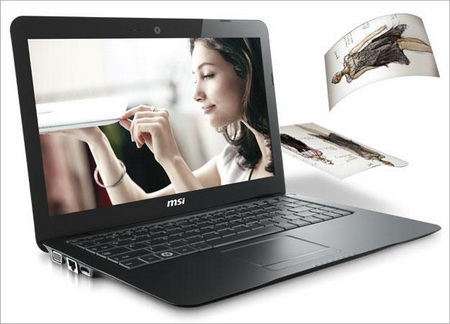 X-Slim, MSI's ultra-slim line Photo: Teamnirvana .
MSI X-Slim X410 and X610 use the new Congo Athlon AMD CPU with 15 Watt power consumption, saving up to 60% of power compared to traditional CPU models still equipped for laptops. In addition, MSI also comes with an intelligent ECO software package to help improve power saving capabilities with 5 modes of running the machine including: playing games, watching movies, presenting, writing documents, and processing Turbo level. All these enhancements focus on extending battery life for the device. MSI X-Slim X610 with 15. 6-inch screen is about 25 mm (1 inch) thick and weighs only 2 kg with 6-cell battery. Basic configuration of the machine includes: AMD Athlon Neo CPU (Congo platform), 4 GB RAM (DDR2 800 MHz), ATI Radeon HD4330 graphics card 512 MB, HDD option 250 GB / 500 GB / 640 GB. The device runs Windows Vista Home Premium, uses 15. 6-inch screen (1, 366 x 768 pixels), has 3 USB ports, HDMI output, integrated 2nd generation Dolby system and 1. 3 Megapixel Webcam, fully equipped with Wi-Fi connection. There is also the option of Blu-ray drive. However, MSI has not given a specific time and price for these new X-Slim models.
FAQ
What should I check before following these steps?
Confirm device and software compatibility, save important data, and make sure you have the required permissions, files, and account access.
Why might the process not work?
Common causes include outdated software, missing permissions, incompatible hardware, an unstable connection, or completing a step in the wrong order.
Can I undo the changes if necessary?
That depends on the tool or setting. Use built-in restore options when available, keep a backup, and record the original configuration first.
Related Articles
 MSI X-Slim X600 Saves Power3 minutes read
 Dell Latitude E4300 Super Power Saving6 minutes read
 Tips to Help Your Computer Use Electricity More Efficiently10 minutes read
 How to Use Power Saving Mode on Telegram3 minutes read
 MSI X-Slim X430 Laptop: the Hidden Bar Contains Power4 minutes read
 MSI 12 Inch Laptop3 minutes read
Reader Comments 0
Sign in with email or Google to join the discussion.