Table of Contents
This guide covers msi continues to upgrade cx, cr with arrandale with practical context and easy-to-follow details. Use it to understand the subject and apply the information confidently.
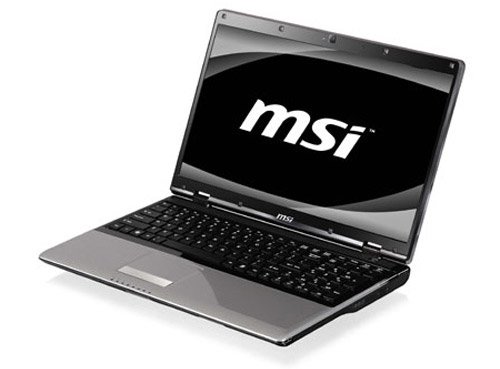
 MSI CX620 Model Photo: MSI .
After bringing the Arrandale platform (including 32nm CPU combined with 45nm graphics GPUs to handle 3D, WiMax, MID. Jobs) into new computers like CR720, CX420 and CR420, MSI continue to bring the platform's processors into two classic design lines: CX620 and CR620. The CX620 and CR620 will all have Intel's Core i-series processors, 4GB DDR3 memory, and hard drives up to 500GB. While the CX620 will be equipped with a powerful 1GB ATI Radeon HD5470 graphics card, the CR620 is a shortened version with an integrated Intel GMA HD graphics chip. Both new MSI machines have a 15. 6-inch LED backlight screen (resolution of 1366 x 768 pixels). There is no information about the attached optical drive yet. Model CX620 and CR620 will own chiclet keyboard, 1. 3 Megapixel camera, stereo speakers, HDMI port, LAN, 3 USB 2. 0 ports, memory card reader, Bluetooth and Wi-Fi standard. Both machines will weigh about 2. 5 kg with the 6-cell battery included and pre-installed with Windows 7 operating system. Information about the price and time to market has not been disclosed by the manufacturer.
FAQ
What should I check before following these steps?
Confirm device and software compatibility, save important data, and make sure you have the required permissions, files, and account access.
Why might the process not work?
Common causes include outdated software, missing permissions, incompatible hardware, an unstable connection, or completing a step in the wrong order.
Can I undo the changes if necessary?
That depends on the tool or setting. Use built-in restore options when available, keep a backup, and record the original configuration first.
Related Articles
 MSI Introduces Arrandale-based Laptop3 minutes read
 Asus X77 Core i5 Shipped Early Next Year3 minutes read
 Upgrade Mac RAM: How to Upgrade RAM on a Mac9 minutes read
 A Few Notes When Upgrading for Computers6 minutes read
 Cannot Activate iPad After iOS 9.3 Upgrade. This Is How to Fix It4 minutes read
 Instructions for Upgrading Windows 7 to Windows 8 and Windows 8.19 minutes read
Reader Comments 0
Sign in with email or Google to join the discussion.