Table of Contents
This updated guide examines Microsoft Warned About Malicious Spam Campaigns Using and organizes the essential facts, background, and practical takeaways in clear American English.
Responsible-use note: Apply security techniques only to systems you own or are explicitly authorized to test.
In a series of tweets posted from Microsoft Security Intelligence accounts on Twitter, Microsoft has repeatedly issued warnings that it has discovered a malicious campaign containing RTF attachments that abuse the CVE-2017 vulnerability. -11882 in Microsoft Office and Wordpad.
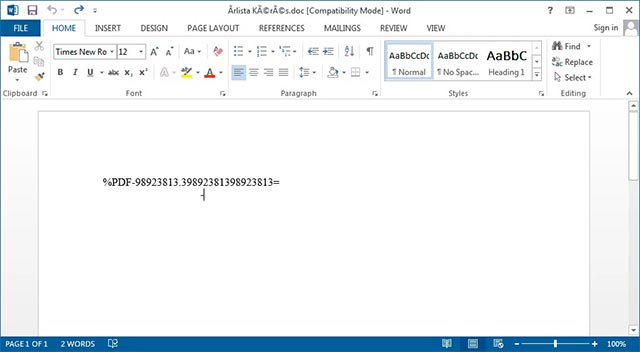
Example attached to the CVE-2017-11882 exploit
- Hacker revealed the second Zero-Day, broke Windows' EoP vulnerability patch
When successfully exploited, this vulnerability can automatically infect users by simply opening a malicious attachment.

Microsoft Security Intelligence Alerts on Twitter
- GoldBrute botnet campaign is trying to hack 1.5 million RDP servers worldwide
The CVE-2017-11882 vulnerability allows RTF and Word documents to be created to automatically execute certain commands after opening. This vulnerability has been successfully patched in 2017, but in fact, Microsoft continues to record small exploits used in attacks, especially showing signs of increasing. both in quantity and scope of impact in the past few weeks. Originally written by Microsoft as follows:
"Notably, Microsoft's security team has recorded a rapid increase in the number of malicious activities related to the CVE-2017-11882 vulnerability in the past few weeks. We really recommend you. Should apply the latest security updates to ensure the safety of your system ".
According to Microsoft experts, when the attachment is opened, it will "execute a large number of scripts of different types (VBScript, PowerShell, PHP, and others) to download the payload to the system. victim '.
Researchers conducted one of the sample documents, when opening the document, it immediately began executing a script downloaded from Pastebin, executing the PowerShell command. This PowerShell command will then download an encrypted file named base64 and save the file to % temp% bakdraw.exe.

Script and malware are being downloaded
- Microsoft Azure is being used to host malware and C2 servers
Next, a copy of bakdraw.exe will be copied to the % UserProfile% AppDataRoamingSystemIDE address , and at the same time a scheduled task (Scheduled Task) named SystemIDE will be configured to start executing as well as modifying add sustainability.
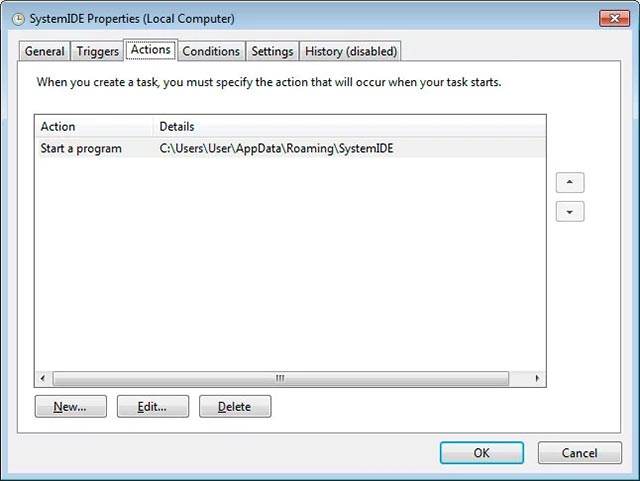
Scheduled Task
- Discovery of Trojan scattering steals virtual money through YouTube
The Microsoft side claims that this executable file is a backdoor currently configured to connect to a malicious domain that is no longer accessible. This means that although the computer will be infected, the backdoor will still not be able to communicate with its own command and control server (C2 server) to receive the command.
However, this payload can still easily be used for other forms of attack, so Microsoft recommends that all Windows users install the latest security update for this vulnerability as soon as possible.
The recent CVE-2017-11882 vulnerability has also been discovered by the FireEye team, and is currently being used in a campaign targeting several Central Asian regions, and establishing a new backdoor called HawkBall.. It is still unclear whether these campaigns are linked.
FAQ
What is Microsoft Warned About Malicious Spam Campaigns Using about?
It provides a structured overview of exploit, explains the main context, and highlights practical takeaways for readers.
Why does this topic matter?
Understanding the main concepts helps readers evaluate the issue, avoid common mistakes, and make better-informed decisions.
How should readers use this information?
Use the guidance as a practical starting point, confirm details that may have changed, and follow current product, safety, or security recommendations.
Related Articles
 Detects 'Long-Standing' Security Vulnerabilities in Microsoft Office3 minutes read
 Microsoft Is Testing Ads in Wordpad on Windows 103 minutes read
 How to Restore WordPad in Windows 11: Step-by-Step Guide4 minutes read
 The Unpatched Microsoft Word DDE Vulnerability Is Exploited in a Massive Malware4 minutes read
 How to Open and Save DOCX Files with WordPad Without Word3 minutes read
 Differences Between Notepad and Wordpad in Windows11 minutes read
Reader Comments 0
Sign in with email or Google to join the discussion.