Table of Contents
If Microsoft Edge blocks a Firefox installer, do not disable Microsoft Defender or SmartScreen. Cancel the download, confirm that it came directly from Mozilla, try the current stable installer, scan the file, and verify its Windows digital signature. Override a reputation warning only when the source and signature are both trustworthy; do not override a confirmed malware detection.
Why Edge can warn about a legitimate installer
Microsoft Defender SmartScreen checks websites and downloads against reported threats and also uses reputation signals. Microsoft explains that Edge can warn when a file is not among well-known, commonly downloaded programs, even if it is not on a malicious-file list. New Beta, Developer, Nightly, enterprise, and freshly signed builds can have lower download reputation than the stable release.
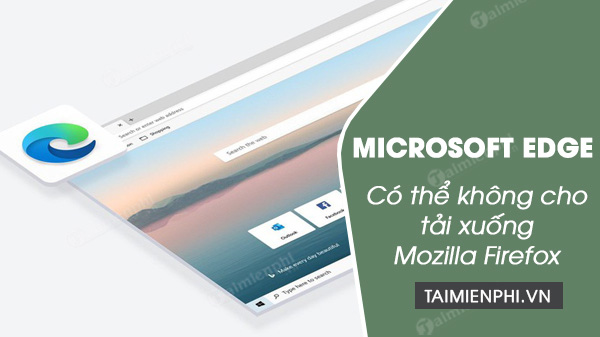
The screenshot records a temporary warning reported for an older Firefox build. It does not show that current Firefox releases are blocked, and it is not evidence that Microsoft intentionally prevented browser competition. Treat the current warning text and security-scan result as the facts that matter.
1. Check the download address
Use Mozilla's official Firefox download page. The page may redirect to Firefox's current official domain and Mozilla's download service. Avoid installers from advertisements, software portals, file-hosting sites, or search results whose domain only resembles Mozilla.
If you do not specifically need a pre-release feature, choose the stable Firefox channel. Beta, Developer Edition, and Nightly change more often and may trigger reputation warnings soon after a new build appears.
2. Distinguish the warning type
- “Isn't commonly downloaded” or “could harm your device”: often a reputation warning. Verification is still required.
- “Malware detected,” a named threat, or quarantine by Windows Security: stop. Do not keep or run the file until Mozilla and Microsoft have resolved the detection.
- “Blocked by your organization”: a work or school policy is involved. Contact the administrator; do not bypass device management.
- Certificate or HTTPS error on Mozilla's site: do not continue. Check date/time, network interception, security software, and the exact domain.
Microsoft's SmartScreen explanation describes the website, malicious-file, and download-reputation checks.
3. Verify the installer before running it
- In File Explorer, right-click the downloaded
.exeand choose Properties. - Open Digital Signatures.
- Select the signature and choose Details.
- Confirm that Windows says the digital signature is valid and identifies Mozilla Corporation as the signer.
- Scan the file with Windows Security.
A missing or invalid signature, an unexpected publisher, or a file that changes after download is a reason to delete it and download again from Mozilla. Do not rely only on the filename; malware can be named “Firefox Installer.exe.”
4. Keep a verified file only when the warning is reputation-based
Edge's wording and menus change between versions, but the Downloads panel generally provides a More actions menu for a warned file. If all of the following are true, you can review the option to keep it:
- The address was Mozilla's official download page.
- The installer is the expected stable, Beta, Developer, Nightly, or ESR channel.
- The digital signature is valid and from Mozilla Corporation.
- Windows Security does not detect malware.
- The PC is not governed by an organization that prohibits the software.
Open Downloads, select the file's menu, and choose the option to keep or retain it. Edge may ask you to confirm that you understand the risk.
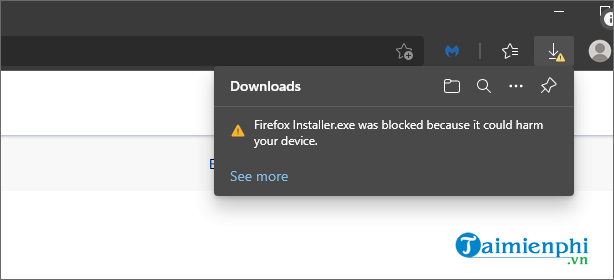
The older TipsMake guide to Edge's blocked-download controls shows the previous interface. Current labels may differ, but the security principle is the same: verify the source and signer before overriding a warning.
Do not turn off Defender or SmartScreen
Disabling protection removes checks for every site and download during that period and can leave it off accidentally. Switching to another browser does not make an unsafe installer safe, and Windows can still scan the file when it runs.
If a genuine, validly signed Mozilla installer continues to be detected:
- Update Edge, Windows Security definitions, and Windows, then try the stable installer again.
- Delete the file and download a fresh copy from Mozilla.
- Use the official Microsoft Store listing when it is available for your device and region.
- Report the false positive through Windows Security or Microsoft's submission channel, and notify Mozilla Support with the exact Firefox channel, version, URL, signature status, and detection name.
- On a managed computer, ask the administrator to review the event and publisher policy.
After Firefox installs
Open Firefox's menu, select Help > About Firefox, and let it check for updates. Import bookmarks or passwords through the browser's built-in migration tool rather than a third-party converter. Keep SmartScreen and Windows real-time protection enabled; installing a second browser does not require weakening the operating system's security.
Related Articles
 Microsoft Edge Has Been Accused of Stealing Data from Firefox on Windows 104 minutes read
 Mozilla Firefox - Free, Fast and Private Web Browser: Main Insights15 minutes read
 Mozilla Firefox and Microsoft Edge Browsers Were Lost at the Pwn2Own 2019 Hack Contest4 minutes read
 Microsoft Edge Is the Best Browser to Prevent Phishing3 minutes read
 Mozilla Finds a New Way to Make Itself the Default Browser4 minutes read
 The Best and Most Secure Web Browsers Should Use 20208 minutes read
Reader Comments 0
Sign in with email or Google to join the discussion.