Table of Contents
This updated overview organizes the essential information about Microsoft Confirms, including practical uses, key features, setup considerations, and common questions.
However, as is 'tradition', this new KB5039302 update has been confirmed to cause a series of system conflict problems, typically lag and taskbar errors.
Microsoft has posted a new notice on the official Windows Health Dashboard website to warn users that update KB5039302 is 'breaking' the taskbar on certain versions of Windows 11, specifically Windows N.
Windows N is a special version of the operating system with a series of multimedia features removed, such as the Windows Media Player application. Microsoft also said the bug affects regular version customers who have turned off multimedia features in the " Turn Windows features on or off " user interface.
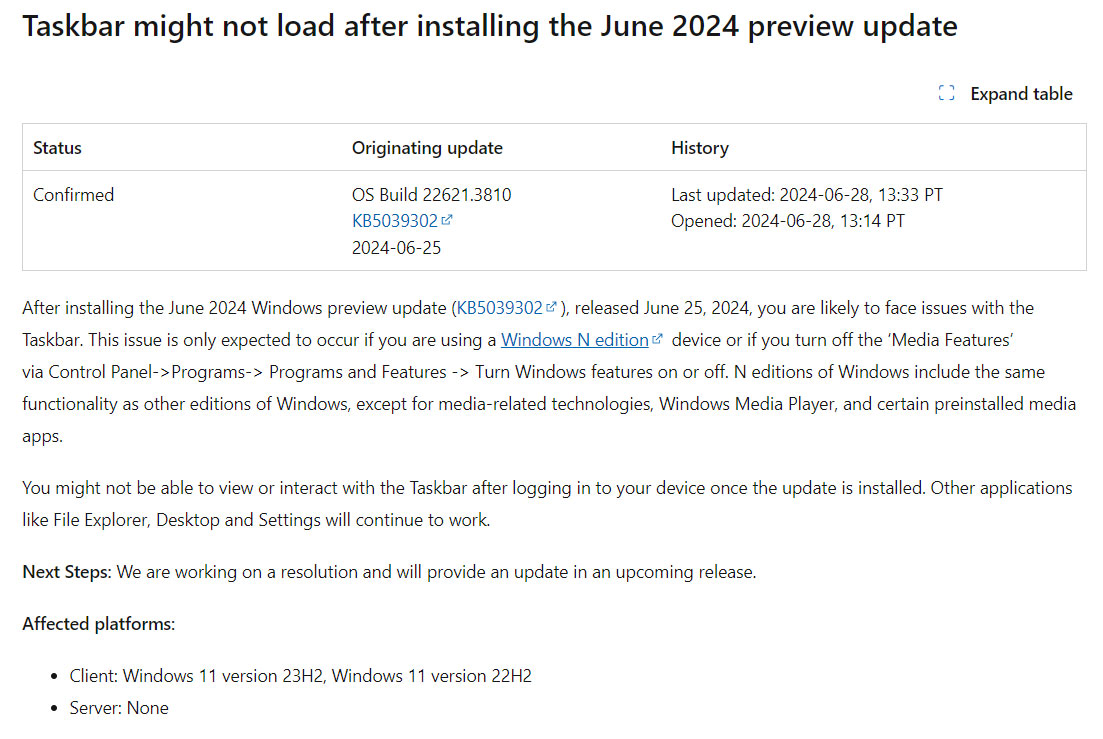
According to confirmation from Microsoft and official documentation, affected customers cannot interact with the taskbar, while the rest of the UI and File Explorer continue to function as normal:
After installing the Windows June 25, 2024 preview update (KB5039302), released June 25, 2024, you may experience problems with the taskbar. This issue is only expected to occur if you are using a Windows N version device or if you turn off ' Media Features ' via Control Panel->Programs->Programs and Features -> Turn Windows features on or off . The N version of Windows has the same functionality as other Windows versions, except that tools related to multimedia processing, Windows Media Player, and some similar applications are preinstalled.
You may not be able to view or interact with the taskbar after signing in to a device that has the KB5039302 update installed. Other applications such as File Explorer, Desktop and Settings still work normally.
Microsoft is working on a fix that will be available in a future update. As a reminder, KB5039302 is no longer available for download—Microsoft removed this update after confirming bug reports from the user community.
You can uninstall KB5039302 by going to Settings > Windows Update .
Final Thoughts
Use the instructions and checks above in order, verify the result after each major step, and keep a backup whenever the process changes important files or system settings.
FAQ
What is Microsoft,update used for?
However, as is 'tradition', this new KB5039302 update has been confirmed to cause a series of system conflict problems, typically lag and taskbar errors.
Who should consider Microsoft,update?
It is most useful for readers who need the features, workflow, or problem-solving approach described in this guide.
What should I check before using it?
Review compatibility, current software requirements, privacy or security settings, costs, and any limitations that could affect your workflow.
Related Articles
 An Advertisement That Microsoft Tried to Insert into the3 minutes read
 Taskbar: Complete Guide: After All, Microsoft Seems to Be Working on3 minutes read
 Microsoft Confirms Extending Edge Support on Windows 103 minutes read
 Microsoft Released Updates for Both Windows 8.1 and Windows4 minutes read
 How to Fix Common Taskbar Errors on Windows 108 minutes read
 Microsoft Will Bring This Useful Feature Back to the Windows4 minutes read
Reader Comments 0
Sign in with email or Google to join the discussion.