Table of Contents
Meta officially introduced Vibes, an AI-generated video feed on the Meta AI app. Users can create or remix AI videos with music, images, and effects.
Meta Vibes Overview
AI-generated content is booming, whether you like it or not. In response, Meta has upgraded its Meta AI app on Android and iOS and introduced a whole new feed dedicated to AI videos called Vibes .
Vibes, currently in early beta, functions a bit like a TikTok feed, but with all the content generated by AI. You can create their own AI videos from scratch or 'remix' other people's videos with new images, add music overlays, or customize the animation style to their liking.
' Vibes is designed to make it easy for you to find creative inspiration and experiment with Meta AI's media creation tools. As you browse Vibes, you'll come across a variety of AI videos from the community and creators ,' Meta shares.
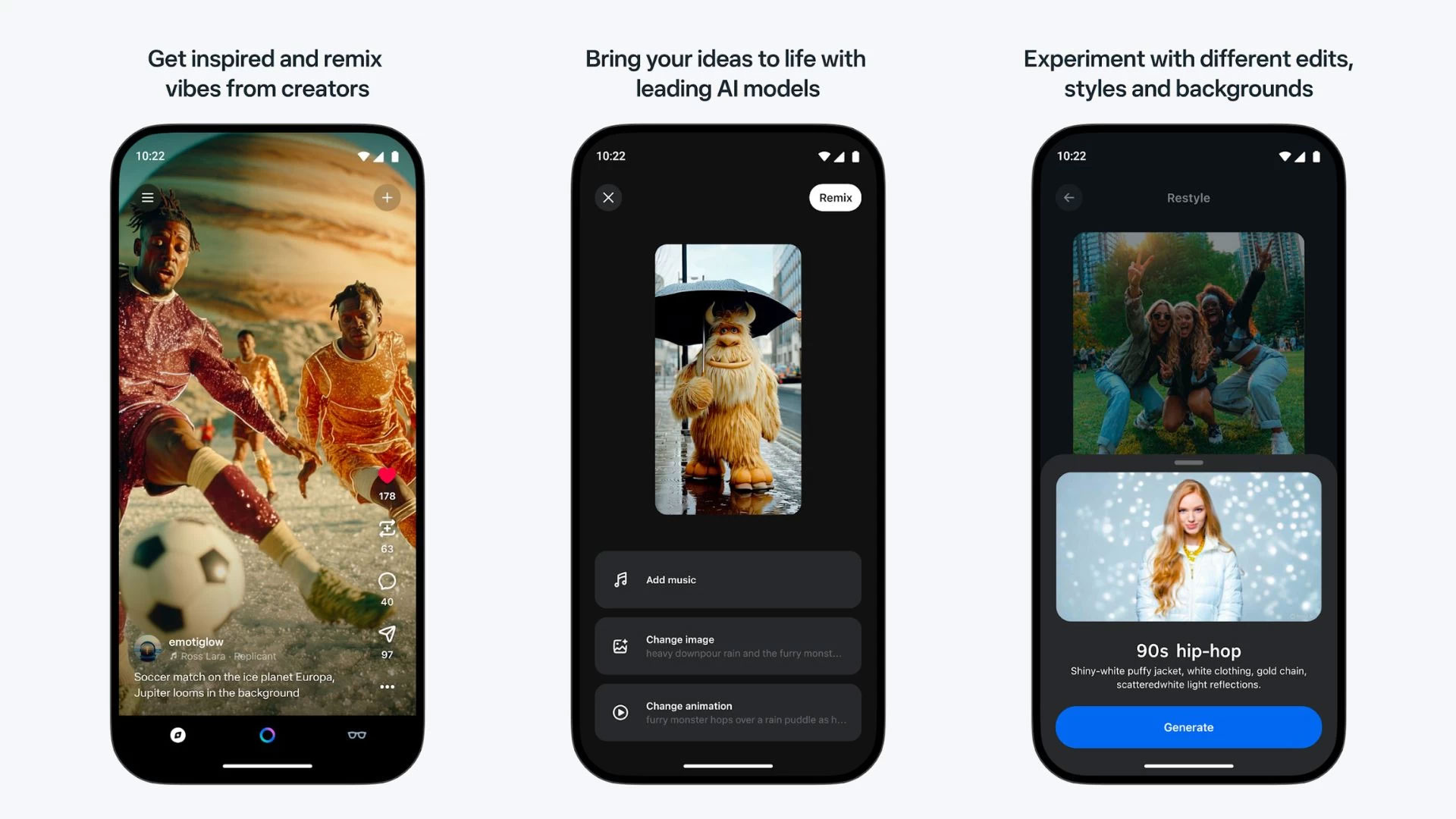
To access Vibes, simply tap the compass icon in the bottom right corner of the screen. The interface is quite similar to Reels, with Like, Remix, Comment, and Share buttons placed along the right side of the video.
You can also rate a video as 'Good' or 'Bad' by tapping the three-dot menu button in the bottom right corner. While you can't search for creators yet, you can still tap their name to open their profile and see more videos.
Another cool thing is that Vibes will display the text (prompt) used to create the AI video right in the description. You can also view and share these AI videos on their computers, post them to their Vibes feed, send them via messages, or cross-share them to Instagram, Facebook Stories, and Reels.
Meta says the Vibes feed will become more personalized over time based on your viewing habits and the content you create. At the same time, Instagram has also just launched a feature that lets you control the recommendation algorithm in Reels and other areas. However, Meta has not yet revealed when Vibes will officially exit the testing phase.
FAQ
What is new about meta launches vibes?
In practical terms, meta officially introduced Vibes, an AI-generated video feed on the Meta AI app. Users can create or remix AI videos with music, images, and effects.
Why does this update matter?
The article highlights that vibes, currently in early beta, functions a bit like a TikTok feed, but with all the content generated by AI.
Is the change available to everyone?
Availability may depend on the product version, region, account, or rollout stage described in the article.
Related Articles
 How to Refresh the Message Board on Tiktok3 minutes read
 Why TikTok Live Video Is Ruining the App!: What You Need to Know5 minutes read
 Instagram Launches TikTok-like Feature3 minutes read
 How to Check Tiktok Video Shares3 minutes read
 TikTok Launches AI Alive, Its Latest AI - Powered Photo Video Creation Tool3 minutes read
 How to Combine Videos Automatically on Tiktok3 minutes read
Reader Comments 0
Sign in with email or Google to join the discussion.