Table of Contents
TikTok AI Alive turns a single photo into an animated Story. To find it, open TikTok’s Story Camera and select a photo from the Story Album. Look for the AI Alive icon in the editing toolbar.
Make an AI Alive Story
- Open the Story Camera in TikTok and pick a still photo.
- Tap AI Alive. If the editor asks for a prompt, describe one clear movement, such as “Make the clouds drift slowly from left to right.”
- Generate the clip and watch the whole preview. Look closely at faces, hands, text and other details that may change unexpectedly. Try a simpler prompt if the first result adds movement you didn’t ask for.
- Check the Story audience before posting. Only use images you have permission to share.
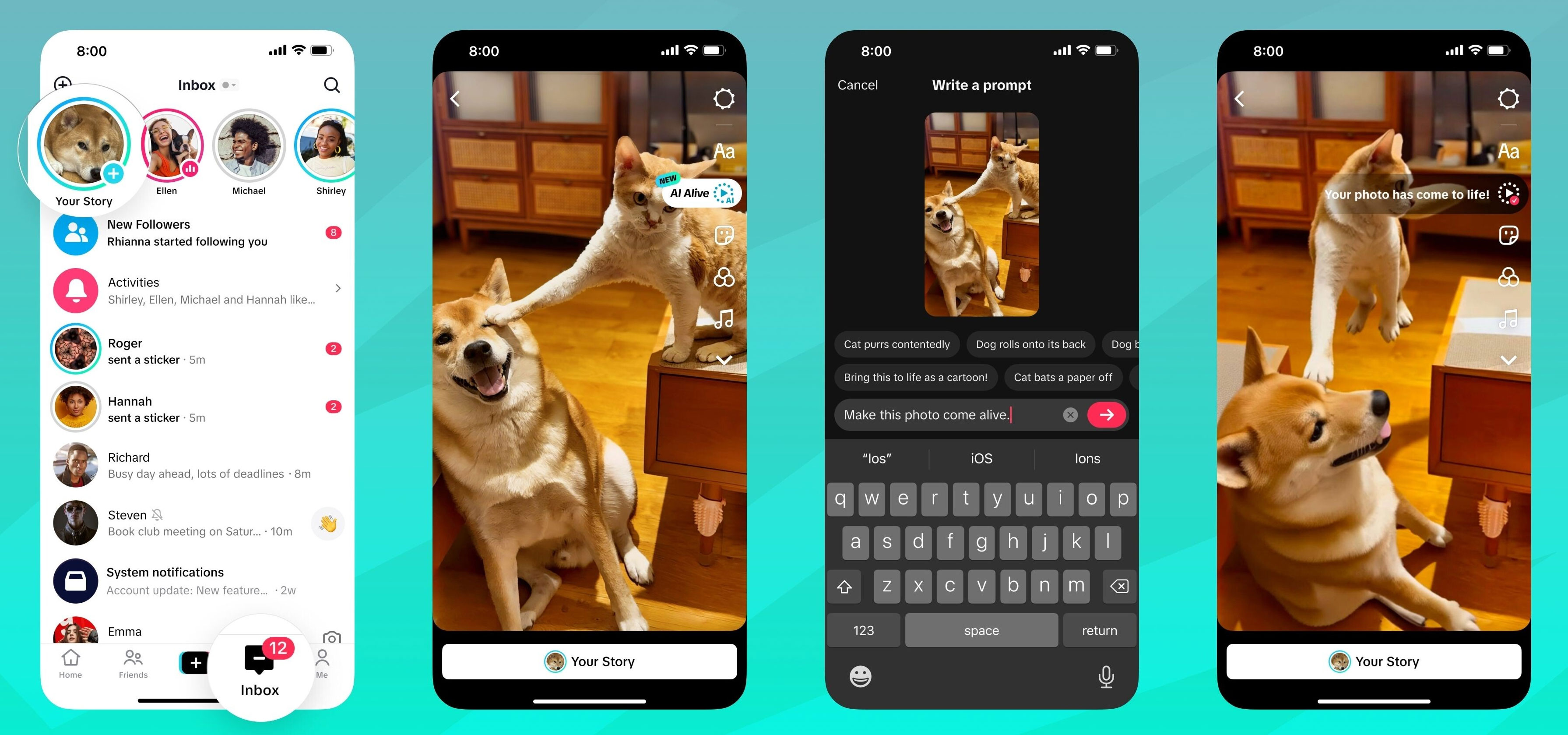
What viewers see
In its AI Alive announcement, TikTok said it labels these Stories as AI-generated and adds C2PA metadata to identify the clip’s origin. TikTok also said it reviews the photo, prompt and generated clip as part of its moderation process. The finished video is an interpretation of the original image, so review it before sharing it with anyone who might mistake the animation for real footage.
If you don’t see the AI Alive button
Confirm you’re in the Story Camera and have selected one still photo. If the option still doesn’t appear, you can use TikTok’s regular photo tools. TipsMake shows how to make a swipeable photo post or a timed video slideshow.






Reader Comments 0
Sign in with email or Google to join the discussion.