Table of Contents
This guide covers journey of 2 years 'molting' of asus transformer with practical context and easy-to-follow details. Use it to understand the subject and apply the information confidently.
Beginning with full of skepticism in mid-2012, transforming laptops are gradually showing their foothold in the computer market. As part of the yearly laptop nomination list of Digitize Tech Awars 2013, Asus Transformer Book Trio is a testament to the new trend, new technology of the computer market.
Ideas and Trends of Formation
The appearance of Windows 8 and the big step of tablet is the main reason for birth of the computer line of transformations. Simultaneously appearing at Computex 2012, such devices are quite diverse in style from the disassembled keyboard of Asus Transformer series, Lenovo's 360-degree screen rotation, two Asus Taichi screens or Toshiba's slide keyboard. And Sony.
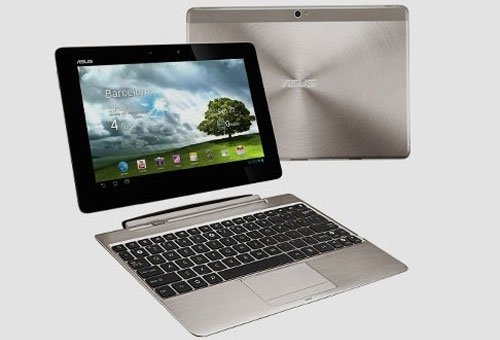 The Asus Transformer Pad is one of the pioneering products for a removable keyboard design.
Shortly thereafter, the form of loose keyboard products has the advantage of better mobility as well as lower cost than other types. However, almost 2 years ago, the simple transformation is in the design part when the keyboard is removable. Most machines are running Android OS and the backend feature is not really clear.
Meet User Needs Like Tablet and Netbook
To compete and move towards the goal of replacing tablets and laptops, Asus knows they need to do more than the Transformer Pad. In addition to being used as a tablet, transformable computers must meet the complete work needs of a regular laptop. This is the reason for the introduction of the Asus Transformer Book T100.
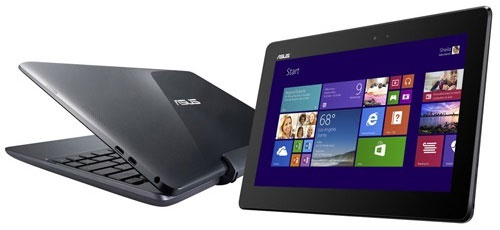 Asus Transformer Book T100 is convenient for work with Windows 8 operating system.
New products of Asus using Windows 8. 1 operating system are compatible with old Windows apps, so it is guaranteed for users at work. In addition, the device is also preinstalled with Microsoft Office 2013 office software.
When used as a tablet, the Modern UI is smooth and modern to meet the needs of surfing the web, viewing email, Facebook or playing games. The T100 has a selling price of less than 10 million dong, a computer model that transforms into a low-cost segment to approach more users.
Multitasking with Two Operating Systems, Two Processors
Not reused in the T100, the sliding keyboard style computer line continued to grow at the end of 2013 when Asus launched the Transformer Book Trio.
This is the first "3 in one" device in the world with the ability to operate as a tablet, laptop or desktop computer. The key to this versatility is the integration of the manufacturer to two processor platforms that enable it to run two different operating systems, Windows 8. 1 and Android, for their respective business and entertainment needs.
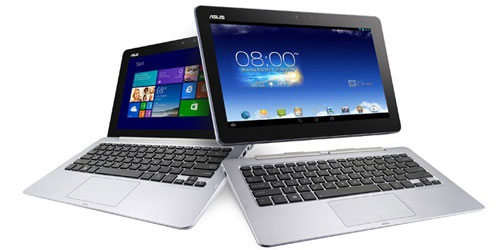 Asus Transformer Book Trio multitasked with two operating systems, two processors.
With its unique hardware design and structure, Transformer Book Trio works like an ultraportable laptop running Windows 8 that supports the work of installing a keyboard. If disassembled, the screen body becomes a tablet running Android operating system with rich software repositories, support for entertainment such as watching movies, surfing the web or Facebook. When connecting the keyboard part to the external monitor, it also acts as a traditional PC.
The efforts of Asus with Transformer Book Trio helped this product to be honored as the best breakthrough device at the world's largest consumer electronics exhibition CES 2014 which took place last week.
FAQ
What should I check before following these steps?
Confirm device and software compatibility, save important data, and make sure you have the required permissions, files, and account access.
Why might the process not work?
Common causes include outdated software, missing permissions, incompatible hardware, an unstable connection, or completing a step in the wrong order.
Can I undo the changes if necessary?
That depends on the tool or setting. Use built-in restore options when available, keep a backup, and record the original configuration first.
Related Articles
 Asus Transformer Pad Netbook Style Launched3 minutes read
 Asus Upgraded the Transformer Line4 minutes read
 Asus Super Device to Vietnam5 minutes read
 Asus Transformer Book 13. 3 Inch Starts Receiving Orders3 minutes read
 ASUS Transformer Book Flip Started Selling in Vietnam3 minutes read
 Asus 'Supermodel' Laptops6 minutes read
Reader Comments 0
Sign in with email or Google to join the discussion.