Table of Contents
This guide covers asus launched the transformer book t100ha hybrid computer with practical context and easy-to-follow details. Use it to understand the subject and apply the information confidently.
ASUS Transformer Book Flip Started Selling in Vietnam
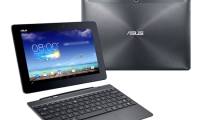
The T100HA still uses a 10. 1-inch screen and can be attached to a removable keyboard base to turn into a laptop, but the surrounding design has been changed with more angles. 4-core Intel Atom x5 ( Cherry Trail ) processor, compared to the T100TA chip, RAM has also been upgraded to 4GB, all packed in an 8. 45mm slim body and weighs only 580g ( Not including the dock ) Asus says the battery life of the T100HA can reach 14 hours.
The device will go on sale in the third quarter of this year with options in white, gray, blue and pink. Unfortunately, price information is not available, but it is likely to revolve around the previous $ 349 T100TA (not including the keyboard).
Basic Configuration of Asus Transformer Book T100HA
- Screen: 10. 1 "resolution 1280 x 800
- CPU: Intel Atom x5 (Cherry Trail) 4 core
- RAM: 4GB
- Battery: 14 hours
- Operating system: Windows 10
- Special feature: can be attached to keyboard dock for use as laptop
- Connection: Bluetooth 4. 0, Wi-Fi a / b / g / n, USB-C
- Internal memory / Memory card: unknown
- Slim: 8. 45mm
- Weight: 580g (excluding dock)
FAQ
What should I check before following these steps?
Confirm device and software compatibility, save important data, and make sure you have the required permissions, files, and account access.
Why might the process not work?
Common causes include outdated software, missing permissions, incompatible hardware, an unstable connection, or completing a step in the wrong order.
Can I undo the changes if necessary?
That depends on the tool or setting. Use built-in restore options when available, keep a backup, and record the original configuration first.
Related Articles
 Asus Transformer Book 13. 3 Inch Starts Receiving Orders3 minutes read
 Asus 'Supermodel' Laptops6 minutes read
 ASUS Transformer Book Flip Started Selling in Vietnam3 minutes read
 Laptop Transformer Book Costs Nearly 1, 500 USD3 minutes read
 Journey of 2 Years 'Molting' of Asus Transformer6 minutes read
 Asus Upgraded the Transformer Line4 minutes read
Reader Comments 0
Sign in with email or Google to join the discussion.