Table of Contents
This guide covers interesting discoveries about ideapad s10-2 with practical context and easy-to-follow details. Use it to understand the subject and apply the information confidently.
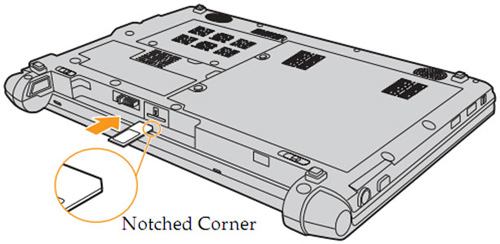 3G sim card slot inside the tray containing S10-2 battery
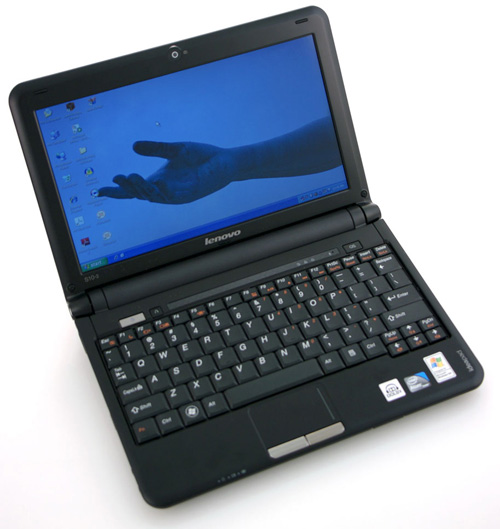 10. 1-inch screen with integrated 1. 3M webcam
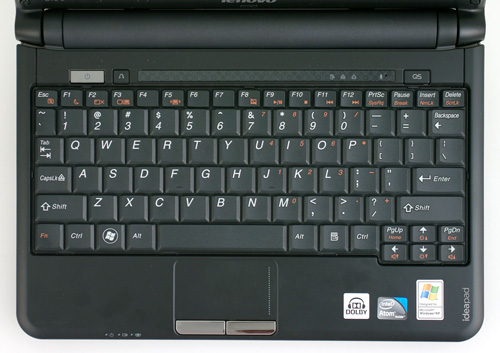 Moderate keyboard with full function keys and utilities
Above, to the right of the keyboard is a Quick-Start quick-launch button, a Spashtop Linux-based feature that helps to quickly boot a computer without having to turn on the whole machine. This is an operating system that starts up fast just to browse basic features such as web browsing, movie and music entertainment software, image display software, and Skype. This operating system has a fast and powerful boot time in just 10 seconds. In case the device is fully booted in Win XP, this quick-start button can be used as a hotkey, giving you quick access to apps (optional). Next to the power button above the keyboard is a button to restore the system (Lenovo's OneKey Rescure), allowing you to easily restore the system in case the system is badly damaged or infected.
FAQ
What should I check before following these steps?
Confirm device and software compatibility, save important data, and make sure you have the required permissions, files, and account access.
Why might the process not work?
Common causes include outdated software, missing permissions, incompatible hardware, an unstable connection, or completing a step in the wrong order.
Can I undo the changes if necessary?
That depends on the tool or setting. Use built-in restore options when available, keep a backup, and record the original configuration first.
Related Articles
 Discover 12 Mysterious Wonders Deep in the Ocean That Few People10 minutes read
 Lenovo IdeaPad: Affirm Your Rank7 minutes read
 Lenovo Ideapad Gaming 3 Detailed Review: the Perfect Match!13 minutes read
 Lenovo Announced Four New Notebooks3 minutes read
 Lenovo's New Entertainment Computer5 minutes read
 24 Interesting Things in Life You May Not Know9 minutes read
Reader Comments 0
Sign in with email or Google to join the discussion.