Table of Contents
This guide covers toshiba launched the first 8. 9-inch mini laptop with practical context and easy-to-follow details. Use it to understand the subject and apply the information confidently.
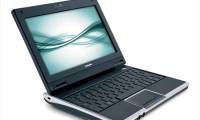
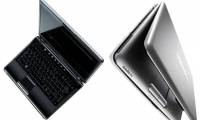
NB100 has a 1024x600 LCD screen, Intel 1. 6GHz processor, 1GB RAM, 120GB hard drive. The device works on Linux OS 8. 04 using OpenOffice 2. 4 or Windows XP Home operating system. In addition, the NB100 is equipped with Wi-Fi port with 802. 11 b / g Wi-Fi standard, 10/100 Ethernet port, 3 USB ports that will allow charging some devices via USB port even when the laptop is in the mode Temporarily turn off (sleep) and a 0. 3MP webcam.
The company also announced a laptop battery life of 4 hours, but details about battery capacity have yet to be announced. Users can choose a 3-cell battery or 6-cell battery. NB100 will have three colors black, gold and silver to choose from. The product will go on sale in the US next month for $ 470.
FAQ
What should I check before following these steps?
Confirm device and software compatibility, save important data, and make sure you have the required permissions, files, and account access.
Why might the process not work?
Common causes include outdated software, missing permissions, incompatible hardware, an unstable connection, or completing a step in the wrong order.
Can I undo the changes if necessary?
That depends on the tool or setting. Use built-in restore options when available, keep a backup, and record the original configuration first.
Related Articles
 Laptop Mini NB200 - Toshiba's 'New Artwork'3 minutes read
 The Market for Mini Laptops Has Toshiba NB1052 minutes read
 Toshiba's Cheap 8. 5-hour Netbook3 minutes read
 Toshiba 5. 6 Inch Computer Equipped with Windows Vista3 minutes read
 Toshiba Chromebook 13. 3 Inch Officially Launched3 minutes read
 Toshiba Unveils the Centrino 2 Laptop Line3 minutes read
Reader Comments 0
Sign in with email or Google to join the discussion.