Table of Contents
Redeem Hero Land OEG gift codes through Menu > Settings > Redeem Reward, then check your in-game mail for the rewards. This guide applies to the OEG version, also called Vùng Đất Anh Hùng; codes for other editions may not work.
Codes to check
The following codes were listed in this guide, but their current validity and rewards have not been confirmed. Treat them as codes to test, rather than a guaranteed list of active offers. The game's response and the publisher's announcement determine whether you can redeem one.
| Code | Current status |
|---|---|
VDAHOEG | Not verified |
VDAHRAMAT | Not verified |
HEROLANDVN | Not verified |
HEROLANDOEG | Not verified |
FREEHEROOEG | Not verified |
How to enter a code
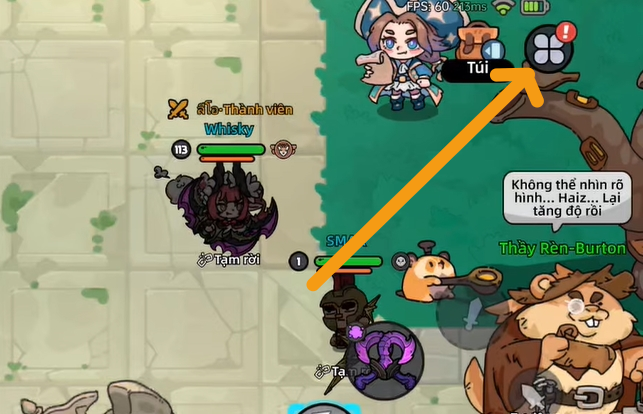
1. Open the menu
Sign in to the correct game account and character. Open the expanded menu in the upper-right corner of the game screen.
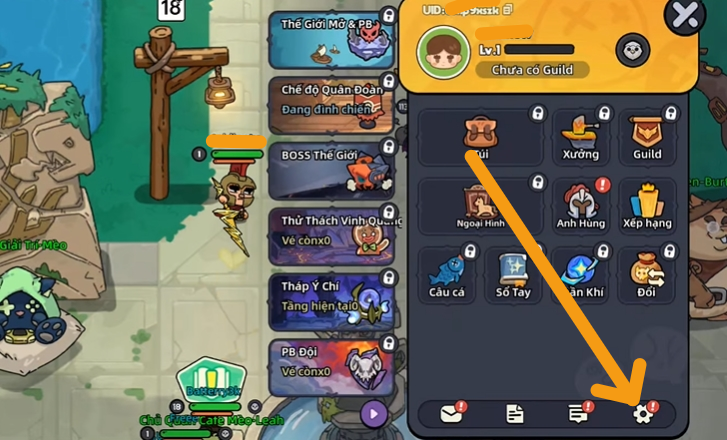
2. Open Settings
Select the gear-shaped Settings icon.
3. Redeem and collect
Select Redeem Reward or Đổi thưởng, enter the code exactly as provided, and tap Confirm. Remove any spaces accidentally copied before or after the code.
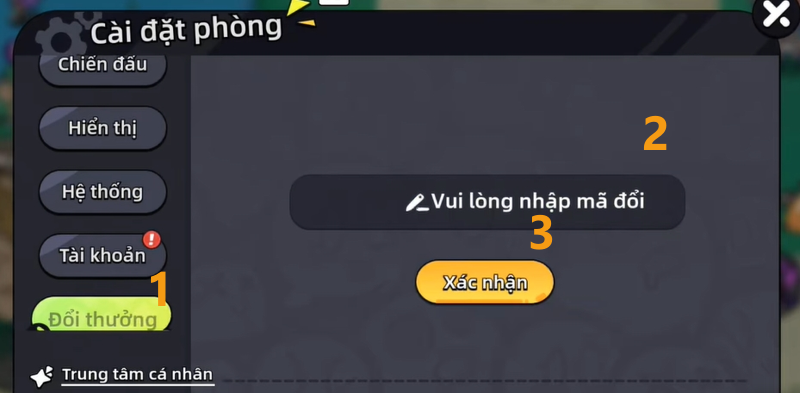
Read the confirmation or error message. After a successful redemption, open the game's mail and claim the attached items. OEG's official giftcode instructions confirm this menu route and mail-collection step.
If a code does not work
- Check spelling: Copy the complete code, including any uppercase letters and numbers.
- Check the edition: Make sure the announcement is for the OEG release you are playing.
- Read the offer's terms: A code may have expired, reached a redemption limit, or have account or event restrictions. Do not assume every code lasts the same number of days.
- Check previous claims: If the game says it has already been redeemed, inspect your mail or earlier claims rather than repeatedly submitting it.
If a code from a current OEG announcement still fails, contact the publisher's support with the code and the exact error message. Keep passwords and sign-in codes private.
Where to find new codes
Check announcements linked from OEG's game page and its official community channels. Look for the applicable game edition, event conditions, and expiry date before trying a code.
For players unfamiliar with the game's PvP and PvE terminology, TipsMake's glossary of common game terms explains the difference.
Related Articles
 Latest Project Hero Code and How to Enter Code
 Tam Quốc: Chiến Địa Vô Cương codes and redemption guide
 Anime Crusaders Codes: Working List and Redemption Steps
 How to Redeem Crossfire: Legends VNG Gift Codes
 Instructions for entering codes and the latest Honkai Impact codes
 Free Fire MAX Redeem Codes for August 2026
Reader Comments 0
Sign in with email or Google to join the discussion.