Table of Contents
Pokémon GO serves as a popular augmented reality (AR) mobile game developed by Niantic in collaboration with The Pokémon Company.
Pokémon GO is a popular augmented reality (AR) mobile game developed by Niantic in collaboration with The Pokémon Company. Launched in 2016, the game quickly became a global sensation by allowing players to 'hunt Pokémon' in the real world via their phone's camera and GPS.
The Pokémon GO 2025 update brings a series of powerful improvements in graphics, performance, and many special events to help players easily connect, battle, and trade Pokémon with friends. If you are a fan of the Pokémon world, this is the ideal time to download and start your journey.
Instructions for downloading and installing Pokémon GO
How to download Pokemon GO! on iOS
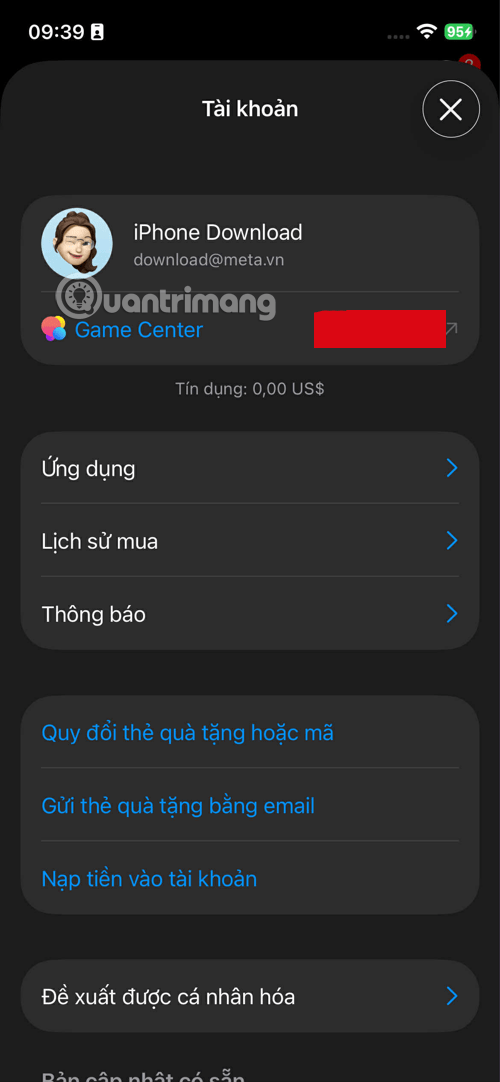
Step 1: First, select the App Store application, select your iCloud account. Here is the iPhone Download account at the top of the feature list.
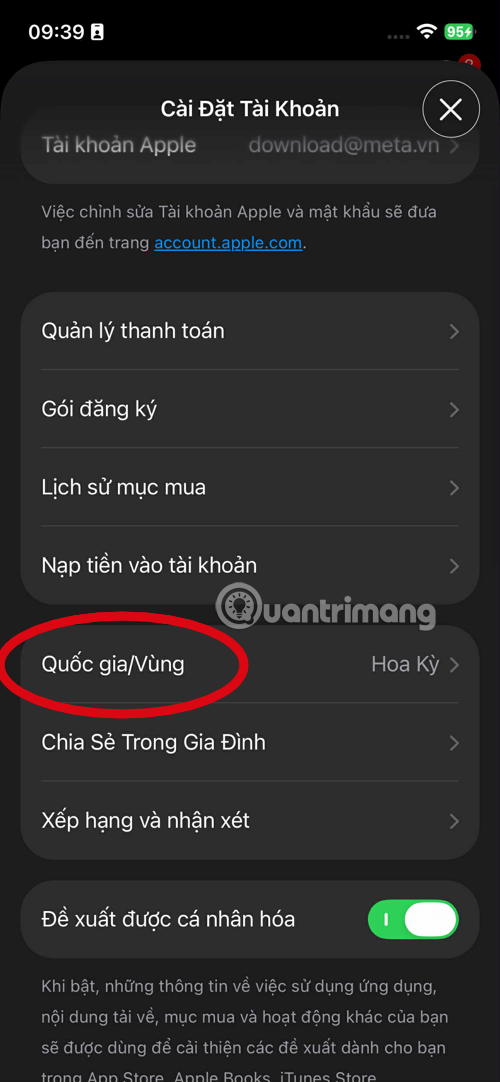
Step 2: Next, select Country/Region . If you have not changed the region, your App Store account will still be in the Vietnam region.
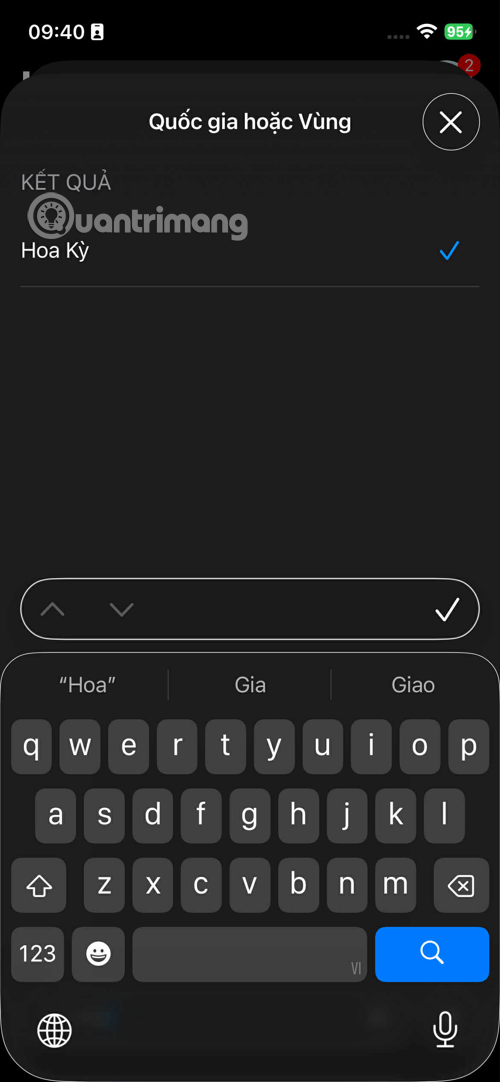
Step 3: In the list of countries you want to change the region to, select United States > select Agree To the policy > select No In the payment section. Below you will have to fill in the items including:
| Item | Required Information | Note |
| Street | Enter any street name or house number (Example: 100 Main Street) |
You should fill in a real address to avoid system errors, it can be found on Google Maps. |
| City (City) |
City name is valid for the above street name |
|
| State | Select a valid state (For example, Alaska or California) |
Hint: The state of Alaska is popular because it has no sales tax. |
| Zip Code | Enter a valid ZIP code for the selected city/state. |
Example for Alaska (Anchorage): 99501. Example for California: 90001 (Los Angeles). |
| Phone | Enter any phone number in US format. |
For example: (907) 555-1234 (or 10 random digits). |
Once you have completed the information filling as suggested above, select Next In the upper left corner to complete the roaming.
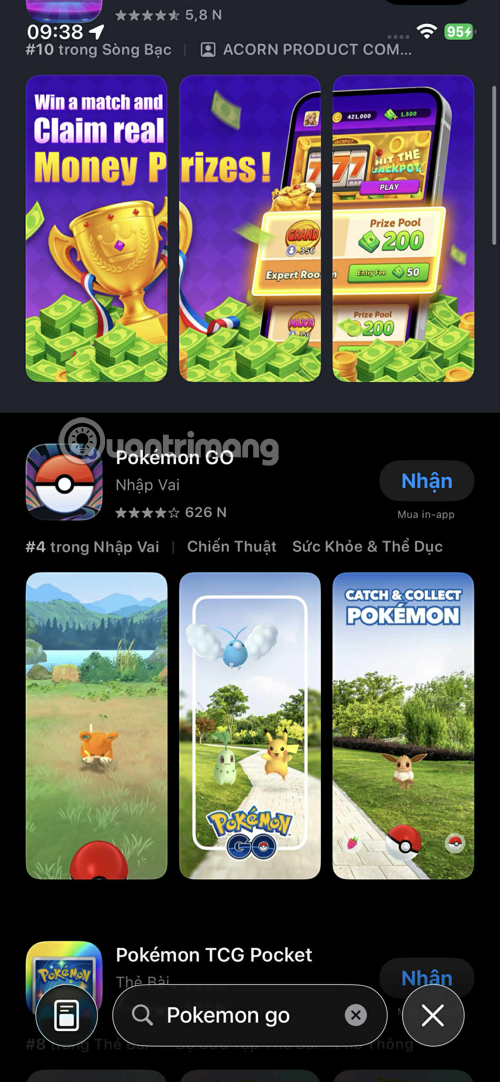
Once you've completed the region transfer, go back to the main interface of the App Store, find the game name and download it.
On Android
You can access the Pokemon GO! download link to download the Pokemon GO! Android version or use the TapTap app to download Pokemon GO! on the TapTap app store.
Basic gameplay instructions
- Catch Pokémon: Move around in real life to find Pokémon, tap to throw Poké Balls.
- Stop at PokéStop: Get free items like Poké Ball, Potion, Revive.
- Gym Battle: Choose the strongest Pokémon to face.
- Join Raid Battle: Join other players to destroy giant Pokémon to get rewards.
- Upgrade and evolve your Pokémon: Use Candy and Stardust to power up your Pokémon.
FAQ about Pokemon GO
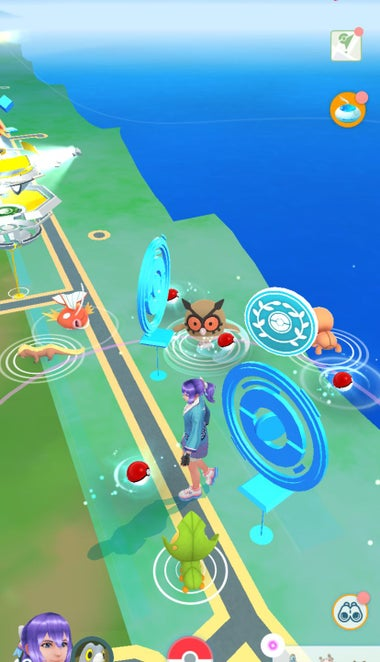
What mobile platforms is Pokémon GO supported on?
Pokémon GO Is an augmented reality (AR) game developed for two major mobile operating systems: IOS And Android . You can search and download the game directly from The App Store (for iPhone and iPad) or Google Play Store (for Android phones and tablets) for free. However, the device needs to meet operating system and hardware requirements (such as GPS and camera) for the optimal AR experience.
Do I need to pay to download and start playing Pokémon GO ?
No. Pokémon GO is a Free-to-play Game. You can download the game, create an account, and start exploring the world to catch Pokémon without paying anything. The game does have in-app purchases that allow players to buy additional items like Poké Balls, Incense, or Lure Modules to speed up progression, but these purchases are completely Optional .
What is Pokémon GO like and does it require any special equipment?
Pokémon GO Is an Augmented reality (AR) Game, meaning it combines the virtual world of Pokémon with the real world through a mobile device's camera and GPS.
- Required: Your device (iOS or Android) must have a stable GPS function and an Internet connection (4G/5G or Wi-Fi) to determine the location of the player and Pokémon in the game.
- Note: AR functionality works best when the device has a gyroscope sensor and a quality camera.
Do I need to pay to play Pokémon GO ?
The answer is NO, Pokémon GO Is a Free -to-Play game.
- Players can experience all the content, catch Pokémon, participate in Gyms and Raids without paying.
- The game features in-app purchases via the PokéCoin Currency, which helps purchase utility items such as Expansion Bags, Poké Balls, or remote Raid tickets.
Can I still play Pokémon GO if I lose my GPS or Internet signal ?
The answer is no, because Pokémon GO Is a location-based AR game, so losing your GPS or internet signal will immediately prevent you from moving your character, interacting with PokéStops, Gyms, or searching for Pokémon. The game will display a message asking you to re-enable location services.
Notes & Recommendations
- Turn on GPS And Have a stable network connection Before playing.
- Do not use emulators or 'fake GPS' software — this may result in account ban.
- Play games in a safe place, avoid moving and looking at the screen.
Pokémon GO Overview
| Information | Detail |
|---|---|
| Game name | Pokémon GO |
| Developer | Niantic, The Pokémon Company |
| Latest version | 0.315.2 (Updated November 5, 2025) |
| Foundation | Android, iOS |
| Capacity | About 400 MB |
| Supported languages | English, Vietnamese (partial) |
| Category | AR games, adventure, exploration, augmented reality |
Outstanding features
- Augmented Reality (AR) : Catch Pokémon in real environments using your phone's camera.
- Gym Battles and Battles : Participate in Gym Battles, defend your team's area.
- Pokémon Trading : Connect and trade Pokémon with friends near or far.
- Community Events : Every month, Niantic holds special events that help players receive rare Pokémon and attractive rewards.
- Avatar and Buddy Pokémon System : Customize your character and accompany your favorite Pokémon.
FAQ
How do you download Pokémon GO?
In practical terms, Pokémon GO is a popular augmented reality (AR) mobile game developed by Niantic in collaboration with The Pokémon Company.
What should you check before getting started?
Review the requirements, compatible device or software version, and any warnings described in the guide before making changes.
What should you do if the steps do not work?
Repeat the steps in order, confirm that your app or system is up to date, and review the troubleshooting details provided above.
Related Articles
 How to Avoid Malware When Downloading Pokémon GO?5 minutes read
 How to Own the 'Pokémon' in Pokémon GO?6 minutes read
 What Will You Do When There Are Multiple Pokémon in Pokémon GO?5 minutes read
 Pokémon Systems When Fighting in Pokémon GO13 minutes read
 How to Download and Playing Pokemon Cafe Mix Game6 minutes read
 Things to Know to Upgrade Pokémon in Pokémon GO6 minutes read
Reader Comments 0
Sign in with email or Google to join the discussion.